HTML <code>-Tag
Das <code>-Tag wird verwendet, um Variablen, Programmcode-Fragmente usw. in ein HTML-Dokument einzufügen. Im Browser wird der Code in einer Monospace-Schriftart angezeigt (eine Schriftart, bei der alle Zeichen die gleiche Breite haben). Das <code>-Tag ist standardmäßig ein Inline-Element.
Das <code>-Tag allein repräsentiert eine einzelne Codezeile oder einen Code-Ausdruck. Es sollte in ein <pre>-Element eingebettet werden, um mehrere Codezeilen darzustellen.
Sie können CSS verwenden, um bessere Effekte zu erzielen.
Syntax
Das <code>-Tag wird in Paaren verwendet. Der Inhalt wird zwischen dem öffnenden (<code>) und dem schließenden (</code>) Tag geschrieben.
Beispiel für das HTML <code>-Tag:
HTML <code>-Tag
<!DOCTYPE html>
<html>
  <head>
    <title>Title of the document</title>
  </head>
  <body>
    <p>Ordinary text.</p>
    <code>Line of program code.</code>
    <p>Continuation of the ordinary text.</p>
  </body>
</html>Ergebnis
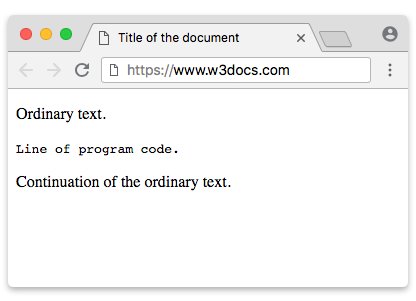
Beispiel für das HTML <code>-Tag innerhalb eines HTML <pre>-Tags:
Beispiel für das HTML <code>-Tag innerhalb eines HTML <pre>-Tags:
<!DOCTYPE html>
<html>
  <head>
    <title>Title of the document</title>
  </head>
  <body>
    <pre>
      <code>
        body {
          color: yellow;
          font-size: 16px;
          line-height: 1.5;
        }
      </code>
    </pre>
  </body>
</html>Beispiel für das HTML <code>-Tag mit CSS-Eigenschaften:
Beispiel für das HTML <code>-Tag mit CSS-Eigenschaften:
<!DOCTYPE html>
<html>
  <head>
    <title>Title of the document</title>
    <style>
      .code-style {
        font-size: 20px;
        line-height: 28px;
        background-color: lightblue;
        color: #ffffff;
      }
    </style>
  </head>
  <body>
    <p>Ordinary text.</p>
    <code class="code-style">Line of program code.</code>
    <p>Continuation of the ordinary text.</p>
  </body>
</html>Attribute
Das <code>-Tag unterstützt die Globalen Attribute und die Ereignisattribute.
Sie können beispielsweise das title-Attribut verwenden, um einen Tooltip hinzuzufügen: <code title="Variablendeklaration">let x = 10;</code>.
Praxis
Wie wird das HTML <code>-Tag korrekt verwendet?