HTML <nav>-Tag
Das <nav>-Element ist ein HTML5-Element, das verwendet wird, um einen Bereich von Navigationslinks auf einer Webseite zu definieren. Dieses Tag unterstützt sowohl die Struktur als auch die Semantik der Webseite und macht sie für Benutzer und Suchmaschinen gleichermaßen zugänglicher. Das <nav>-Element kann verwendet werden, um die Hauptnavigationslinks zu gruppieren, wie z. B. Links zu verschiedenen Abschnitten oder Seiten einer Website.
Das <nav>-Tag ist eines der HTML5-Elemente. Es wird verwendet, um einen Block von Navigationslinks zu definieren, entweder innerhalb des aktuellen Dokuments oder zu anderen Dokumenten. Beispiele für Navigationsblöcke sind Inhaltsverzeichnisse, Menüs und Indexe.
Ein HTML-Dokument kann mehrere <nav>-Tags enthalten, zum Beispiel eines für die Site-Navigation und eines für die Navigation innerhalb der Seite.
Beachten Sie, dass nicht alle Links im HTML-Dokument im <nav>-Element platziert werden; es umfasst die Hauptnavigationsblöcke. Das <nav>-Tag kann zur Definition von Links im Footer der Website verwendet werden, jedoch wird in solchen Fällen normalerweise das <footer>-Tag eingesetzt.
DANGER
Das <nav>-Tag kann nicht in das <address>-Element verschachtelt werden.
Syntax
Das <nav>-Tag wird immer in Paaren verwendet. Der Inhalt wird zwischen dem öffnenden (<nav>) und dem schließenden (</nav>)-Tag geschrieben.
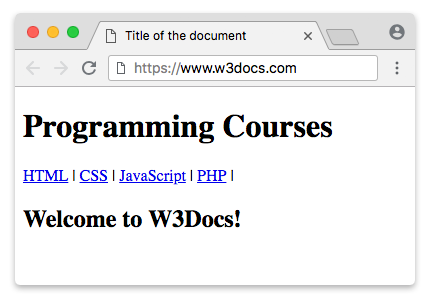
Beispiel zur Verwendung des HTML <nav>-Tags:
Beispiel für das HTML nav-Tag
<!DOCTYPE html>
<html>
  <head>
    <title>Title of the document</title>
  </head>
  <body>
    <header>
      <h1>Programming Courses</h1>
    </header>
    <nav>
      <a href="/learn-html.html">HTML</a> |
      <a href="/learn-css.html">CSS</a> |
      <a href="/learn-javascript.html">JavaScript</a> |
      <a href="/learn-php.html">PHP</a>
    </nav>
    <h2>Welcome to W3Docs!</h2>
  </body>
</html>Beispiel für das <nav>-Tag:
Beispiel für das HTML nav-Tag
<!DOCTYPE html>
<html>
  <head>
    <style>
      nav {
        display: flex;
        flex-wrap: wrap;
      }
      nav a {
        text-decoration: none;
        display: block;
        padding: 15px 25px;
        text-align: center;
        background-color: rgb(189, 185, 185);
        color: #464141;
        margin: 0;
        font-family: sans-serif;
      }
      nav a:hover {
        background-color: #777777;
        color: #ffffff;
      }
    </style>
  </head>
  <body>
    <h1>Example of the HTML nav tag:</h1>
    <nav>
      <a href="https://www.w3docs.com/">Home</a>
      <a href="https://www.w3docs.com/quiz/">Quizzes</a>
      <a href="https://www.w3docs.com/snippets">Snippets</a>
      <a href="https://www.w3docs.com/tool/">Tools</a>
      <a href="https://www.w3docs.com/string-functions/">String Functions</a>
    </nav>
  </body>
</html>Beispiel zum Erstellen eines Dropdown-Menüs mit dem HTML <nav>-Tag:
Beispiel für das nav-Tag beim Erstellen eines Dropdown-Menüs
<!DOCTYPE html>
<html>
  <head>
    <style>
      nav ul ul {
        display: none;
      }
      nav ul li:hover > ul {
        display: block;
      }
      nav ul:after {
        content: "";
        clear: both;
        display: block;
      }
      nav ul li {
        float: left;
        position: relative;
        list-style-type: none;
      }
      nav ul li:hover {
        background: rgba(19, 20, 123, 0.67);
      }
      nav ul li:hover a {
        color: #fff;
      }
      nav ul li a {
        display: block;
        padding: 20px 30px;
        color: #ffffff;
        text-decoration: none;
        background-color: rgba(35, 17, 134, 0.8);
        font-family: sans-serif;
      }
      nav ul ul {
        background: #5f6975;
        padding: 0;
        position: absolute;
        top: 100%;
      }
      nav ul ul li {
        float: none;
        position: relative;
      }
      nav ul ul li a {
        padding: 15px 10px;
        color: #ffffff;
        text-transform: uppercase;
      }
      nav ul ul li a:hover {
        background: rgba(19, 20, 123, 0.67);
      }
    </style>
  </head>
  <body>
    <h1>Dropdown menu with the HTML nav tag:</h1>
    <nav>
      <ul>
        <li>
          <a href="https://www.w3docs.com/">Home</a>
        </li>
        <li>
          <a href="https://www.w3docs.com/quiz/">Quizzes</a>
          <ul>
            <li>
              <a href="https://www.w3docs.com/quiz-start/html-basic">HTML Basics</a>
            </li>
            <li>
              <a href="https://www.w3docs.com/quiz-start/css-basic">CSS Basics</a>
            </li>
            <li>
              <a href="https://www.w3docs.com/quiz-start/javascript-basic">JavaScript Basics</a>
            </li>
            <li>
              <a href="https://www.w3docs.com/quiz-start/php-basic">PHP Basics</a>
            </li>
            <li>
              <a href="https://www.w3docs.com/quiz-start/es6-basic">ES6 Basics</a>
            </li>
          </ul>
        </li>
        <li>
          <a href="https://www.w3docs.com/snippets">Snippets</a>
          <ul>
            <li>
              <a href="https://www.w3docs.com/snippets/angularjs.html">Angular JS</a>
            </li>
            <li>
              <a href="https://www.w3docs.com/snippets/apache.html">Apache</a>
            </li>
            <li>
              <a href="https://www.w3docs.com/snippets/git.html">Git</a>
            </li>
            <li>
              <a href="https://www.w3docs.com/snippets/linux.html">Linux</a>
            </li>
            <li>
              <a href="https://www.w3docs.com/snippets/nodejs.html">Node.Js</a>
            </li>
            <li>
              <a href="https://www.w3docs.com/snippets/symfony.html">Symfony</a>
            </li>
          </ul>
        </li>
        <li>
          <a href="https://www.w3docs.com/tool/">Tools</a>
          <ul>
            <li>
              <a href="https://www.w3docs.com/tools/html-encoder/">HTML ENCODER/DECODER</a>
            </li>
            <li>
              <a href="https://www.w3docs.com/css3-maker/border-radius">CSS MAKER</a>
            </li>
            <li>
              <a href="https://www.w3docs.com/tools/password-generator">PASSWORD GENERATOR</a>
            </li>
            <li>
              <a href="https://www.w3docs.com/tools/image-base64">Base 64</a>
            </li>
            <li>
              <a href="https://www.w3docs.com/tools/code-diff/">CODE DIFF</a>
            </li>
          </ul>
        </li>
        <li>
          <a href="https://www.w3docs.com/string-functions/">String Functions</a>
          <ul>
            <li>
              <a href="https://www.w3docs.com/tools/string-revers">STRING REVERSE</a>
            </li>
            <li>
              <a href="https://www.w3docs.com/tools/string-word-count">STRING WORD COUNT</a>
            </li>
            <li>
              <a href="https://www.w3docs.com/tools/string-remove-empty-lines">EMPTY LINES REMOVER</a>
            </li>
          </ul>
        </li>
      </ul>
    </nav>
  </body>
</html>Attribute
Das <nav>-Tag unterstützt die Globalen Attribute und die Ereignisattribute.. Beachten Sie, dass globale Attribute auf alle HTML-Elemente anwendbar sind.
So stylen Sie ein HTML <nav>-Tag
nav {
  background-color: #333;
  padding: 10px;
}
nav a {
  color: white;
  text-decoration: none;
  margin-right: 15px;
}
Praxis
Was ist der Zweck und die Verwendung des <nav>-Tags in HTML?