HTML <section>-Tag
Das HTML <section>-Element ist eines der HTML5-Elemente. Es wird verwendet, um eigenständige Abschnitte innerhalb einer Webseite zu erstellen, die logisch zusammenhängende Inhalte enthalten (News-Bereich, Kontaktinformationen usw.). Der <section>-Tag wird häufig beim Erstellen einer Landingpage eingesetzt, um die Seite in separate logische Blöcke zu unterteilen.
Ein Navigationsmenü muss beispielsweise in einen <nav>-Tag eingebettet werden, während eine Kartenanzeige und eine Liste von Suchergebnissen keine spezifischen Elemente haben und in einen <section>-Tag eingefügt werden können.
Der <section>-Tag kann innerhalb des <article>-Tags verschachtelt werden, um den Inhalt in Gruppen zu unterteilen. HTML5 empfiehlt, jedem Abschnitt eine Überschrift (<h1>–<h6>) hinzuzufügen, um sein Thema zu definieren. Zwar kann jede Überschriftenebene verwendet werden, es ist jedoch Best Practice, einer logischen Hierarchie zu folgen, die auf der Verschachtelungsstruktur basiert.
DANGER
Verwenden Sie den <section>-Tag nicht als universellen Container zum Erstellen der Seitenstruktur; dafür sollten Sie den <div>-Tag verwenden.
Syntax
Der <section>-Tag kommt immer in Paaren vor. Der Inhalt wird zwischen dem öffnenden (<section>) und dem schließenden (</section>) Tag geschrieben.
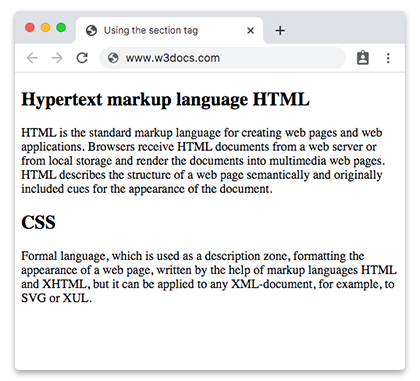
Beispiel für den HTML <section>-Tag:
Beispiel für den HTML <section>-Tag
<!DOCTYPE html>
<html>
  <head>
    <title>Using the section tag</title>
  </head>
  <body>
    <section>
      <h2>Hypertext markup language HTML</h2>
      <p>HTML is the standard markup language for creating web pages and web applications. Browsers receive HTML documents from a web server or from local storage and render the documents into multimedia web pages. HTML describes the structure of a web page semantically and originally included cues for the appearance of the document.</p>
    </section>
    <section>
      <h2>CSS</h2>
      <p>Formal language, which is used as a description zone, formatting the appearance of a web page, written by the help of markup languages HTML and XHTML, but it can be applied to any XML-document, for example, to SVG or XUL.</p>
    </section>
  </body>
</html>Ergebnis
Beispiel für den HTML <section>-Tag innerhalb eines weiteren <section>-Tags:
Beispiel für den HTML <section>-Tag innerhalb eines weiteren <section>-Tags
<!DOCTYPE html>
<html>
  <head>
    <title>Title of the document</title>
  </head>
  <body>
    <h1>Example of the section tag</h1>
    <section>
      <h2>Hypertext markup language HTML</h2>
      <p>
        HTML is the standard markup language for creating web pages and web applications. Browsers receive HTML documents from a web server or from local storage and render the documents into multimedia web pages. HTML describes the structure of a web page semantically and originally included cues for the appearance of the document.
      </p>
      <section>
        <h3>Hypertext markup language HTML</h3>
        <p>HTML is the standard markup language for creating web pages and web applications. Browsers receive HTML documents from a web server or from local storage and render the documents into multimedia web pages. HTML describes the structure of a web page semantically and originally included cues for the appearance of the document.</p>
      </section>
    </section>
    <section>
      <h2>CSS</h2>
      <p>Formal language, which is used as a description zone, formatting the appearance of a web page, written by the help of markup languages HTML and XHTML, but it can be applied to any XML-document, for example, to SVG or XUL.</p>
    </section>
  </body>
</html>Attribute
Der <section>-Tag unterstützt die Globalen Attribute und die Ereignisattribute.
So stylen Sie einen HTML <section>-Tag
section {
  background-color: #f9f9f9;
  padding: 20px;
  border: 1px solid #ddd;
}
Praxis
Was ist der Zweck des Section-Tags in HTML?