HTML <h1>-<h6>-Tags
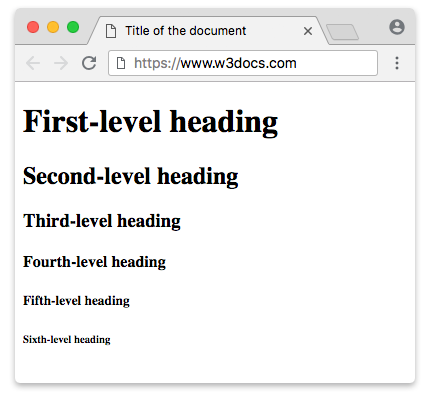
Die Elemente <h1> bis <h6> werden verwendet, um sechs Ebenen von HTML-Überschriften zu definieren, wobei <h1> die höchste (oder wichtigste) Ebene und <h6> die am wenigsten wichtige ist.
TIP
Jede Webseite darf nur eine <h1>-Überschrift haben. Da Suchmaschinen sie verwenden, um die Struktur und den Inhalt von Webdokumenten zu indexieren, sollten Sie darin unbedingt Schlüsselwörter einfügen.
User Agents können Überschrifteninformationen verwenden, um automatisch ein Inhaltsverzeichnis für ein Dokument zu erstellen.
Wenn Sie Text vergrößern oder verkleinern möchten, sollten Sie besser keine Heading-Tags verwenden. Stattdessen können Sie die Eigenschaft CSS font-size verwenden. Es wird empfohlen, keine Überschriftenebenen zu überspringen (<h1>, <h2>, <h3>, <h4>, <h5>, <h6>) und <h1> nur einmal pro Seite zu verwenden.
Überschrift-Tags haben ebenfalls SEO-Wert. Eine Suchmaschine versucht zwei Dinge über Ihre Seite herauszufinden: worum es auf der Seite geht und wie gut sie ist. Eines der wichtigsten Dinge, auf die Suchmaschinen bei der Bestimmung des Seiteninhalts achten, sind die Wörter innerhalb der Überschrift-Tags.
Wenn eine Seite nur einen Inhaltsblock hat, muss ihr Haupttitel in einem <h1>-Tag stehen, die größeren Abschnitte müssen in <h2> enthalten sein und so weiter. Auf diese Weise können Sie Ihre Inhalte besser strukturieren. Sie sollten sich daran erinnern, dass niemand jedes Wort eines Inhalts liest.
Es gibt zwei Arten von Seiten mit Inhalt: Seiten mit einem einzelnen Inhalt und Indexseiten. Auf Seiten mit einem einzelnen Inhalt muss der Titel dieses Inhalts nahe am Anfang von <body> in einem <h1> stehen. Auf einer Indexseite wird der Seitentitel oder der Indexname normalerweise in <h1> gesetzt. Dann müssen die Titel aller aufgelisteten einzelnen Teile <h2>-Tags verwenden.
Da die <h1>- bis <h6>-Tags Block-Elemente sind, beginnen sie immer in einer neuen Zeile und nehmen die gesamte verfügbare Breite ein.
Standardmäßig haben <h1>-<h6>-Tags die folgenden Eigenschaften: margin-left, margin-right, font-weight, display.
HTML <h1>-<h6> Tags
margin-left: 0;
margin-right: 0;
font-weight: bold;
display: block;
Syntax
Die <h1>-<h6>-Tags kommen paarweise vor, daher ist das schließende Tag erforderlich.
Example of the HTML <h1>-<h6> tags:
HTML <h1>-<h6> Tags
<!DOCTYPE html>
<html>
  <head>
    <title>Title of the document</title>
  </head>
  <body>
    <h1>First-level heading</h1>
    <h2>Second-level heading</h2>
    <h3>Third-level heading</h3>
    <h4>Fourth-level heading</h4>
    <h5>Fifth-level heading</h5>
    <h6>Sixth-level heading</h6>
  </body>
</html>Result
DANGER
Die Elemente <h1>-<h6> dürfen nicht verwendet werden, um Zwischenüberschriften, Untertitel, alternative Titel und Slogans auszuzeichnen, es sei denn, sie sind als Überschrift für einen neuen Abschnitt oder Unterabschnitt gedacht.
TIP
Da das align-Attribut in HTML5 nicht unterstützt wird, verwenden Sie stattdessen die CSS-Eigenschaft text-align.
Example of the HTML <h1> tag:
Example of the HTML <h1> tag:
<!DOCTYPE html>
<html>
  <head>
    <title>Title of the document</title>
    <style>
      h1 {
        color: #224cc5;
        text-align: center;
      }
    </style>
  </head>
  <body>
    <h1>First-level heading</h1>
    <p>Lorem ipsum, or lipsum as it is sometimes known, is dummy text used in laying out print, graphic or web designs. The passage is attributed to an unknown typesetter in the 15th century who is thought to have scrambled parts of Cicero's De Finibus Bonorum et Malorum for use in a type specimen book.</p>
  </body>
</html>Example of the HTML <h2> tag:
Example of the HTML <h2> tag:
<!DOCTYPE html>
<html>
  <head>
    <title>Title of the document</title>
    <style>
      h2 {
        color: #22c599;
        text-align: right;
      }
    </style>
  </head>
  <body>
    <h2>Second-level heading</h2>
    <p>
      Lorem ipsum, or lipsum as it is sometimes known, is dummy text used in laying out print, graphic or web designs. The passage is attributed to an unknown typesetter in the 15th century who is thought to have scrambled parts of Cicero's De Finibus Bonorum et Malorum for use in a type specimen book.
    </p>
  </body>
</html>Example of the HTML <h3> tag:
Example of the HTML <h3> tag:
<!DOCTYPE html>
<html>
  <head>
    <title>Title of the document</title>
    <style>
      h3 {
        color: #bc22c5;
        font-size: 20px;
        padding: 10px 0;
      }
    </style>
  </head>
  <body>
    <h3>Third-level heading</h3>
    <p>
      Lorem ipsum, or lipsum as it is sometimes known, is dummy text used in laying out print, graphic or web designs. The passage is attributed to an unknown typesetter in the 15th century who is thought to have scrambled parts of Cicero's De Finibus Bonorum et Malorum for use in a type specimen book.
    </p>
  </body>
</html>Example of the HTML <h4> tag:
Example of the HTML <h4> tag:
<!DOCTYPE html>
<html>
  <head>
    <title>Title of the document</title>
    <style>
      h4 {
        color: #1c87c9;
        margin: 10px 0;
        letter-spacing: 4px;
        text-indent: 50px;
      }
    </style>
  </head>
  <body>
    <h4>Fourth-level heading</h4>
    <p>
      Lorem ipsum, or lipsum as it is sometimes known, is dummy text used in laying out print, graphic or web designs. The passage is attributed to an unknown typesetter in the 15th century who is thought to have scrambled parts of Cicero's De Finibus Bonorum et Malorum for use in a type specimen book.
    </p>
  </body>
</html>Example of the HTML <h5> tag:
Example of the HTML <h5> tag:
<!DOCTYPE html>
<html>
  <head>
    <title>Title of the document</title>
    <style>
      h5 {
        background-color: #1c87c9;
        color: #ffffff;
        text-transform: uppercase;
        padding: 15px 20px;
      }
    </style>
  </head>
  <body>
    <h5>Fifth-level heading</h5>
    <p>
      Lorem ipsum, or lipsum as it is sometimes known, is dummy text used in laying out print, graphic or web designs. The passage is attributed to an unknown typesetter in the 15th century who is thought to have scrambled parts of Cicero's De Finibus Bonorum et Malorum for use in a type specimen book.
    </p>
  </body>
</html>Example of the HTML <h6> tag:
Example of the HTML <h6> tag:
<!DOCTYPE html>
<html>
  <head>
    <title>Title of the document</title>
    <style>
      h6 {
        font-style: italic;
        font-family: sans-serif;
        color: #401cc9;
        font-size: 16px;
        line-height: 1.625;
        margin: 0;
      }
    </style>
  </head>
  <body>
    <h6>Sixth-level heading</h6>
    <p>
      Lorem ipsum, or lipsum as it is sometimes known, is dummy text used in laying out print, graphic or web designs. The passage is attributed to an unknown typesetter in the 15th century who is thought to have scrambled parts of Cicero's De Finibus Bonorum et Malorum for use in a type specimen book.
    </p>
  </body>
</html>Attributes
| Attribute | Value | Description |
|---|---|---|
| align | left right center justify | Definiert die horizontale Ausrichtung des Tag-Inhalts. Wird in HTML 5 nicht unterstützt. |
Die <h1>- bis <h6>-Tags unterstützen die Global Attributes und die Event Attributes.
How to style an HTML <h1>-<h6> Tags
{
    "tag_name": "h1-h6"
}
Practice
Welche der folgenden Aussagen trifft auf HTML-Überschrift-Tags zu?