CSS margin-left-Eigenschaft
Die margin-left-Eigenschaft legt die Breite des linken Randes fest.
Wenn die Summe aus width, margin-left, border, padding, dem Inhaltsbereich und margin-right die Containerbreite überschreitet, werden die Ränder auf auto gesetzt.
Die margin-left-Eigenschaft wird als Schlüsselwort <auto>, <percentage> oder eine <length> definiert. Ihr Wert kann negativ, positiv oder null sein.
INFO
Negative Werte sind erlaubt.
| Anfangswert | 0 |
|---|---|
| Anwendbar auf | Alle Elemente. Gilt auch für ::first-letter. |
| Vererbbar | Nein. |
| Animierbar | Ja. Der linke Rand des Elements ist animierbar. |
| Version | CSS2 |
| DOM-Syntax | object.style.marginLeft = "20px"; |
Syntax
Syntax der CSS margin-left-Eigenschaft
css
margin-left: auto | <length> | <percentage> | initial | inherit;Beispiel für die margin-left-Eigenschaft mit "px":
Beispiel für die CSS margin-left-Eigenschaft mit px-Wert
html
<!DOCTYPE html>
<html>
  <head>
    <title>Title of the document</title>
    <style>
      .left {
        margin-left: 25px;
      }
    </style>
  </head>
  <body>
    <h2>Margin-left property example</h2>
    <p>Lorem Ipsum is simply dummy text of the printing and typesetting industry.</p>
    <p class="left">Lorem Ipsum is simply dummy text of the printing and typesetting industry.</p>
  </body>
</html>Ergebnis
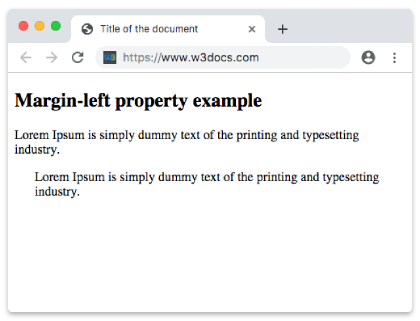
Beispiel für die margin-left-Eigenschaft mit "em":
Beispiel für die CSS margin-left-Eigenschaft mit em-Wert
html
<!DOCTYPE html>
<html>
  <head>
    <title>Title of the document</title>
    <style>
      .left {
        margin-left: 8em;
      }
    </style>
  </head>
  <body>
    <h2>Margin-left property example</h2>
    <p>Lorem Ipsum is simply dummy text of the printing and typesetting industry.</p>
    <p class="left">Lorem Ipsum is simply dummy text of the printing and typesetting industry.</p>
  </body>
</html>Beispiel für die margin-left-Eigenschaft mit "px", "em" und "%":
Beispiel für die CSS margin-left-Eigenschaft mit em-, px- und %-Werten
html
<!DOCTYPE html>
<html>
  <head>
    <title>Title of the document</title>
    <style>
      p.p1 {
        margin-left: 6em;
      }
      p.p2 {
        margin-left: 40px;
      }
      p.p3 {
        margin-left: 10%;
      }
    </style>
  </head>
  <body>
    <h2>Margin-left property example</h2>
    <p>No specified margin.</p>
    <p class="p1"> Left margin is set to 6em.</p>
    <p class="p2">Left margin is set to 40px.</p>
    <p class="p3">Left margin is set to 10%.</p>
    <p>No specified margin</p>
  </body>
</html>Werte
| Wert | Beschreibung | Ausführen |
|---|---|---|
| auto | Legt den linken Rand fest. Dies ist der Standardwert dieser Eigenschaft. | Ausführen » |
| length | Definiert einen linken Rand in px, pt, cm usw. Standardwert ist 0. | Ausführen » |
| % | Legt den linken Rand in % des enthaltenen Elements fest. | Ausführen » |
| initial | Legt fest, dass die Eigenschaft ihren Standardwert verwendet. | Ausführen » |
| inherit | Erbt die Eigenschaft vom Elternelement. |
Practice
Was gibt die 'margin-left'-Eigenschaft in CSS an?