CSS padding-top-Eigenschaft
Die Eigenschaft padding-top legt den oberen Innenabstand eines Elements fest.
INFO
Negative Werte sind nicht gültig.
INFO
Diese Eigenschaft hat keinen Einfluss auf Inline-Elemente, wie <span>.
| Anfangswert | 0 |
|---|---|
| Gilt für | Alle Elemente, außer wenn die display-Eigenschaft auf table-row-group, table-header-group, table-footer-group, table-row, table-column-group oder table-column gesetzt ist. Sie gilt auch für ::first-letter. |
| Vererbbar | Nein. |
| Animierbar | Ja. Der Innenabstand ist animierbar. |
| Version | CSS1 |
| DOM-Syntax | object.style.paddingTop = "10px"; |
Syntax
Syntax der CSS padding-top-Eigenschaft
css
padding-top: length | initial | inherit;Beispiel für die padding-top-Eigenschaft:
Beispiel für die CSS padding-top-Eigenschaft mit px-Wert
html
<!DOCTYPE html>
<html>
  <head>
    <title>The title of the document</title>
    <style>
      p {
        border: 2px solid #666;
        color: #8ebf42;
        padding-top: 30px;
      }
    </style>
  </head>
  <body>
    <h2>Padding-top property example</h2>
    <p>Lorem Ipsum is simply dummy text of the printing and typesetting industry.</p>
  </body>
</html>Ergebnis
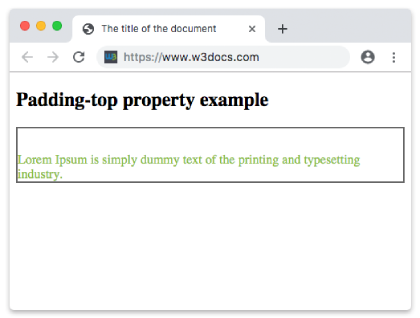
Beispiel für die padding-top-Eigenschaft, die in „em“ festgelegt ist.
Beispiel für die CSS padding-top-Eigenschaft mit em-Wert
html
<!DOCTYPE html>
<html>
  <head>
    <title>The title of the document</title>
    <style>
      p {
        border: 2px solid #666;
        color: #8ebf42;
        padding-top: 4em;
      }
    </style>
  </head>
  <body>
    <h2>Padding-top property example</h2>
    <p>Lorem Ipsum is simply dummy text of the printing and typesetting industry.</p>
  </body>
</html>Beispiel für die padding-top-Eigenschaft, die in Prozent angegeben ist:
Beispiel für die CSS padding-top-Eigenschaft mit „%“-Wert:
html
<!DOCTYPE html>
<html>
  <head>
    <title>The title of the document</title>
    <style>
      p {
        border: 2px solid #cccccc;
        color: #8ebf42;
        padding-top: 15%;
      }
    </style>
  </head>
  <body>
    <h2>Padding-top property example</h2>
    <p>Lorem Ipsum is simply dummy text of the printing and typesetting industry.</p>
  </body>
</html>Werte
| Wert | Beschreibung | Testen |
|---|---|---|
| length | Legt den oberen Innenabstand in px, pt, cm usw. fest. Der Standardwert ist 0. | Testen » |
| % | Legt den oberen Innenabstand in % der Breite des Elternelements fest. | Testen » |
| initial | Weist der Eigenschaft ihren Standardwert zu. | Testen » |
| inherit | Erbt die Eigenschaft von ihrem Elternelement. |
Practice
Welche Funktion hat die CSS-Eigenschaft 'padding-top'?