CSS position-Eigenschaft
Die position-Eigenschaft legt die Position des Elements in einem Dokument fest.
Diese Eigenschaft hat folgende Werte:
- static
- fixed
- absolute
- relative
- sticky
Arten der Positionierung
Positionierte Elemente – Wenn ein Element positioniert wird, wird seine Position auf der Seite mithilfe der Offset-Eigenschaften top, right, bottom und left bestimmt. Offset-Eigenschaften funktionieren nicht bei statischen Elementen.
Relativ positionierte Elemente – Der position-Wert ist „relative“. Die Eigenschaften top und bottom geben den vertikalen Versatz zur normalen Position an, left und right den horizontalen Versatz.
Absolut positionierte Elemente – Der position-Wert ist „absolute“ oder „fixed“. Die Eigenschaften top, right, bottom und left geben den Versatz zu den Kanten des umschließenden Blocks des Elements an.
Sticky positionierte Elemente – Der position-Wert ist „sticky“. Es wird als eine Mischung aus „relative“ und „fixed“ Elementen behandelt.
| Anfangswert | static |
|---|---|
| Gilt für | Alle Elemente. |
| Vererbbar | Nein. |
| Animierbar | Nein. |
| Version | CSS2 |
| DOM-Syntax | Object.style.position = "sticky"; |
Syntax
CSS position-Syntax
position: static | absolute | fixed | relative | sticky | initial | inherit;Beispiel zur position-Eigenschaft:
CSS position-Codebeispiel
<!DOCTYPE html>
<html>
  <head>
    <title>Title of the document</title>
    <style>
      p {
        position: absolute;
        left: 40px;
        top: 120px;
      }
    </style>
  </head>
  <body>
    <h2>Position property example</h2>
    <p>Lorem Ipsum is dummy text of the printing and typesetting industry. Lorem Ipsum has been the industry's standard dummy text ever since the 1500s when an unknown printer took a galley of type and scrambled it to make a type specimen book.</p>
  </body>
</html>Ergebnis
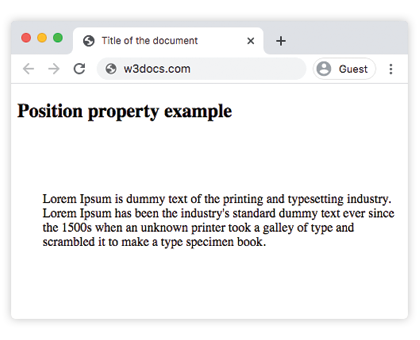
Beispiel zur position-Eigenschaft mit allen Werten:
CSS position-Beispiel mit allen Werten
<!DOCTYPE html>
<html>
  <head>
    <title>Title of the document</title>
    <style>
      #box1 {
        position: static;
        border: 2px solid #666;
        width: 300px;
        height: 100px;
      }
      #box2 {
        position: absolute;
        border: 2px solid #8ebf42;
        top: 70px;
        right: 15px;
      }
      #box3 {
        position: relative;
        border: 2px solid #666;
        width: 300px;
        height: 100px;
      }
      #box4 {
        position: absolute;
        border: 2px solid #8ebf42;
        top: 70px;
        right: 15px;
      }
      #box5 {
        position: absolute;
        border: 2px solid #666;
        width: 320px;
        height: 100px;
        top: 750px;
        right: 25px;
      }
      #box6 {
        position: absolute;
        border: 2px solid #8ebf42;
        top: 70px;
        right: 15px;
      }
      #box7 {
        position: fixed;
        border: 2px solid #8ebf42;
        background-color: #eee;
        width: 300px;
        height: 100px;
        bottom: 0;
        left: 0;
        right: 0;
      }
      #box8 {
        position: absolute;
        border: 2px solid #666;
        top: 70px;
        right: 15px;
      }
    </style>
  </head>
  <body>
    <h2>Position property example</h2>
    <h3>Position: static</h3>
    <p>
      The Box1 element remains in the natural flow of the page and does not act as anchor point for the absolutely positioned Box2 element:
    </p>
    <div id="box1">
      Box1: position: static.
      <div id="box2">Box2: position: absolute, right: 15px, top: 70px</div>
    </div>
    <h3>Position: relative</h3>
    <p>
      The Box3 element remains in the natural flow of the page and also acts as anchor point for the absolutely positioned Box4 element:
    </p>
    <div id="box3">
      Box3: position: relative.
      <div id="box4">Box4: position: absolute, right: 15px, top: 70px</div>
    </div>
    <h3>Position: absolute</h3>
    <p>
      The Box5 element does not remain in the natural flow of the page. It positions itself according to the closest positioned ancestor and also acts as anchor point for the absolutely positioned Box6 element:
    </p>
    <div id="box5">
      Box5: position: absolute, top: 750px, right: 15px.
      <div id="box6">Box6: position: absolute, right: 15px, top: 70px</div>
    </div>
    <h3>Position: fixed</h3>
    <p>
      The Box7 element does not remain in the natural flow of the page and positions itself according to the viewport and acts as anchor point for the absolutely positioned Box8 element:
    </p>
    <div id="box7">
      Box7: position: fixed, bottom: 0, left: 0, right: 0.
      <div id="box8">Box8: position: absolute, right: 15px, top: 70px</div>
    </div>
  </body>
</html>Im obigen Beispiel werden alle Werte eingefügt, um die Unterschiede zu zeigen:
Beispiel zur position-Eigenschaft mit dem Wert „sticky“:
Beispiel zur position-Eigenschaft mit dem Wert „sticky“:
<!DOCTYPE html>
<html>
  <head>
    <title>Title of the document</title>
    <style>
      ul {
        height: 150px;
        overflow: auto;
        position: relative;
        background-color: #cccccc;
        padding: 0;
      }
      ul li {
        list-style-type: none;
        height: 30px;
        padding: 10px 10px 0;
      }
      ul li:first-child {
        position: -webkit-sticky;
        position: sticky;
        top: 1px;
        background-color: #dddddd;
      }
    </style>
  </head>
  <body>
    <h2>Example of the position property with the "sticky" value:</h2>
    <ul>
      <li>Sticky List Item</li>
      <li>List Item 1</li>
      <li>List Item 2</li>
      <li>List Item 3</li>
      <li>List Item 4</li>
      <li>List Item 5</li>
      <li>List Item 6</li>
      <li>List Item 7</li>
      <li>List Item 8</li>
      <li>List Item 9</li>
    </ul>
  </body>
</html>Werte
| Wert | Beschreibung | Abspielen |
|---|---|---|
| static | Elemente werden gemäß dem normalen Dokumentfluss platziert. Dies ist der Standardwert dieser Eigenschaft. | Abspielen » |
| absolute | Elemente werden aus dem Dokumentfluss entfernt und relativ zu ihrem positionierten Elternelement positioniert. | Abspielen » |
| fixed | Elemente werden aus dem Dokumentfluss entfernt und relativ zum Browserfenster positioniert. | Abspielen » |
| relative | Elemente werden relativ zu ihrer normalen Position platziert. | Abspielen » |
| sticky | Elemente werden gemäß dem normalen Dokumentfluss positioniert und dann relativ zu ihrem nächsten scrollbaren Elternelement und umschließenden Block verschoben. | |
| initial | Legt fest, dass die Eigenschaft ihren Standardwert verwendet. | Abspielen » |
| inherit | Erbt die Eigenschaft von ihrem Elternelement. |
Praxis
Welche verschiedenen Positionierungsarten gibt es in CSS?