CSS-Eigenschaft outline-style
Die Eigenschaft outline-style definiert den Stil einer Umrandung.
Sie ähnelt der Eigenschaft border, aber es gibt einen Unterschied. Die Umrandung liegt außerhalb des Rahmens eines Elements und nimmt keinen Platz ein. Standardmäßig wird sie um alle vier Seiten eines Elements gezeichnet.
Die Eigenschaft outline-style hat die folgenden Werte:
- none
- hidden
- dotted
- dashed
- solid
- double
- groove
- ridge
- inset
- outset
Die Eigenschaften width und height eines Elements enthalten die Umrandungsbreite nicht, da die Umrandung nicht als Teil der Abmessungen des Elements betrachtet wird.
| Initial Value | none |
|---|---|
| Applies to | All elements. |
| Inherited | No. |
| Animatable | No. |
| Version | CSS2 |
| DOM Syntax | object.style.outlineStyle = "dotted" |
Syntax
CSS outline-style syntax
outline-style: none | hidden | dotted | dashed | solid | double | groove | ridge | inset | outset | initial | inherit;Beispiel für die Eigenschaft outline-style:
Beispiel für die Eigenschaft outline-style:
<!DOCTYPE html>
<html>
  <head>
    <title>Title of the document</title>
    <style>
      .p1 {
        outline-style: solid;
      }
      .p2 {
        outline-style: dashed;
      }
      .p3 {
        outline-style: dotted;
      }
      .p4 {
        outline-style: double;
      }
      .p5 {
        outline-style: none;/*hidden*/
      }
      .p6 {
        outline-style: groove;
        outline-color: #ccc;
      }
      .p7 {
        outline-style: ridge;
        outline-color: #ccc;
      }
      .p8 {
        outline-style: inset;
        outline-color: #ccc;
      }
      .p9 {
        outline-style: outset;
        outline-color: #ccc;
      }
    </style>
  </head>
  <body>
    <h2>Outline property example</h2>
    <p class="p1">This is a paragraph with outline set to solid.</p>
    <p class="p2">This is a paragraph with outline set to dashed.</p>
    <p class="p3">This is a paragraph with outline set to dotted.</p>
    <p class="p4">This is a paragraph with outline set to double.</p>
    <p class="p5">This is a paragraph with outline set to none.</p>
    <p class="p6">This is a paragraph with outline set to groove.</p>
    <p class="p7">This is a paragraph with outline set to ridge.</p>
    <p class="p8">This is a paragraph with outline set to inset.</p>
    <p class="p9">This is a paragraph with outline set to outset.</p>
  </body>
</html>Ergebnis
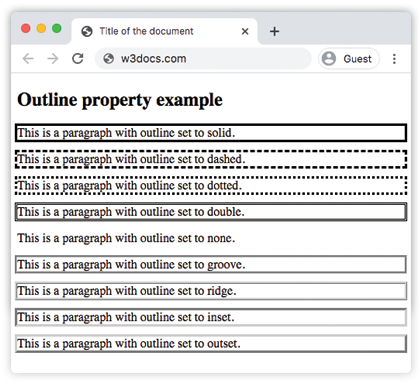
Beispiel für die Eigenschaft outline-style mit allen Werten:
CSS outline-style another code example
<!DOCTYPE html>
<html>
  <head>
    <title>Title of the document</title>
    <style>
      p.dotted {
        outline: 4px dotted gray;
      }
      p.dashed {
        outline: 0.2em dashed rgb(142, 191, 66);
      }
      p.solid {
        outline: 4px solid #ccc;
      }
      p.double {
        outline: 4px double #000;
      }
      p.groove {
        outline: 4px groove #666;
      }
      p.ridge {
        outline: thick ridge #1c87c9;
      }
      p.inset {
        outline: medium inset #1c87c9;
      }
      p.outset {
        outline: 4px outset #1c87c9;
      }
    </style>
  </head>
  <body>
    <h2>Outline property example</h2>
    <p class="dotted">Lorem Ipsum is simply dummy text of the printing...</p>
    <p class="dashed">Lorem Ipsum is simply dummy text of the printing...</p>
    <p class="solid">Lorem Ipsum is simply dummy text of the printing...</p>
    <p class="double">Lorem Ipsum is simply dummy text of the printing...</p>
    <p class="groove">Lorem Ipsum is simply dummy text of the printing...</p>
    <p class="ridge">Lorem Ipsum is simply dummy text of the printing...</p>
    <p class="inset">Lorem Ipsum is simply dummy text of the printing...</p>
    <p class="outset">Lorem Ipsum is simply dummy text of the printing...</p>
  </body>
</html>Beispiel für die Eigenschaft outline-style mit dem Wert "groove":
Beispiel für die Eigenschaft outline-style mit dem Wert groove
<!DOCTYPE html>
<html>
  <head>
    <title>Title of the document</title>
    <style>
      p {
        color: #7f7fa7;
        text-align: center;
        outline-width: 8px;
        outline-style: groove;
        padding: 10px;
      }
    </style>
  </head>
  <body>
    <h1>Outline property example</h1>
    <p>This is a paragraph with outline set to groove.</p>
  </body>
</html>Beispiel für die Eigenschaft outline-style mit dem Wert "ridge":
Beispiel für die Eigenschaft outline-style mit dem Wert ridge
<!DOCTYPE html>
<html>
  <head>
    <title>Title of the document</title>
    <style>
      p {
        color: #69afad;
        text-align: center;
        outline-width: 8px;
        outline-style: ridge;
        padding: 10px;
      }
    </style>
  </head>
  <body>
    <h1>Outline property example</h1>
    <p>This is a paragraph with outline set to ridge.</p>
  </body>
</html>Beispiel für die Eigenschaft outline-style mit dem Wert "inset":
Beispiel für die Eigenschaft outline-style mit dem Wert inset
<!DOCTYPE html>
<html>
  <head>
    <title>Title of the document</title>
    <style>
      p {
        color: #69afad;
        text-align: center;
        outline-width: 8px;
        outline-style: inset;
        padding: 10px;
      }
    </style>
  </head>
  <body>
    <h1>Outline property example</h1>
    <p>This is a paragraph with outline set to ridge.</p>
  </body>
</html>Beispiel für die Eigenschaft outline-style mit dem Wert "outset":
Beispiel für die Eigenschaft outline-style mit dem Wert outset:
<!DOCTYPE html>
<html>
  <head>
    <title>Title of the document</title>
    <style>
      p {
        color: #69afad;
        text-align: center;
        outline-width: 8px;
        outline-style: outset;
        padding: 10px;
      }
    </style>
  </head>
  <body>
    <h1>Outline property example</h1>
    <p>This is a paragraph with outline set to ridge.</p>
  </body>
</html>Beispiel für die Eigenschaft outline-style mit dem Wert "dotted":
Beispiel für die Eigenschaft outline-style mit dem Wert dotted:
<!DOCTYPE html>
<html>
  <head>
    <title>Title of the document</title>
    <style>
      p {
        color: #69afad;
        text-align: center;
        outline-width: 4px;
        outline-style: dotted;
        padding: 10px;
      }
    </style>
  </head>
  <body>
    <h1>Outline property example</h1>
    <p>This is a paragraph with outline set to ridge.</p>
  </body>
</html>Beispiel für die Eigenschaft outline-style mit dem Wert "dashed":
Beispiel für die Eigenschaft outline-style mit dem Wert dashed:
<!DOCTYPE html>
<html>
  <head>
    <title>Title of the document</title>
    <style>
      p {
        color: #69afad;
        text-align: center;
        outline-width: 4px;
        outline-style: dashed;
        padding: 10px;
      }
    </style>
  </head>
  <body>
    <h1>Outline property example</h1>
    <p>This is a paragraph with outline set to ridge.</p>
  </body>
</html>Werte
| Value | Description | Play it |
|---|---|---|
| none | Zeigt keine Umrandung an. Dies ist der Standardwert dieser Eigenschaft. | Play it » |
| hidden | Definiert eine versteckte Umrandung. | Play it » |
| dotted | Die outline wird als Reihe von Punkten angegeben. | Play it » |
| dashed | Die Umrandung wird als Reihe von Strichen angegeben. | Play it » |
| solid | Die Umrandung wird als durchgezogene Linie angegeben. | Play it » |
| double | Die Umrandung wird als doppelte durchgezogene Linie angegeben. | Play it » |
| groove | Gibt eine 3D-gerillte Umrandung an. | Play it » |
| ridge | Gibt eine 3D-erhabene outline an. | Play it » |
| inset | Gibt eine eingesenkte Umrandung an. | Play it » |
| outset | Gibt eine geprägte Umrandung an. | Play it » |
| initial | Setzt die Eigenschaft auf ihren Standardwert. | Play it » |
| inherit | Erbt die Eigenschaft vom übergeordneten Element. |
Practice
Which of the following are valid values for the 'outline-style' property in CSS?