CSS text-decoration-Eigenschaft
Die Eigenschaft text-decoration dient zum Festlegen der Textdekoration.
In CSS3 ist es eine Kurzschreibweise für die folgenden Eigenschaften:
Fehlt der Wert einer dieser Eigenschaften, wird automatisch der Standardwert festgelegt. Beachten Sie, dass text-decoration-line nicht erforderlich ist; wenn es weggelassen wird, lautet der Standardwert none.
In der CSS1-Spezifikation war text-decoration keine Kurzschreibweise und hatte folgende Werte:
- none
- underline
- overline
- line-through
- blink
| Anfangswert | none currentColor solid |
|---|---|
| Gilt für | Alle Elemente. Gilt auch für ::first-letter und ::first-line. |
| Vererbbar | Nein. |
| Animierbar | Nein. |
| Version | CSS1, CSS3 |
| DOM-Syntax | object.style.textDecoration = "dashed"; |
Syntax
Syntax der CSS text-decoration-Eigenschaft
text-decoration: text-decoration-line text-decoration-color text-decoration-style | initial | inherit;Beachten Sie, dass mehrere Linienwerte in der Kurzschreibweise kombiniert werden können, z. B. underline overline.
Beispiel für die text-decoration-Eigenschaft:
Beispiel für die CSS text-decoration-Eigenschaft mit den Werten overline, line-through, underline und overline
<!DOCTYPE html>
<html>
  <head>
    <title>Title of the document</title>
    <style>
      .a {
        text-decoration: overline;
      }
      .b {
        text-decoration: line-through;
      }
      .c {
        text-decoration: underline;
      }
      .d {
        text-decoration: underline overline;
      }
    </style>
  </head>
  <body>
    <h2>Text-decoration property example</h2>
    <p class="a">Lorem Ipsum is simply dummy text...</p>
    <p class="b">Lorem Ipsum is simply dummy text...</p>
    <p class="c">Lorem Ipsum is simply dummy text...</p>
    <p class="d">Lorem Ipsum is simply dummy text...</p>
  </body>
</html>Ergebnis
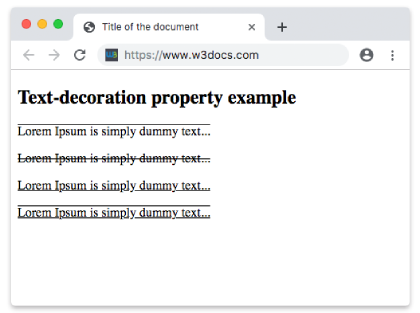
Beispiel für die text-decoration-Eigenschaft mit einer angegebenen Farbe:
Beispiel für die CSS text-decoration-Eigenschaft mit der text-decoration-color-Eigenschaft
<!DOCTYPE html>
<html>
  <head>
    <title>Title of the document</title>
    <style>
      p {
        text-decoration: underline;
        text-decoration-color: #1c87c9;
      }
    </style>
  </head>
  <body>
    <h2>Text-decoration property example</h2>
    <p>Lorem ipsum is simply dummy text...</p>
  </body>
</html>INFO
Das -webkit- Präfix wurde hier weggelassen, da moderne Browser die Standard-Eigenschaft vollständig unterstützen.
Beispiel für die text-decoration-Eigenschaft mit einem angegebenen Stil:
Beispiel für die CSS text-decoration-Eigenschaft mit den text-decoration-line- und text-decoration-style-Eigenschaften
<!DOCTYPE html>
<html>
  <head>
    <title>Title of the document</title>
    <style>
      div {
        text-decoration-line: underline;
      }
      div.t1 {
        text-decoration-style: dotted;
      }
      div.t2 {
        text-decoration-style: wavy;
      }
      div.t3 {
        text-decoration-style: solid;
      }
      div.t4 {
        text-decoration-line: overline underline;
        text-decoration-style: double;
      }
    </style>
  </head>
  <body>
    <h2>Text-decoration property example</h2>
    <div class="t1">Lorem ipsum is simply dummy text...</div>
    <br />
    <div class="t2">Lorem ipsum is simply dummy text...</div>
    <br />
    <div class="t3">Lorem ipsum is simply dummy text...</div>
    <br />
    <div class="t4">Lorem ipsum is simply dummy text...</div>
  </body>
</html>Werte
| Wert | Beschreibung |
|---|---|
| text-decoration-line | Gibt die Art der Textdekoration an. |
| text-decoration-color | Gibt die Farbe der Textdekoration an. |
| text-decoration-style | Gibt den Stil der Textdekoration an. |
| initial | Legt fest, dass die Eigenschaft ihren Standardwert verwendet. |
| inherit | Erbt die Eigenschaft vom Elternelement. |
Praxis
Welche CSS-Eigenschaft verändert die Darstellung von Inline-Text, indem Effekte wie Unterstreichungen oder Durchstreichungen hinzugefügt werden?