CSS list-style-type-Eigenschaft
Die CSS-Eigenschaft list-style-type wird verwendet, um den Typ eines Listenelements anzugeben.
Ein Listenmarker kann drei Typen haben: Glyphen (circle, disc, square), Nummerierungssysteme und alphabetische Systeme.
Die Farbe des Markers ist dieselbe wie die berechnete Farbe des Elements, auf das er angewendet wird. Farben können Sie hier auswählen.
Nur die Elemente <li> und <summary> haben den Wert "list-item" der Eigenschaft display. Wir können die Eigenschaft list-style-type auf jedes Element anwenden, dessen display auf list-item gesetzt ist. Diese Eigenschaft kann auf ein übergeordnetes Element gesetzt werden (normalerweise <ol> oder <ul>).
| Initial Value | disc |
|---|---|
| Applies to | List items. |
| Inherited | Yes. |
| Animatable | No. |
| Version | CSS1 |
| DOM Syntax | object.style.listStyleType = "armenian"; |
Syntax
Syntax der CSS-Eigenschaft list-style-type
list-style-type: disc | armenian | circle | cjk-ideographic | decimal | decimal-leading-zero | georgian | hebrew | hiragana | hiragana-iroha | katakana | katakana-iroha | lower-alpha | lower-greek | lower-latin | lower-roman | none | square | upper-alpha | upper-latin | upper-roman | initial | inherit;Beispiel für die Eigenschaft list-style-type:
Beispiel der CSS-Eigenschaft list-style-type mit den Werten square und hebrew
<!DOCTYPE html>
<html>
  <head>
    <title>Title of the document</title>
    <style>
      ul.list-styles {
        list-style-type: square;
      }
      ul.list-styles2 {
        list-style-type: hebrew;
      }
    </style>
  </head>
  <body>
    <h2>List-style-type property example</h2>
    <ul class="list-styles">
      <li>Appetizers</li>
      <li>Main Course</li>
      <li>Salads</li>
    </ul>
    <ul class="list-styles2">
      <li>Cold Drinks</li>
      <li>Hot Drinks</li>
      <li>Ice-Creams</li>
    </ul>
  </body>
</html>Ergebnis
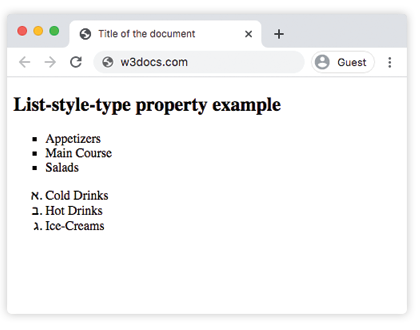
Beispiel für die Eigenschaft list-style-type mit dem Wert "disc":
Beispiel für die Eigenschaft list-style-type mit dem Wert "disc":
<!DOCTYPE html>
<html>
  <head>
    <title>Title of the document</title>
    <style>
      .text {
        list-style-type: disc;
      }
    </style>
  </head>
  <body>
    <h1>
      Example of the list-style-type property with "disc" value.
    </h1>
    <ul class="text">
      <li>Barcelona</li>
      <li>Madrid</li>
      <li>London</li>
    </ul>
  </body>
</html>Beispiel für die Eigenschaft list-style-type mit dem Wert "decimal":
Beispiel für die Eigenschaft list-style-type mit dem Wert "decimal":
<!DOCTYPE html>
<html>
  <head>
    <title>Title of the document</title>
    <style>
      .text {
        list-style-type: decimal;
      }
    </style>
  </head>
  <body>
    <h1>
      Example of the list-style-type property
    </h1>
    <ul class="text">
      <li>Barcelona</li>
      <li>Madrid</li>
      <li>London</li>
    </ul>
  </body>
</html>Beispiel für die Eigenschaft list-style-type bei geordneten Listen:
Beispiel der CSS-Eigenschaft list-style-type mit circle, square, upper-roman, lower-alpha, armenian, decimal, cjk-ideographic, georgian, upper-alpha und anderen Werten
<!DOCTYPE html>
<html>
  <head>
    <title>Title of the document</title>
    <style>
      ul.a {
        list-style-type: circle;
      }
      ul.b {
        list-style-type: square;
      }
      ol.c {
        list-style-type: upper-roman;
      }
      ol.d {
        list-style-type: lower-alpha;
      }
      ol.e {
        list-style-type: armenian;
      }
      ol.f {
        list-style-type: decimal;
      }
      ol.g {
        list-style-type: cjk-ideographic;
      }
      ol.h {
        list-style-type: decimal-leading-zero;
      }
      ol.i {
        list-style-type: georgian;
      }
      ol.j {
        list-style-type: hebrew;
      }
      ol.k {
        list-style-type: hiragana;
      }
      ol.l {
        list-style-type: hiragana-iroha;
      }
      ol.m {
        list-style-type: katakana;
      }
      ol.n {
        list-style-type: katakana-iroha;
      }
      ol.o {
        list-style-type: lower-greek;
      }
      ol.p {
        list-style-type: lower-latin;
      }
      ol.q {
        list-style-type: lower-roman;
      }
      ol.r {
        list-style-type: none;
      }
      ol.s {
        list-style-type: upper-alpha;
      }
      ol.t {
        list-style-type: upper-latin;
      }
    </style>
  </head>
  <body>
    <h2>List-style-type property example</h2>
    <p>Examples of unordered lists:</p>
    <h3>Circle</h3>
    <ul class="a">
      <li>New York</li>
      <li>Las Vegas</li>
      <li>Washington</li>
    </ul>
    <h3>Square</h3>
    <ul class="b">
      <li>San Francisco</li>
      <li>Los Angeles</li>
      <li>Miami</li>
    </ul>
    <p>Examples of ordered lists:</p>
    <h3>Upper-roman</h3>
    <ol class="c">
      <li>Barcelona</li>
      <li>Madrid</li>
      <li>London</li>
    </ol>
    <h3>Lower-alpha</h3>
    <ol class="d">
      <li>Dubai</li>
      <li>Anu Dhabi</li>
      <li>Qatar</li>
    </ol>
    <h3>Armenian</h3>
    <ol class="e">
      <li>Yerevan</li>
      <li>Paris</li>
      <li>Rome</li>
    </ol>
    <h3>Decimal</h3>
    <ol class="f">
      <li>Sydney</li>
      <li>Honk Kong</li>
      <li>Moscow</li>
    </ol>
    <h3>Cjk-ideographic</h3>
    <ol class="g">
      <li>Kiev</li>
      <li>Saint-Petersburg</li>
      <li>Tula</li>
    </ol>
    <h3>Decimal-leading-zero</h3>
    <ol class="h">
      <li>Bangkok</li>
      <li>Gyumri</li>
      <li>Valencia</li>
    </ol>
    <h3>Georgian</h3>
    <ol class="i">
      <li>Madrid</li>
      <li>Barcelona</li>
      <li>Prague</li>
    </ol>
    <h3>Hebrew</h3>
    <ol class="j">
      <li>Jerusalem</li>
      <li>Toronto</li>
      <li>Prague</li>
    </ol>
    <h3>Hiragana</h3>
    <ol class="k">
      <li>Cairo</li>
      <li>Tokyo</li>
      <li>Athens</li>
    </ol>
    <h3>Hiragana-iroha</h3>
    <ol class="l">
      <li>Tehran</li>
      <li>Tavriz</li>
      <li>Tel Aviv</li>
    </ol>
    <h3>Katakana</h3>
    <ol class="m">
      <li>Munich</li>
      <li>Berlin</li>
      <li>Bavaria</li>
    </ol>
    <h3>Katakana-iroha</h3>
    <ol class="n">
      <li>Brussels</li>
      <li>Istanbul</li>
      <li>Sydney</li>
    </ol>
    <h3>Lower-greek</h3>
    <ol class="o">
      <li>Seville</li>
      <li>Granada</li>
      <li>Venice</li>
    </ol>
    <h3>Lower-latin</h3>
    <ol class="p">
      <li>Budapest</li>
      <li>Vienna</li>
      <li>Amsterdam</li>
    </ol>
    <h3>Lower-roman</h3>
    <ol class="q">
      <li>Buenos Aires</li>
      <li>Rio de Janeiro</li>
      <li>San Paolo</li>
    </ol>
    <h3>None</h3>
    <ol class="r">
      <li>Vilnius</li>
      <li>Tallin</li>
      <li>Riga</li>
    </ol>
    <h3>Upper-alpha</h3>
    <ol class="s">
      <li>Montreal</li>
      <li>Melbourne</li>
      <li>Edinburgh</li>
    </ol>
    <h3>Upper-latin</h3>
    <ol class="t">
      <li>Dublin</li>
      <li>Mexico</li>
      <li>Florence</li>
    </ol>
  </body>
</html>Werte
| Value | Description | Play it |
|---|---|---|
| disc | Erstellt einen Marker als ausgefüllten Kreis. Dies ist der Standardwert dieser Eigenschaft. | Play it » |
| armenian | Erstellt einen Marker als traditionelle armenische Nummerierung. | Play it » |
| circle | Erstellt einen Marker als Kreis. | Play it » |
| cjk-ideographic | Erstellt einen Marker, der eine einfache ideografische Zahl ist. | Play it » |
| decimal | Erstellt einen Marker als Zahl. | Play it » |
| decimal-leading-zero | Erstellt einen Marker als Zahl mit führender Null, z. B. 01, 02, 05... | Play it » |
| georgian | Erstellt einen Marker als traditionelle georgische Nummerierung. | Play it » |
| hebrew | Erstellt einen Marker als traditionelle hebräische Nummerierung. | Play it » |
| hiragana | Erstellt einen Marker als traditionelle Hiragana-Nummerierung. | Play it » |
| hiragana-iroha | Erstellt einen Marker als traditionelle Hiragana-Iroha-Nummerierung. | Play it » |
| katakana | Erstellt einen Marker als traditionelle Katakana-Nummerierung. | Play it » |
| katakana-iroha | Erstellt einen Marker als traditionelle Katakana-Iroha-Nummerierung. | Play it » |
| lower-alpha | Erstellt einen Marker als lower-alpha, z. B. a, b, c, d... | Play it » |
| lower-greek | Erstellt einen Marker als lower-greek. | Play it » |
| lower-latin | Erstellt einen Marker als lower-latin, z. B. a, b, c, d... | Play it » |
| lower-roman | Erstellt einen Marker als lower-roman, z. B. i, ii, iii, iv... | Play it » |
| none | Bedeutet, dass der Marker nicht angezeigt wird. | Play it » |
| square | Erstellt einen Marker als Quadrat. | Play it » |
| upper-alpha | Erstellt einen Marker als upper-alpha, z. B. A, B, C, D... | Play it » |
| upper-latin | Erstellt einen Marker als upper-latin, z. B. A, B, C, D... | Play it » |
| upper-roman | Erstellt einen Marker als upper-roman, z. B. I, II, III, IV, V... | Play it » |
| initial | Setzt die Eigenschaft auf ihren Standardwert. | Play it » |
| inherit | Erbt die Eigenschaft vom übergeordneten Element. |
Practice
What does the list-style-type property in CSS specify?