CSS column-gap-Eigenschaft
Die column-gap-Eigenschaft legt die Länge des Abstands zwischen den Spalten fest.
Die column-gap-Eigenschaft ist eine der CSS3-Eigenschaften.
Sie akzeptiert das Schlüsselwort normal oder einen <length>-Wert. normal ist der Standardwert. Der Abstand kann in em, px oder Prozent angegeben werden. Die Eigenschaft unterstützt auch die Standard-Schlüsselwörter initial und inherit.
INFO
Vendor-Prefixes sind für moderne Browser nicht mehr erforderlich. Die native Unterstützung ist in allen gängigen Browsern verfügbar.
Wenn eine column-rule zwischen den Spalten verwendet wird, befindet sie sich in der Mitte des Abstands.
| Anfangswert | normal |
|---|---|
| Gilt für | Elemente mit mehreren Spalten, flex-Container, grid-Container. |
| Vererbt | Nein. |
| Animierbar | Ja. Die Länge des Spaltenabstands ist animierbar. |
| Version | CSS3 |
| DOM-Syntax | object.style.columnGap = "100px"; |
Syntax
Syntax der CSS column-gap-Eigenschaft
column-gap: length | normal | initial | inherit;Beispiel für die column-gap-Eigenschaft:
Beispiel für die CSS column-gap-Eigenschaft mit dem Wert „normal“
<!DOCTYPE html>
<html>
  <head>
    <title>Title of the document</title>
    <style>
      div {
        column-count: 4;
        column-gap: normal;
      }
    </style>
  </head>
  <body>
    <h2>The column-gap property example</h2>
    <div>
      Lorem Ipsum is dummy text of the printing and typesetting industry. Lorem Ipsum has been the industry's standard dummy text ever since the 1500s when an unknown printer took a galley of type and scrambled it to make a type specimen book. It has survived not only five centuries, but also the leap into electronic typesetting, remaining essentially unchanged. It was popularised in the 1960s with the release of Letraset sheets containing Lorem Ipsum passages, and more recently with desktop publishing software like Aldus PageMaker including versions of Lorem Ipsum.
    </div>
  </body>
</html>Ergebnis
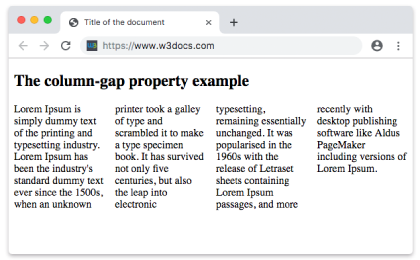
Beispiel für die column-gap-Eigenschaft mit dem Wert „length“:
Beispiel für die CSS column-gap-Eigenschaft mit dem Wert „length“
<!DOCTYPE html>
<html>
  <head>
    <title>Title of the document</title>
    <style>
      div {
        column-count: 4;
        column-gap: 30px;
      }
    </style>
  </head>
  <body>
    <h2>Column-gap property example</h2>
    <div>
      Lorem Ipsum is dummy text of the printing and typesetting industry. Lorem Ipsum has been the industry's standard dummy text ever since the 1500s when an unknown printer took a galley of type and scrambled it to make a type specimen book. It has survived not only five centuries, but also the leap into electronic typesetting, remaining essentially unchanged. It was popularised in the 1960s with the release of Letraset sheets containing Lorem Ipsum passages, and more recently with desktop publishing software like Aldus PageMaker including versions of Lorem Ipsum.
    </div>
  </body>
</html>Werte
| Wert | Beschreibung |
|---|---|
| normal | Der Standardabstand zwischen den Spalten. |
| length | Legt die Länge fest, die den Abstand zwischen den Spalten definiert. Kann in em, px oder Prozent angegeben werden. |
| initial | Setzt die Eigenschaft auf ihren Standardwert zurück. |
| inherit | Erbt die Eigenschaft von ihrem übergeordneten Element. |
Praxis
Was ist der Zweck der column-gap-Eigenschaft in CSS?