CSS text-indent-Eigenschaft
Die text-indent-Eigenschaft gibt die Länge des leeren Raums der ersten Zeile in einem Textblock an. Die Richtung des Textes wird durch die direction-Eigenschaft festgelegt. Wenn ein negativer Wert angegeben wird, wird die erste Zeile nach links eingerückt. Die text-indent-Eigenschaft gilt nur für die erste Zeile des Textes in einem Element.
WARNING
Die Werte „each-line" und „hanging" sind experimentell.
| Anfangswert | 0 |
|---|---|
| Anwendbar auf | Block-Container. |
| Vererbbar | Ja. |
| Animierbar | Ja. text-indent ist animierbar. |
| Version | CSS1 |
| DOM-Syntax | object.style.textIndent = "100px"; |
Syntax
Syntax der CSS text-indent-Eigenschaft
css
text-indent: length | percentage | each-line | hanging | initial | inherit;Beispiel für die text-indent-Eigenschaft:
Beispiel der CSS text-indent-Eigenschaft mit px-Wert
html
<!DOCTYPE html>
<html>
  <head>
    <title>Title of the document</title>
    <style>
      p {
        text-indent: 100px;
      }
    </style>
  </head>
  <body>
    <h2>Text-indent property example</h2>
    <p>
      This is same text with text-indent property. This is same text with text-indent property. This is same text with text-indent property. This is same text with text-indent property. This is same text with text-indent property. This is same text with text-indent property.
    </p>
  </body>
</html>Ergebnis
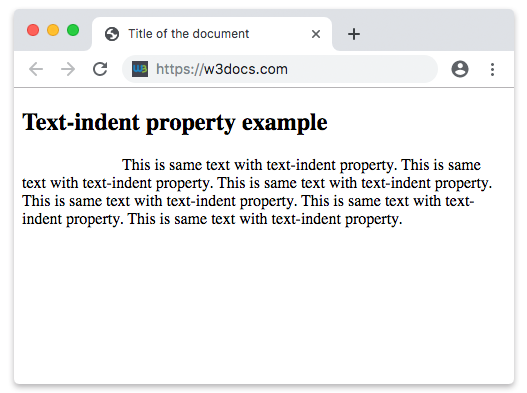
Beispiel für die text-indent-Eigenschaft in „pt“, „em“, „%“ und „cm“:
Beispiel der CSS text-indent-Eigenschaft mit pt-, cm-, %- und em-Werten
html
<!DOCTYPE html>
<html>
  <head>
    <title>Title of the document</title>
    <style>
      div.a {
        text-indent: 20pt;
      }
      div.b {
        text-indent: -5em;
      }
      div.c {
        text-indent: 70%;
      }
      div.d {
        text-indent: 4em;
      }
      div.e {
        text-indent: 5cm;
      }
    </style>
  </head>
  <body>
    <h2>Text-indent property example</h2>
    <h3>text-indent: 20pt</h3>
    <div class="a">
      Lorem Ipsum is simply dummy text of the printing and typesetting industry. Lorem Ipsum has been the industry's standard dummy text ever since the 1500s, when an unknown printer took a galley of type and scrambled it to make a type specimen book.
    </div>
    <h3>text-indent: -5em</h3>
    <div class="b">
      Lorem Ipsum is dummy text of the printing and typesetting industry. Lorem Ipsum has been the industry's standard dummy text ever since the 1500s when an unknown printer took a galley of type and scrambled it to make a type specimen book.
    </div>
    <h3>text-indent: 70%</h3>
    <div class="c">
      Lorem Ipsum is dummied text of the printing and typesetting industry. Lorem Ipsum has been the industry's standard dummy text ever since the 1500s when an unknown printer took a galley of type and scrambled it to make a type specimen book.
    </div>
    <h3>text-indent: 4em</h3>
    <div class="d">
      Lorem Ipsum is dummied text of the printing and typesetting industry. Lorem Ipsum has been the industry's standard dummy text ever since the 1500s when an unknown printer took a galley of type and scrambled it to make a type specimen book.
    </div>
    <h3>text-indent: 5cm</h3>
    <div class="e">
      Lorem Ipsum is dummied text of the printing and typesetting industry. Lorem Ipsum has been the industry's standard dummy text ever since the 1500s when an unknown printer took a galley of type and scrambled it to make a type specimen book.
    </div>
  </body>
</html>Werte
| Wert | Beschreibung | Ausführen |
|---|---|---|
| length | Gibt die Einrückung in px, pt, cm, em usw. an. Der Standardwert ist 0. Negative Werte sind erlaubt. | Ausführen » |
| percentage | Gibt die Einrückung in Prozent der Breite des umgebenden Blocks an. | Ausführen » |
| each-line | Die Einrückung betrifft die erste Zeile sowie jede Zeile nach einem erzwungenen Zeilenumbruch, wirkt sich aber nicht auf Zeilen nach einem weichen Umbruch aus. Dieser Wert ist eine experimentelle Technologie. | |
| hanging | Kehrt um, welche Zeilen eingerückt werden. Die erste Zeile wird nicht eingerückt. Dieser Wert ist eine experimentelle Technologie. | |
| initial | Legt fest, dass die Eigenschaft ihren Standardwert verwendet. | Ausführen » |
| inherit | Erbt die Eigenschaft von ihrem übergeordneten Element. |
Practice
Was macht die text-indent-Eigenschaft in CSS?