CSS ::placeholder-Pseudoelement
Das `::placeholder`-Pseudoelement wird verwendet, um den Platzhaltertext von Formular-Elementen zu stylen. Der `::placeholder`-Selektor gilt nur für <input>- und <textarea>-Elemente, die ein placeholder-Attribut haben. Standardmäßig hat der Platzhaltertext in den meisten Browsern eine halbtransparente oder hellgraue Farbe.
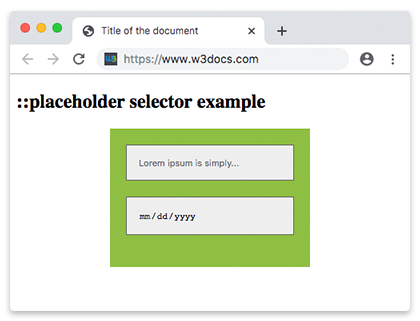
Der Platzhaltertext wird mit dem placeholder-Attribut festgelegt, das einen Hinweis angibt, der den erwarteten Wert eines Eingabefeldes beschreibt.
INFO
Vendor-Prefixes (-webkit-, -moz-, -ms-) sind veraltet und für moderne Browser nicht erforderlich. Der Standard-`::placeholder`-Selektor wird überall unterstützt.
Version
Syntax
CSS ::placeholder-Syntaxbeispiel
::placeholder {
  css declarations;
}
Beispiel für den ::placeholder-Selektor:
CSS ::placeholder-Beispiel
<!DOCTYPE html>
<html>
  <head>
    <title>Title of the document</title>
    <style>
      input::placeholder {
        color: #1c87c9;
        font-size: 1.2em;
        font-style: italic;
      }
    </style>
  </head>
  <body>
    <h2>::placeholder selector example</h2>
    <input placeholder="Type here..." />
  </body>
</html>Beispiel für den ::placeholder-Selektor in einem Formular:
CSS ::placeholder-Codebeispiel
<!DOCTYPE html>
<html>
  <head>
    <title>Title of the document</title>
    <style>
      * {
        box-sizing: border-box;
      }
      .container {
        margin: 20px auto;
        max-width: 250px;
        background-color: #8ebf42;
        padding: 20px;
      }
      input {
        border: 1px solid #666666;
        background-color: #eeeeee;
        padding: 15px;
        margin-bottom: 20px;
        display: block;
        width: 100%;
      }
      input::-webkit-input-placeholder {
        color: #666666;
      }
      input::-moz-placeholder {
        color: #666666;
      }
      input:-ms-input-placeholder {
        color: #666666;
      }
      input::placeholder {
        color: #666666;
      }
    </style>
  </head>
  <body>
    <h2>::placeholder selector example</h2>
    <div class="container">
      <form>
        <input type="text" placeholder="Lorem ipsum is simply..." />
        <input type="date" placeholder="DD/MM/YYYY" />
      </form>
    </div>
  </body>
</html>Beispiel für den ::placeholder-Selektor mit dem HTML <input> autofocus-Attribut:
HTML-Beispiel für Platzhalter
<!DOCTYPE html>
<html>
  <head>
    <title>Title of the document</title>
    <style>
      label {
        display: block;
        color: #777777;
        margin: 0 0 4px;
      }
      input {
        border: 1px solid transparent;
        padding: 15px;
        font-size: 1.2em;
        outline: 0;
      }
      input::placeholder {
        color: #8ebf42;
      }
      label,
      input {
        font-family: sans-serif;
      }
    </style>
  </head>
  <body>
    <h2>::placeholder selector example</h2>
    <form action="#">
      <div>
        <label for="name">Name:</label>
        <input id="name" name="name" type="text" placeholder="Enter your name here" autofocus />
      </div>
    </form>
  </body>
</html>Praxis
Was bedeutet das ::placeholder-Pseudoelement in CSS?