CSS-Eigenschaft justify-content
Die Eigenschaft justify-content richtet die Elemente aus, wenn die Elemente nicht den gesamten verfügbaren Platz entlang der Hauptachse nutzen. Sie steuert die Ausrichtung von Elementen, die über die Zeile hinausgehen. Diese Eigenschaft ist eine Untereigenschaft des Moduls Flexible Box Layout.
Die Eigenschaft justify-content ist eine der CSS3-Eigenschaften.
INFO
Die Eigenschaft justify-content sollte zusammen mit der Eigenschaft display verwendet werden, die auf "flex" gesetzt ist. Zum vertikalen Ausrichten der Elemente verwenden Sie die Eigenschaft align-items.
| Initial Value | flex-start |
|---|---|
| Applies to | Flex containers. |
| Inherited | No. |
| Animatable | No. |
| Version | CSS3 |
| DOM Syntax | object.style.justifyContent = "center"; |
Syntax
CSS justify-content syntax
justify-content: flex-start | flex-end | center | space-between | space-around | space-evenly | initial | inherit;Beispiel für die Eigenschaft justify-content:
CSS justify-content code example
<!DOCTYPE html>
<html>
  <head>
    <title>Title of the document </title>
    <style>
      .center {
        width: 400px;
        height: 150px;
        border: 1px solid #666;
        display: flex;
        justify-content: center;
      }
      .center div {
        width: 70px;
        height: 70px;
        background-color: #ccc;
        border: 1px solid #666;
      }
    </style>
  </head>
  <body>
    <h2>Justify-content property example</h2>
    <p>Here the "justify-content: center" is set:</p>
    <div class="center">
      <div>1</div>
      <div>2</div>
      <div>3</div>
    </div>
  </body>
</html>Ergebnis
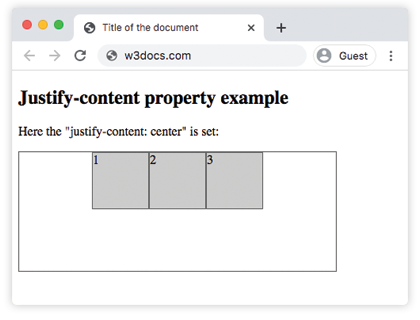
Beispiel für die Eigenschaft justify-content mit dem Wert "flex-start":
CSS justify-content flex-start example
<!DOCTYPE html>
<html>
  <head>
    <title>Title of the document </title>
    <style>
      .start {
        width: 400px;
        height: 150px;
        border: 1px solid #666;
        display: flex;
        justify-content: flex-start;
      }
      .start div {
        width: 70px;
        height: 70px;
        background-color: #ccc;
        border: 1px solid #666;
      }
    </style>
  </head>
  <body>
    <h2>Justify-content property example</h2>
    <p>Here the "justify-content: flex-start" is set:</p>
    <div class="start">
      <div>1</div>
      <div>2</div>
      <div>3</div>
    </div>
  </body>
</html>Beispiel für die Eigenschaft justify-content mit dem Wert "flex-end":
CSS justify-content flex-end example
<!DOCTYPE html>
<html>
  <head>
    <title>Title of the document </title>
    <style>
      .end {
        width: 400px;
        height: 150px;
        border: 1px solid #666;
        display: flex;
        justify-content: flex-end;
      }
      .end div {
        width: 70px;
        height: 70px;
        background-color: #ccc;
        border: 1px solid #666;
      }
    </style>
  </head>
  <body>
    <h2>Justify-content property example</h2>
    <p>Here the "justify-content: flex-end" is set:</p>
    <div class="end">
      <div>1</div>
      <div>2</div>
      <div>3</div>
    </div>
  </body>
</html>Beispiel für die Eigenschaft justify-content mit dem Wert "space-between":
CSS justify-content space-between example
<!DOCTYPE html>
<html>
  <head>
    <title>Title of the document </title>
    <style>
      .space-between {
        width: 400px;
        height: 150px;
        border: 1px solid #666;
        display: flex;
        justify-content: space-between;
      }

      .space-between div {
        width: 70px;
        height: 70px;
        background-color: #ccc;
        border: 1px solid #666;
      }
    </style>
  </head>
  <body>
    <h2>Justify-content property example</h2>
    <p>Here the "justify-content: space-between" is set:</p>
    <div class="space-between">
      <div>1</div>
      <div>2</div>
      <div>3</div>
    </div>
  </body>
</html>Beispiel für die Eigenschaft justify-content mit dem Wert "space-around":
CSS justify-content space-around example
<!DOCTYPE html>
<html>
  <head>
    <title>Title of the document </title>
    <style>
      .space-around {
        width: 400px;
        height: 150px;
        border: 1px solid #666;
        display: flex;
        justify-content: space-around;
      }
      .space-around div {
        width: 70px;
        height: 70px;
        background-color: #ccc;
        border: 1px solid #666;
      }
    </style>
  </head>
  <body>
    <h2>Justify-content property example</h2>
    <p>Here the "justify-content: space-around" is used:</p>
    <div class="space-around">
      <div>1</div>
      <div>2</div>
      <div>3</div>
    </div>
  </body>
</html>Werte
| Value | Description | Play it |
|---|---|---|
| flex-start | Die Elemente beginnen am Anfang des Containers. | Play it » |
| flex-end | Die Elemente werden am Ende des Containers platziert. | Play it » |
| center | Die Elemente werden in der Mitte des Containers platziert. | Play it » |
| space-around | Vor, zwischen und nach den Elementen ist Platz. | Play it » |
| space-between | Zwischen den Elementen ist Platz. | Play it » |
| space-evenly | Vor, zwischen und nach den Elementen ist gleich viel Platz. | Play it » |
| initial | Verwendet den Standardwert der Eigenschaft. | Play it » |
| inherit | Erbt die Eigenschaft vom übergeordneten Element. |
Practice
What does the 'justify-content' property in CSS do?