CSS text-align-last-Eigenschaft
Die CSS-Eigenschaft text-align-last legt die Ausrichtung der letzten Textzeile fest. Sie ist eine der CSS3-Eigenschaften.
Die Eigenschaft text-align-last legt die Ausrichtung für die letzte Zeile des Block-Containers fest, auf den sie angewendet wird. Wenn ein <div> beispielsweise drei Absätze enthält, gilt text-align-last nur für die letzte Zeile des <div> selbst und nicht für die einzelnen Absätze darin.
Hinweis
Diese Eigenschaft ist am deutlichsten sichtbar, wenn
text-align: justifyverwendet wird und der Text auf mehrere Zeilen umbricht. Bei einer einzelnen Zeile verhält sie sich identisch zutext-align.
| Anfangswert | auto |
|---|---|
| Gilt für | Block-Container. |
| Vererbbar | Ja. |
| Animierbar | Nein. |
| Version | CSS3 |
| DOM-Syntax | object.style.textAlignLast = "left"; |
Browser-Kompatibilität
| Browser | Unterstützung |
|---|---|
| Chrome | 50+ |
| Edge | 12+ |
| Firefox | 49+ |
| Safari | 10.1+ |
| Opera | 37+ |
Syntax
CSS-Syntax für text-align-last
text-align-last: auto | left | right | center | justify | start | end | initial | inherit;Beispiel für die text-align-last-Eigenschaft:
CSS-Codebeispiel für text-align-last
<!DOCTYPE html>
<html>
  <head>
    <title>Title of the document</title>
    <style>
      .demo {
        text-align: justify;
        text-align-last: right;
      }
    </style>
  </head>
  <body>
    <h2>Text-align-last property example</h2>
    <h3>text-align-last: right:</h3>
    <div class="demo">
      Lorem Ipsum is dummy text of the printing and typesetting industry. Lorem Ipsum has been the industry's standard dummy text ever since the 1500s when an unknown printer took a galley of type and scrambled it to make a type specimen book. It has survived not only five centuries, but also the leap into electronic typesetting, remaining essentially unchanged. It was popularised in the 1960s with the release of Letraset sheets containing Lorem Ipsum passages, and more recently with desktop publishing software like Aldus PageMaker including versions of Lorem Ipsum.
    </div>
  </body>
</html>Ergebnis
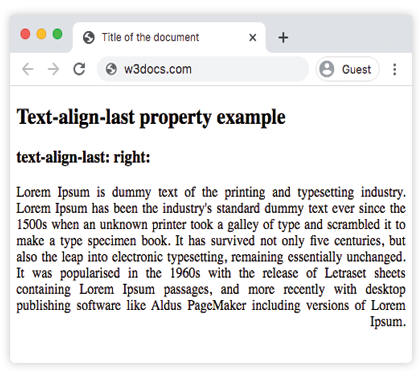
Beispiel für die text-align-last-Eigenschaft mit den Werten „start“, „justify“ und „center“:
CSS-Codebeispiel für alle Werte von text-align-last
<!DOCTYPE html>
<html>
  <head>
    <title>Title of the document</title>
    <style>
      .demo1 {
        text-align: justify;
        text-align-last: start;
      }
      .demo2 {
        text-align: justify;
        text-align-last: center;
      }
      .demo3 {
        text-align: justify;
        text-align-last: justify;
      }
    </style>
  </head>
  <body>
    <h2>Text-align-last property example</h2>
    <h3>Text-align-last: start:</h3>
    <div class="demo1">
      Lorem Ipsum is dummy text of the printing and typesetting industry. Lorem Ipsum has been the industry's standard dummy text ever since the 1500s when an unknown printer took a galley of type and scrambled it to make a type specimen book. It has survived not only five centuries, but also the leap into electronic typesetting, remaining essentially unchanged. It was popularised in the 1960s with the release of Letraset sheets containing Lorem Ipsum passages, and more recently with desktop publishing software like Aldus PageMaker including versions of Lorem Ipsum.
    </div>
    <h3>Text-align-last: center:</h3>
    <div class="demo2">
      Lorem Ipsum is dummy text of the printing and typesetting industry. Lorem Ipsum has been the industry's standard dummy text ever since the 1500s when an unknown printer took a galley of type and scrambled it to make a type specimen book. It has survived not only five centuries, but also the leap into electronic typesetting, remaining essentially unchanged. It was popularised in the 1960s with the release of Letraset sheets containing Lorem Ipsum passages, and more recently with desktop publishing software like Aldus PageMaker including versions of Lorem Ipsum.
    </div>
    <h3>Text-align-last: justify:</h3>
    <div class="demo3">
      Lorem Ipsum is dummy text of the printing and typesetting industry. Lorem Ipsum has been the industry's standard dummy text ever since the 1500s when an unknown printer took a galley of type and scrambled it to make a type specimen book. It has survived not only five centuries, but also the leap into electronic typesetting, remaining essentially unchanged. It was popularised in the 1960s with the release of Letraset sheets containing Lorem Ipsum passages, and more recently with desktop publishing software like Aldus PageMaker including versions of Lorem Ipsum.
    </div>
  </body>
</html>Beispiel für die text-align-last-Eigenschaft mit dem Wert „end“:
Beispiel für die text-align-last-Eigenschaft mit dem Wert „end“:
<!DOCTYPE html>
<html>
  <head>
    <title>Title of the document</title>
    <style>
      .demo {
        text-align: justify;
        text-align-last: end;
      }
    </style>
  </head>
  <body>
    <h2>Text-align-last property example</h2>
    <h3>text-align-last: end:</h3>
    <div class="demo">
      <p>
        Lorem Ipsum is dummy text of the printing and typesetting industry. Lorem Ipsum has been the industry's standard dummy text ever since the 1500s when an unknown printer took a galley of type and scrambled it to make a type specimen book. It has survived not only five centuries, but also the leap into electronic typesetting, remaining essentially unchanged. It was popularised in the 1960s with the release of Letraset sheets containing Lorem Ipsum passages, and more recently with desktop publishing software like Aldus PageMaker including versions of Lorem Ipsum.
      </p>
      <p>
        Lorem Ipsum is dummy text of the printing and typesetting industry. Lorem Ipsum has been the industry's standard dummy text ever since the 1500s when an unknown printer took a galley of type and scrambled it to make a type specimen book. It has survived not only five centuries, but also the leap into electronic typesetting, remaining essentially unchanged.
      </p>
      <p>
        Lorem Ipsum is dummy text of the printing and typesetting industry. Lorem Ipsum has been the industry's standard dummy text ever since the 1500s when an unknown printer took a galley of type and scrambled it to make a type specimen book.
      </p>
    </div>
  </body>
</html>Werte
| Wert | Beschreibung | Testen |
|---|---|---|
| auto | Verwendet den Wert der text-align-Eigenschaft. Dies ist der Standardwert. | Testen » |
| left | Richtet die letzte Zeile links aus. | Testen » |
| right | Richtet die letzte Zeile rechts aus. | Testen » |
| center | Richtet die letzte Zeile zentriert aus. | Testen » |
| justify | Die letzte Zeile wird wie die anderen Zeilen Blocksatz erhalten. | Testen » |
| start | Die letzte Zeile wird am Zeilenanfang ausgerichtet. Links bei links-nach-rechts-Schreibrichtung, rechts bei rechts-nach-links. | Testen » |
| end | Die letzte Zeile wird am Zeilenende ausgerichtet. Rechts bei links-nach-rechts-Schreibrichtung, links bei rechts-nach-links. | Testen » |
| initial | Setzt die Eigenschaft auf ihren Standardwert zurück. | Testen » |
| inherit | Erbt die Eigenschaft vom übergeordneten Element. | Testen » |
Praxis
Was bewirkt die 'text-align-last'-Eigenschaft in CSS?