CSS :read-only-Pseudoklasse
Der Selektor :read-only wählt Elemente aus, die vom Benutzer nicht bearbeitet werden können.
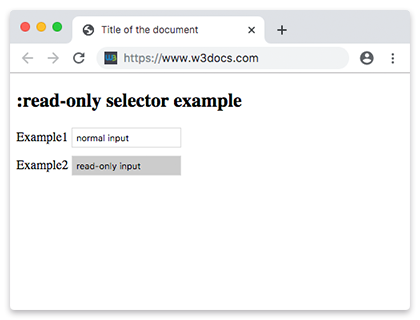
Zu den bearbeitbaren Elementen gehören:
<input>-Elemente, die nicht schreibgeschützt und nicht deaktiviert sind.<textarea>, das weder schreibgeschützt noch deaktiviert ist.- Ein Element, das weder ein
<input>noch ein<textarea>ist und bei dem das Attributcontenteditableauftruegesetzt ist.
Umgekehrt trifft :read-only auf diese Elemente zu, wenn das Attribut contenteditable false ist oder fehlt.
Der Selektor :read-only kann mit anderen Selektoren (z. B. :hover) und mit Pseudoelementen (z. B. ::after) kombiniert werden.
Version
CSS Basic User Interface Module Level 3
Syntax
CSS :read-only syntax
:read-only {
  css declarations;
}
Example of the :read-only selector:
CSS :read-only code example
<!DOCTYPE html>
<html>
  <head>
    <title>Title of the document</title>
    <style>
      input {
        margin-bottom: 10px;
        border: 1px solid #ddd;
        padding: 5px;
      }
      input:read-only {
        background-color: #ccc;
      }
    </style>
  </head>
  <body>
    <h2>:read-only selector example</h2>
    <form>
      <div>
        <label for="normal">Example1</label>
        <input value="normal input" id="normal" />
      </div>
      <div>
        <label for="read-only">Example2</label>
        <input readonly value="read-only input" id="read-only" />
      </div>
    </form>
  </body>
</html>Das enumerierte Attribut contenteditable gibt an, ob der Benutzer das Element bearbeiten kann. Wenn es aktiviert ist, wird das Browser-Widget so angepasst, dass Bearbeitungen möglich sind. Das Attribut sollte einen der folgenden Werte haben:
true(oder der leere String), was angibt, dass das Element bearbeitbar sein sollte;false, was angibt, dass das Element nicht bearbeitbar sein sollte.
Example of the :read-only selector with contenteditable attribute:
Example of CSS :read-only pseudo class with contenteditable attribute
<!DOCTYPE html>
<html>
  <head>
    <title>Title of the document</title>
    <style>
      p:read-only {
        background: #8ebf42;
      }
      p[contenteditable="true"] {
        color: #777777;
      }
    </style>
  </head>
  <body>
    <h2>:read-only selector example</h2>
    <p>Example of a normal paragraph.</p>
    <p contenteditable="true">Example of a contenteditable paragraph! Just click and edit!</p>
  </body>
</html>Example of the :read-only selector with HTML <textarea> tag on hover:
Example of the CSS :read-only selector with HTML <textarea> tag and on hover case
<!DOCTYPE html>
<html>
  <head>
    <title>Title of the document</title>
    <style>
      textarea:read-only {
        background: #ffffff;
      }
      textarea:read-only:hover {
        cursor: not-allowed;
        background: #8ebf42;
      }
    </style>
  </head>
  <body>
    <h2>:read-only selector example</h2>
    <textarea cols="40" rows="5" readonly>Here is an example of :read-only selector on hover.</textarea>
  </body>
</html>Example of the :read-only selector with HTML <div> tag and the :after, :before pseudo-elements:
Example CSS :read-only Pseudo Class with :before, :after pseudo-elements
<!DOCTYPE html>
<html>
  <head>
    <title>Title of the document</title>
    <style>
      div:read-only:hover {
        background-color: #eee;
      }
      div:read-only:before,
      div:read-only:after {
        content: " / ";
        padding: 10px;
        color: #1c87c9;
        font-size: 30px;
      }
    </style>
  </head>
  <body>
    <h2>:read-only selector example</h2>
    <div readonly>Here is an example of :read-only selector on hover.</div>
    <br />
    <div contenteditable="true">Example of a contenteditable paragraph! Just click and edit!</div>
  </body>
</html>Practice
Was wählt die CSS-Pseudoklasse :read-only aus?