CSS background-origin-Eigenschaft
Die CSS background-origin-Eigenschaft definiert den Hintergrund-Positionierungsbereich eines background-image.
Die background-origin-Eigenschaft ist eine der CSS3-Eigenschaften.
Wenn background-attachment auf fixed gesetzt ist, wird die background-origin-Eigenschaft ignoriert.
| Anfangswert | padding-box |
|---|---|
| Gilt für | Alle Elemente. Gilt auch für ::first-letter und ::first-line. |
| Vererbbar | Nein. |
| Animierbar | Nein. |
| Version | CSS3 |
| DOM-Syntax | object.style.backgroundOrigin = "content-box"; |
Syntax
Syntax der CSS background-origin-Eigenschaft
background-origin: padding-box | border-box | content-box | initial | inherit;Beispiel für die background-origin-Eigenschaft:
Beispiel für die CSS background-origin-Eigenschaft mit dem Wert padding-box
<!DOCTYPE html>
<html>
  <head>
    <title>The title of the document</title>
    <style>
      .example1 {
        border: 5px dashed #666;
        padding: 35px;
        background: url("https://de.w3docs.com/uploads/media/default/0001/01/25acddb3da54207bc6beb5838f65f022feaa81d7.jpeg");
        background-repeat: no-repeat;
        background-origin: padding-box;
      }
    </style>
  </head>
  <body>
    <h2>Background-origin property example</h2>
    <p>Here the background-origin is set to "padding-box".</p>
    <div class="example1">
      <h2>Hello world.</h2>
      <p> Some text for example.</p>
    </div>
  </body>
</html>Ergebnis
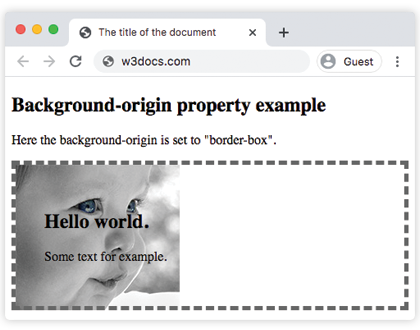
Hier ist ein Beispiel, das den Unterschied zwischen padding-box und content-box zeigt.
Beispiel für die background-origin-Eigenschaft mit den Werten "padding-box" und "content-box":
Beispiel für die CSS background-origin-Eigenschaft mit den Werten padding-box und content-box
<!DOCTYPE html>
<html>
  <head>
    <title>The title of the document</title>
    <style>
      .example1 {
        border: 5px dashed #666;
        padding: 35px;
        background: url("https://de.w3docs.com/uploads/media/default/0001/01/b408569013c0bb32b2afb0f0d45e93e982347951.jpeg");
        background-repeat: no-repeat;
        background-origin: padding-box;
      }
      .example2 {
        border: 5px dashed #666;
        padding: 35px;
        background: url("https://de.w3docs.com/uploads/media/default/0001/01/b408569013c0bb32b2afb0f0d45e93e982347951.jpeg");
        background-repeat: no-repeat;
        background-origin: content-box;
      }
    </style>
  </head>
  <body>
    <h2>Background-origin property example</h2>
    <p>Here the background-origin is set to "padding-box" which is the default value of this property.</p>
    <div class="example1">
      <h2>Hello  world</h2>
      <p> Some text for example.</p>
    </div>
    <p>Here the background-origin is set to "content-box".</p>
    <div class="example2">
      <h2>Hello  world</h2>
      <p> Some text for example.</p>
    </div>
  </body>
</html>Im folgenden Beispiel erfahren Sie, wie Sie zwei Hintergrundbilder für ein div-Element mit unterschiedlichen Werten festlegen.
Beispiel für die background-origin-Eigenschaft mit unterschiedlichen Werten:
Beispiel für die CSS background-origin-Eigenschaft mit den Werten content-box und border-box
<!DOCTYPE html>
<html>
  <head>
    <title>The title of the document</title>
    <style>
      #example1 {
        border: 5px double black;
        padding: 25px;
        background: url("https://de.w3docs.com/uploads/media/default/0001/02/55a2f152f59bf42a99b576d44a4578ec9daa0ab6.png"), url("https://de.w3docs.com/uploads/media/default/0001/02/aa55a168be25d7d121dcab8d67ad72ce021dcde3.png");
        background-repeat: no-repeat;
        background-origin: content-box, border-box;
      }
      #example2 {
        border: 5px double black;
        padding: 25px;
        background: url("https://de.w3docs.com/uploads/media/default/0001/02/55a2f152f59bf42a99b576d44a4578ec9daa0ab6.png"), url("https://de.w3docs.com/uploads/media/default/0001/02/aa55a168be25d7d121dcab8d67ad72ce021dcde3.png");
        background-repeat: no-repeat;
        background-origin: content-box, padding-box;
      }
      #example3 {
        border: 5px double black;
        padding: 25px;
        background: url("https://de.w3docs.com/uploads/media/default/0001/02/55a2f152f59bf42a99b576d44a4578ec9daa0ab6.png"), url("https://de.w3docs.com/uploads/media/default/0001/02/aa55a168be25d7d121dcab8d67ad72ce021dcde3.png");
        background-repeat: no-repeat;
        background-origin: content-box, content-box;
      }
    </style>
  </head>
  <body>
    <h2>Background-origin property example</h2>
    <p>Here the background-origin: content-box, border-box; is set:</p>
    <div id="example1">
      <h2>Hello World</h2>
      <p>The first background-image starts from the upper left corner of the content.</p>
      <p>The second background-image starts from the upper left corner of the border.</p>
    </div>
    <p>Here the background-origin: content-box, padding-box:</p>
    <div id="example2">
      <h2>Hello World</h2>
      <p>The first background image starts from the upper left corner of the content.</p>
      <p>The second background-image starts from the upper left corner of the padding edge.</p>
    </div>
    <p>Here the background-origin: content-box, content-box; is set:</p>
    <div id="example3">
      <h2>Hello World</h2>
      <p>Both background images start from the upper left corner of the content.</p>
    </div>
  </body>
</html>Werte
| Wert | Beschreibung | Testen |
|---|---|---|
| border-box | Die background-position bezieht sich auf die Rahmenbox, und das Hintergrundbild beginnt in der oberen linken Ecke des Rahmens. | Testen » |
| padding-box | Die background-position bezieht sich auf die Auffüllbox, und das Hintergrundbild beginnt in der oberen linken Ecke der Auffüllung. Dies ist der Standardwert. | Testen » |
| content-box | Die background-position bezieht sich auf die Inhaltsbox, und das Hintergrundbild beginnt in der oberen linken Ecke des Inhalts. | Testen » |
| initial | Legt die Eigenschaft auf ihren Standardwert fest. | Testen » |
| inherit | Erbt die Eigenschaft von ihrem übergeordneten Element. |
Übung
Was steuert die CSS background-origin-Eigenschaft?