CSS grid-row-start-Eigenschaft
Die CSS-Eigenschaft grid-row-start definiert den Start des Elements innerhalb der Grid-Zeile, fügt seiner Grid-Position einen Span, eine Linie oder nichts hinzu und legt die Block-Start-Linie des Grid-Bereichs des Elements fest. Diese Eigenschaft ist Teil der Kurzschreibweise grid-row.
| Initial Value | auto |
|---|---|
| Applies to | Grid items. |
| Inherited | No. |
| Animatable | Yes. The placement of items is animatable. |
| Version | CSS Grid Layout Module Level 1 |
| DOM Syntax | object.style.gridRowStart = "5"; |
Syntax
CSS grid-row-start syntax
grid-row-start: auto | <line> | span <number> | initial | inherit;Hinweis: <line> ist ein Platzhalter für eine Zeilennummer oder einen benutzerdefinierten Liniennamen.
Example of the grid-row-start property:
CSS grid-row-start code example
<!DOCTYPE html>
<html>
  <head>
    <title>Title of the document</title>
    <style>
      .grid-container {
        display: grid;
        grid-template-columns: auto auto auto auto;
        gap: 20px;
        background-color: #ccc;
        padding: 10px;
      }
      .grid-container > div {
        background-color: #eee;
        text-align: center;
        padding: 30px 0;
        font-size: 30px;
      }
      .box {
        grid-row-start: auto;
      }
    </style>
  </head>
  <body>
    <h2>Grid-row-start property example</h2>
    <div class="grid-container">
      <div>1</div>
      <div>2</div>
      <div class="box">3</div>
      <div>4</div>
      <div>5</div>
      <div>6</div>
    </div>
  </body>
</html>Result
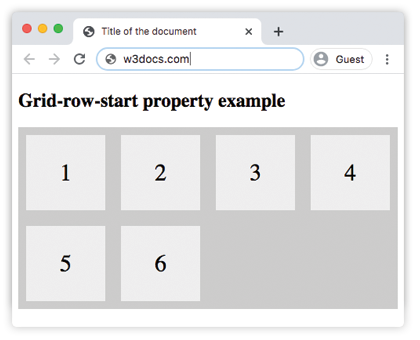
Example of the grid-row-start property, where the third box starts from the first row:
CSS grid-row-start first row example
<!DOCTYPE html>
<html>
  <head>
    <title>Title of the document</title>
    <style>
      .grid-container {
        display: grid;
        grid-template-columns: auto auto auto auto;
        gap: 20px;
        background-color: #ccc;
        padding: 10px;
      }
      .grid-container > div {
        background-color: #eee;
        text-align: center;
        padding: 30px 0;
        font-size: 30px;
      }
      .box {
        grid-row-start: 1;
      }
    </style>
  </head>
  <body>
    <h2>Grid-row-start property example</h2>
    <div class="grid-container">
      <div>1</div>
      <div>2</div>
      <div class="box">3</div>
      <div>4</div>
      <div>5</div>
      <div>6</div>
    </div>
  </body>
</html>Example of the grid-row-start property, where the fourth box starts from the second row:
CSS grid-row-start second row example
<!DOCTYPE html>
<html>
  <head>
    <title>Title of the document</title>
    <style>
      .grid-container {
        display: grid;
        grid-template-columns: auto auto auto auto;
        gap: 20px;
        background-color: #ccc;
        padding: 10px;
      }
      .grid-container > div {
        background-color: #eee;
        text-align: center;
        padding: 30px 0;
        font-size: 30px;
      }
      .box {
        grid-row-start: 2;
      }
    </style>
  </head>
  <body>
    <h2>Grid-row-start property example</h2>
    <div class="grid-container">
      <div>1</div>
      <div>2</div>
      <div>3</div>
      <div class="box">4</div>
      <div>5</div>
      <div>6</div>
    </div>
  </body>
</html>Example of the grid-row-start property with the span keyword:
CSS grid-row-start span example
<!DOCTYPE html>
<html>
  <head>
    <title>Title of the document</title>
    <style>
      .grid-container {
        display: grid;
        grid-template-columns: auto auto auto auto;
        gap: 20px;
        background-color: #ccc;
        padding: 10px;
      }
      .grid-container > div {
        background-color: #eee;
        text-align: center;
        padding: 30px 0;
        font-size: 30px;
      }
      .box {
        grid-row-start: span 2;
      }
    </style>
  </head>
  <body>
    <h2>Grid-row-start property example with span</h2>
    <div class="grid-container">
      <div>1</div>
      <div>2</div>
      <div class="box">3</div>
      <div>4</div>
      <div>5</div>
      <div>6</div>
    </div>
  </body>
</html>Result
Example of the initial and inherit values:
CSS grid-row-start initial/inherit example
.box-initial {
  grid-row-start: initial; /* Resets to the default 'auto' behavior */
}
.box-inherit {
  grid-row-start: inherit; /* Inherits the value from the parent grid item */
}
Hinweis:
initialwird typischerweise verwendet, um die Eigenschaft auf ihr Standardverhalten zurückzusetzen, währendinheritnützlich ist, wenn ein untergeordnetes Grid-Element das Platzierungsverhalten seines übergeordneten Elements übernehmen soll.
Values
| Value | Description | Play it |
|---|---|---|
| auto | Spans one row. Exact placement depends on grid auto-placement rules. This is the default value of this property. | Play it » |
<line> | Specifies a line number or name where the item should start. | Play it » |
| initial | Makes the property use its default value. | |
| inherit | Inherits the property from its parent element. |
Hinweis: Wenn
grid-row-endzusammen verwendet wird, stellen Sie sicher, dass die Startlinie vor der Endlinie liegt, um überlappende oder zusammengefallene Grid-Elemente zu vermeiden.
Practice
What does the grid-row-start property in CSS specify?