CSS overflow-y-Eigenschaft
Die Eigenschaft overflow-y legt fest, ob der Inhalt verborgen, sichtbar oder vertikal scrollbar sein soll, wenn der Inhalt die obere und untere Kante des Elements überläuft. Diese Eigenschaft ist eine der CSS3-Eigenschaften.
Die Eigenschaft overflow-y hat vier Hauptwerte: visible, hidden, auto und scroll.
INFO
Wenn der Wert von overflow-y auf visible gesetzt ist, wird der Wert von overflow-x standardmäßig ebenfalls auf visible gesetzt. Wenn der Wert von overflow-y auf scroll, auto oder hidden gesetzt ist, wird der Wert von overflow-x auf auto gesetzt.
| Initial Value | visible |
|---|---|
| Applies to | Block-Container, flex-Container und grid-Container. |
| Inherited | No. |
| Animatable | No. |
| Version | CSS3 |
| DOM Syntax | object.style.overflowY = "auto"; |
INFO
Mit der Eigenschaft overflow-x kann das Abschneiden der rechten und linken Seiten definiert werden.
Syntax
CSS overflow-y
overflow-y: visible | hidden | scroll | auto | initial | inherit;Beispiel für die Eigenschaft overflow-y:
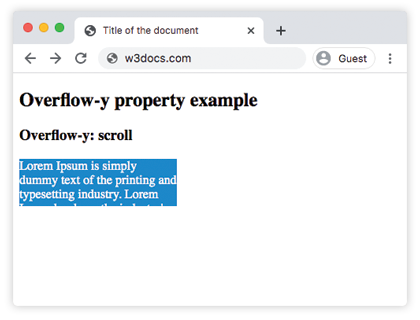
CSS overflow-y code example
<!DOCTYPE html>
<html>
  <head>
    <title>Title of the document</title>
    <style>
      div.scroll {
        background-color: #1c87c9;
        color: #fff;
        height: 60px;
        width: 200px;
        overflow-y: scroll;
      }
    </style>
  </head>
  <body>
    <h2>Overflow-y property example</h2>
    <h3>Overflow-y: scroll</h3>
    <div class="scroll">Lorem Ipsum is simply dummy text of the printing and typesetting industry. Lorem Ipsum has been the industry's standard dummy text ever since the 1500s, when an unknown printer took a galley of type and scrambled it to make a type specimen book.</div>
  </body>
</html>Ergebnis
Beispiel für die Eigenschaft overflow-y mit dem Wert "visible":
CSS overflow-y visible example
<!DOCTYPE html>
<html>
  <head>
    <title>Title of the document</title>
    <style>
      div.visible {
        background-color: #8ebf42;
        color: #666;
        height: 40px;
        width: 200px;
        overflow-y: visible;
      }
    </style>
  </head>
  <body>
    <h2>Overflow-y property example</h2>
    <h3>Overflow-y: visible</h3>
    <div class="visible">Lorem Ipsum is simply dummy text of the printing and typesetting industry. Lorem Ipsum has been the industry's standard dummy text ever since the 1500s, when an unknown printer took a galley of type and scrambled it to make a type specimen book.</div>
  </body>
</html>Beispiel für die Eigenschaft overflow-y mit dem Wert "hidden":
CSS overflow-y hidden example
<!DOCTYPE html>
<html>
  <head>
    <title>Title of the document</title>
    <style>
      div.hidden {
        background-color: #1c87c9;
        color: #fff;
        height: 60px;
        width: 200px;
        overflow-y: hidden;
      }
    </style>
  </head>
  <body>
    <h2>Overflow-y property example</h2>
    <h3>Overflow-y: hidden</h3>
    <div class="hidden">Lorem Ipsum is simply dummy text of the printing and typesetting industry. Lorem Ipsum has been the industry's standard dummy text ever since the 1500s, when an unknown printer took a galley of type and scrambled it to make a type specimen book.</div>
  </body>
</html>Beispiel für die Eigenschaft overflow-y mit dem Wert "auto":
CSS overflow-y auto example
<!DOCTYPE html>
<html>
  <head>
    <title>Title of the document</title>
    <style>
      div.auto {
        background-color: #1c87c9;
        color: #fff;
        height: 60px;
        width: 200px;
        overflow-y: auto;
      }
    </style>
  </head>
  <body>
    <h2>Overflow-y property example</h2>
    <h3>Overflow-y: auto</h3>
    <div class="auto">Lorem Ipsum is simply dummy text of the printing and typesetting industry. Lorem Ipsum has been the industry's standard dummy text ever since the 1500s, when an unknown printer took a galley of type and scrambled it to make a type specimen book.</div>
  </body>
</html>Beispiel für die Eigenschaft overflow-y mit allen Werten:
CSS overflow-y all values example
<!DOCTYPE html>
<html>
  <head>
    <title>Title of the document</title>
    <style>
      div.scroll {
        background-color: #8ebf42;
        height: 70px;
        width: 150px;
        overflow-y: scroll;
      }
      div.hidden {
        background-color: #8ebf42;
        height: 70px;
        width: 150px;
        overflow-y: hidden;
      }
      div.auto {
        background-color: #8ebf42;
        height: 70px;
        width: 150px;
        overflow-y: auto;
      }
      div.visible {
        background-color: #8ebf42;
        height: 70px;
        width: 150px;
        overflow-y: visible;
      }
    </style>
  </head>
  <body>
    <h2>Overflow-y property example</h2>
    <h3>overflow-y: scroll</h3>
    <div class="scroll">
      Lorem Ipsum is simply dummy text of the printing and typesetting industry. Lorem Ipsum has been the industry's standard dummy text ever since the 1500s, when an unknown printer took a galley of type and scrambled it to make a type specimen book
    </div>
    <h3>overflow-y: hidden</h3>
    <div class="hidden">
      Lorem Ipsum is simply dummy text of the printing and typesetting industry. Lorem Ipsum has been the industry's standard dummy text ever since the 1500s, when an unknown printer took a galley of type and scrambled it to make a type specimen book.
    </div>
    <h3>overflow-y: auto</h3>
    <div class="auto">
      Lorem Ipsum is simply dummy text of the printing and typesetting industry. Lorem Ipsum has been the industry's standard dummy text ever since the 1500s, when an unknown printer took a galley of type and scrambled it to make a type specimen book.
    </div>
    <h3>overflow-y: visible</h3>
    <div class="visible">
      Lorem Ipsum is simply dummy text of the printing and typesetting industry. Lorem Ipsum has been the industry's standard dummy text ever since the 1500s, when an unknown printer took a galley of type and scrambled it to make a type specimen book.
    </div>
  </body>
</html>Werte
| Value | Description | Play it |
|---|---|---|
| visible | Der Inhalt wird nicht abgeschnitten und wird außerhalb der oberen und unteren Kanten des Padding-Box gerendert. Dies ist der Standardwert dieser Eigenschaft. | Play it » |
| hidden | Der Inhalt wird abgeschnitten, um vertikal in die Padding-Box zu passen. Es wird keine Bildlaufleiste hinzugefügt. | Play it » |
| scroll | Der Inhalt wird abgeschnitten, um vertikal in die Padding-Box zu passen. Die Bildlaufleiste wird hinzugefügt, um den restlichen Inhalt anzuzeigen. | Play it » |
| auto | Der Inhalt wird abgeschnitten, um vertikal in die Padding-Box zu passen. Hängt vom Browser ab. Wenn der Inhalt überläuft, wird eine Bildlaufleiste hinzugefügt. | Play it » |
| initial | Verwendet den Standardwert der Eigenschaft. | Play it » |
| inherit | Erbt die Eigenschaft vom übergeordneten Element. |
Practice
What does the overflow-y property in CSS do?