CSS column-width-Eigenschaft
Die column-width-Eigenschaft definiert die Breite der Spalten. Der Browser berechnet automatisch die Anzahl der Spalten, die benötigt werden, um den Inhalt innerhalb des Elements anzuzeigen.
Die column-width-Eigenschaft ist eine der CSS3-Eigenschaften.
Sie hat zwei Werte: auto und length. auto ist der Standardwert der column-width-Eigenschaft. length gibt die Breite der Spalten in px, em und ch an. Die column-width-Eigenschaft ist flexibel. Wenn der Container nicht breit genug ist, um zwei Spalten bei der angegebenen Breite aufzunehmen, werden die Spalten zu einer einzigen Spalte zusammengefasst. Wenn die Breite des Containers schmaler ist als der angegebene Wert, wird die Breite der einzelnen Spalte kleiner sein als die angegebene Spaltenbreite. Beachten Sie, dass column-width auch dann, wenn column-count angegeben ist, als maximale Breite fungiert und der Browser die tatsächliche Spaltenanzahl basierend auf dem verfügbaren Platz im Container anpasst.
Mit dieser Eigenschaft können Sie auch responsive Designs für verschiedene Bildschirmgrößen erstellen.
INFO
Moderne Browser unterstützen column-width ohne Vendor-Prefixes.
| Anfangswert | auto |
|---|---|
| Gilt für | Block-Container, ausgenommen Tabellen-Wrapper-Boxen. |
| Vererbbar | Nein. |
| Animierbar | Ja. |
| Version | CSS3 |
| DOM-Syntax | object.style.columnWidth = "5px"; |
Syntax
Syntax der CSS column-width-Eigenschaft
column-width: auto | length | initial | inherit;Beispiel für die column-width-Eigenschaft:
Beispiel der CSS column-width-Eigenschaft mit der length-Eigenschaft
<!DOCTYPE html>
<html>
  <head>
    <title>Title of the document</title>
    <style>
      div {
        column-width: 80px;
      }
    </style>
  </head>
  <body>
    <h1>Column-width property example</h1>
    <p>Here the width of the column is set to 80px.</p>
    <div>
      Lorem Ipsum is dummy text of the printing and typesetting industry. Lorem Ipsum has been the industry's standard dummy text ever since the 1500s when an unknown printer took a galley of type and scrambled it to make a type specimen book. It has survived not only five centuries, but also the leap into electronic typesetting, remaining essentially unchanged. It was popularised in the 1960s with the release of Letraset sheets containing Lorem Ipsum passages, and more recently with desktop publishing software like Aldus PageMaker including versions of Lorem Ipsum.
    </div>
  </body>
</html>Ergebnis
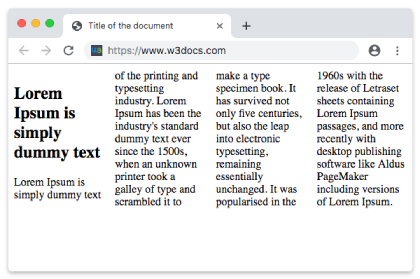
Beispiel für die column-width-Eigenschaft mit dem Wert "auto":
Beispiel der column-width-Eigenschaft mit dem Wert "auto":
<!DOCTYPE html>
<html>
  <head>
    <title>Title of the document</title>
    <style>
      div {
        column-width: auto;
      }
    </style>
  </head>
  <body>
    <h1>Column-width property example</h1>
    <p>Here the width of the column is set to auto.</p>
    <div>
      Lorem Ipsum is dummy text of the printing and typesetting industry. Lorem Ipsum has been the industry's standard dummy text ever since the 1500s when an unknown printer took a galley of type and scrambled it to make a type specimen book. It has survived not only five centuries, but also the leap into electronic typesetting, remaining essentially unchanged. It was popularised in the 1960s with the release of Letraset sheets containing Lorem Ipsum passages, and more recently with desktop publishing software like Aldus PageMaker including versions of Lorem Ipsum.
    </div>
  </body>

</html>Werte
| Wert | Beschreibung | Ausführen |
|---|---|---|
| auto | Die Breite der Spalte wird vom Browser festgelegt. Dies ist der Standardwert. | |
| length | Die Breite der Spalten wird durch die Länge festgelegt. | |
| initial | Setzt die Eigenschaft auf ihren Standardwert zurück. | |
| inherit | Erbt die Eigenschaft vom übergeordneten Element. |
Practice
Was bewirkt die 'column-width'-Eigenschaft in CSS?