CSS bottom-Eigenschaft
Die CSS bottom-Eigenschaft gibt die untere Position eines Elements in Kombination mit der position-Eigenschaft an.
Hinweis: Die bottom-Eigenschaft hat keine Auswirkung auf Elemente mit position: static (Standardwert).
Je nachdem, wie das Element positioniert ist, kann die Wirkung der bottom-Eigenschaft unterschiedlich sein. Insbesondere:
- Wenn die Positionierung eines Elements
relative,absolute,fixedoderstickyist, spielt derbottom-Wert eine wichtige Rolle. - Bei
fixedwird das Element relativ zum Ansichtsfenster (Viewport) des Bildschirms positioniert und bleibt beim Scrollen fixiert. - Bei
absolutewird das Element relativ zu seinem Container positioniert. - Bei
relativewird die untere Kante des Elements über oder unter seiner normalen Position verschoben. - Bei
stickyverhält sich das Element wierelative, bis ein Scroll-Schwellenwert erreicht ist, danach verhält es sich wiefixedrelativ zum Viewport.
| Anfangswert | auto |
|---|---|
| Anwendbar auf | Alle Elemente. Gilt auch für ::first-letter. |
| Vererbbar | Nein. |
| Animierbar | Ja. Die untere Position kann animiert werden. |
| Version | CSS2 |
| DOM-Syntax | object.style.bottom = "10px"; |
Syntax
Syntax der CSS bottom-Eigenschaft
css
bottom: auto | length | percentage | initial | inherit;Beispiel zur bottom-Eigenschaft:
Beispiel zur CSS bottom-Eigenschaft mit dem Wert position: absolute
html
<!DOCTYPE html>
<html>
  <head>
    <style>
      div.parent {
        position: relative;
        height: 300px;
        width: 80%;
        border: 3px solid #8ebf42;
      }
      div.absolute {
        position: absolute;
        width: 50%;
        bottom: 10px;
        border: 3px solid #8ebf42;
      }
    </style>
  </head>
  <body>
    <h2>Bottom property example</h2>
    <div class="parent">
      The position of this div is set to relative.
      <div class="absolute">This div's bottom edge is placed 10 pixels above the bottom edge of the containing element, and the position is set to absolute.</div>
    </div>
  </body>
</html>Ergebnis
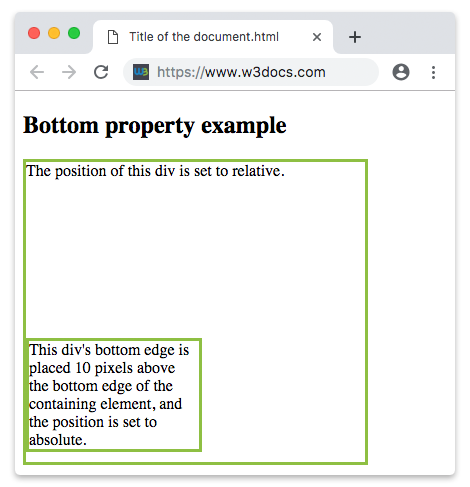
Beispiel zur bottom-Eigenschaft mit allen Positionierungsarten:
Beispiel zur CSS bottom-Eigenschaft mit allen Positionierungen
html
<!DOCTYPE html>
<html>
  <head>
    <style>
      div.parent {
        position: relative;
        height: 180px;
        border: 3px solid #8AC007;
      }
      div.absolute {
        position: absolute;
        width: 50%;
        bottom: 20px;
        border: 3px solid #8AC007;
      }
      div.relative {
        position: relative;
        width: 50%;
        bottom: 2px;
        border: 3px solid #8AC007;
      }
      div.fixed {
        position: fixed;
        width: 50%;
        bottom: 50px;
        border: 3px solid #8AC007;
      }
      div.sticky {
        position: sticky;
        top: 0;
        width: 50%;
        bottom: 10px;
        border: 3px solid #8AC007;
      }
    </style>
  </head>
  <body>
    <h2>Bottom property example</h2>
    <div class="parent">
      This div element has position: relative.
      <div class="absolute"><strong>position: absolute and bottom 20px</strong>
        <br />This div's bottom edge is placed 20 pixels above the bottom edge of the containing element.</div>
    </div>
    <br />
    <div class="parent">
      This div element has position: relative.
      <div class="relative"><strong>position: relative and bottom 2px</strong>
        <br />This div's bottom edge is placed 2 pixels above its normal position.</div>
    </div>
    <br />
    <div class="fixed"><strong>position: fixed and bottom 50px</strong>
      <br />This div's bottom edge is placed 50 pixels from the bottom of the viewport.</div>
    <div class="parent">
      This div element has position: relative.
      <div class="sticky"><strong>position: sticky and bottom 10px</strong>
        <br />This div is sticky.</div>
    </div>
  </body>
</html>Werte
| Wert | Beschreibung | Ausführen |
|---|---|---|
| auto | Dies ist der Standardwert. Er lässt den Browser die Position der unteren Kante berechnen. | Ausführen » |
| percentage | Definiert die Position des Elements in Prozent der Höhe des umschließenden Blocks. | |
| length | Definiert die Position des Elements in px, cm usw. Negative Werte sind erlaubt. | Ausführen » |
| initial | Setzt die Eigenschaft auf ihren Standardwert zurück. | Ausführen » |
| inherit | Erbt die Eigenschaft von ihrem übergeordneten Element. |
Praxis
Was macht die 'bottom'-Eigenschaft in CSS?