CSS-Eigenschaft column-rule-style
Die Eigenschaft column-rule-style legt den Stil der Linie zwischen Spalten fest. Eine column-rule ist ähnlich wie ein border, den Sie hinzufügen können, um benachbarte Spalten zu trennen. Sie kann auch Stile wie ein Rahmen haben.
Diese Eigenschaft ist eine der CSS3-Eigenschaften.
Um diese Eigenschaft zu verwenden, müssen Sie zuerst Spalten mit den Eigenschaften columns oder column-count definieren.
Die Eigenschaft column-rule-style hat die folgenden Werte:
- none
- hidden
- dotted
- dashed
- solid
- double
- groove
- ridge
- inset
- outset
| Initial Value | none |
|---|---|
| Applies to | Mehrspalten-Elemente. |
| Inherited | No. |
| Animatable | No. |
| Version | CSS3 |
| DOM Syntax | object.style.columnRuleStyle = "dashed" ; |
Syntax
Syntax der CSS-Eigenschaft column-rule-style
column-rule-style: none | hidden | dotted | dashed | solid | double | groove | ridge | inset | outset | initial | inherit;Beispiel für die Eigenschaft column-rule-style:
Beispiel der CSS-Eigenschaft column-rule-style mit dem Wert dotted
<!DOCTYPE html>
<html>
  <head>
    <title>Title of the document</title>
    <style>
      div {
        column-count: 3;
        column-gap: 30px;
        column-rule-style: dotted;
      }
    </style>
  </head>
  <body>
    <h2>Column-rule-style property example</h2>
    <div>
      Lorem Ipsum is dummy text of the printing and typesetting industry. Lorem Ipsum has been the industry's standard dummy text ever since the 1500s, when an unknown printer took a galley of type and scrambled it to make a type specimen book. It has survived not only five centuries, but also the leap into electronic typesetting, remaining essentially unchanged. It was popularised in the 1960s with the release of Letraset sheets containing Lorem Ipsum passages, and more recently with desktop publishing software like Aldus PageMaker including versions of Lorem Ipsum.
    </div>
  </body>
</html>Ergebnis
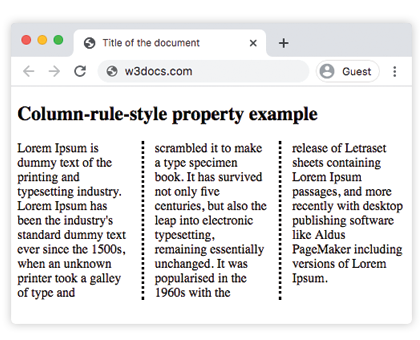
Im folgenden Beispiel sind die Linien zwischen den Spalten doppelt. In diesem Beispiel wird die Farbe für die Linie mit der Eigenschaft column-rule-color angegeben.
Beispiel für die Eigenschaft column-rule-style mit dem Wert "double":
Beispiel der CSS-Eigenschaft column-rule-style mit dem Wert double
<!DOCTYPE html>
<html>
  <head>
    <title>Title of the document</title>
    <style>
      div {
        column-count: 3;
        column-gap: 30px;
        column-rule-style: double;
        column-rule-color: #1c87c9;
        column-rule-width: 5px;
        text-align: justify;
      }
    </style>
  </head>
  <body>
    <h1>Column-rule-style property example</h1>
    <div>
      Lorem Ipsum is dummy text of the printing and typesetting industry. Lorem Ipsum has been the industry's standard dummy text ever since the 1500s, when an unknown printer took a galley of type and scrambled it to make a type specimen book. It has survived not only five centuries, but also the leap into electronic typesetting, remaining essentially unchanged. It was popularised in the 1960s with the release of Letraset sheets containing Lorem Ipsum passages, and more recently with desktop publishing software like Aldus PageMaker including versions of Lorem Ipsum.
    </div>
  </body>
</html>Werte
| Value | Description |
|---|---|
| none | Es wird keine Linie definiert. Dies ist der Standardwert. |
| hidden | Die Linie ist ausgeblendet. |
| dotted | Die Linie ist gepunktet. |
| dashed | Die Linie ist gestrichelt. |
| solid | Die Linie ist durchgezogen. |
| double | Die Linie ist doppelt. |
| groove | Die Linie ist eine 3D-Rille. Breiten- und Farbwerte bestimmen den Effekt. |
| ridge | Die Linie ist ein 3D-Kamm. Breiten- und Farbwerte bestimmen den Effekt. |
| inset | Die Linie ist eine 3D-Innenkante. Breiten- und Farbwerte bestimmen den Effekt. |
| outset | Die Linie ist eine 3D-Außenkante. Breiten- und Farbwerte bestimmen den Effekt. |
| initial | Setzt die Eigenschaft auf ihren Standardwert. |
| inherit | Erbt die Eigenschaft vom übergeordneten Element. |
Practice
Which of the following statements are true about the CSS column-rule-style property?