CSS-Eigenschaft flex-flow
Die Eigenschaft flex-flow gilt als Kurzschreibweise für die Eigenschaften flex-wrap und flex-direction.
Diese Eigenschaft ist eine der CSS3-Eigenschaften. Sie ist Teil des Flexible Box Layout-Moduls.
Wenn es keine flexiblen Elemente gibt, hat die Eigenschaft flex-flow keine Wirkung.
Moderne Browser unterstützen die Eigenschaft flex-flow nativ ohne Vendor-Präfixe.
| Anfangswert | row nowrap |
|---|---|
| Gilt für | Flex-Container |
| Vererbt | Nein. |
| Animierbar | Nein. |
| Version | CSS3 |
| DOM-Syntax | object.style.flexFlow = "column nowrap"; |
Syntax
Syntax der CSS-Eigenschaft flex-flow
css
flex-flow: <flex-direction> || <flex-wrap>;
/* or */ initial | inherit;
Wenn wir flex-flow: row wrap; setzen, bedeutet das, dass der erste Wert flex-direction definiert und der zweite Wert die Eigenschaft flex-wrap definiert.
Beispiel der CSS-Eigenschaft flex-flow
css
flex-flow: row wrap;Der folgende Code ist derselbe wie der obige Code.
Beispiel der Eigenschaften flex-direction und flex-wrap
css
flex-direction: row;
flex-wrap: wrap;
Beispiel der Eigenschaft flex-flow mit den Werten "row" und "wrap":
html
<!DOCTYPE html>
<html>
  <head>
    <title>Title of the document</title>
    <style>
      .example {
        width: 200px;
        height: 200px;
        border: 1px solid #c3c3c3;
        display: flex;
        flex-flow: row wrap;
      }
      .example div {
        width: 50px;
        height: 50px;
      }
    </style>
  </head>
  <body>
    <h2>Flex-flow property example</h2>
    <div class="example">
      <div style="background-color: #8ebf42;">A</div>
      <div style="background-color: #1c87c9;">B</div>
      <div style="background-color: #cccccc;">C</div>
      <div style="background-color: #666666;">D</div>
      <div style="background-color: #4c4a4a;">E</div>
      <div style="background-color: #c6c4c4;">F</div>
    </div>
  </body>
</html>Beispiel der Eigenschaft flex-flow mit den Werten "wrap-reverse" und "column":
html
<!DOCTYPE html>
<html>
  <head>
    <title>Title of the document</title>
    <style>
      .example {
        width: 200px;
        height: 200px;
        border: 1px solid #c3c3c3;
        display: flex;
        flex-flow: column wrap-reverse;
      }
      .example div {
        width: 50px;
        height: 50px;
      }
    </style>
  </head>
  <body>
    <h2>Flex-flow property example</h2>
    <div class="example">
      <div style="background-color: #8ebf42;">A</div>
      <div style="background-color: #1c87c9;">B</div>
      <div style="background-color: #cccccc;">C</div>
      <div style="background-color: #666666;">D</div>
      <div style="background-color: #4c4a4a;">E</div>
      <div style="background-color: #c6c4c4;">F</div>
    </div>
  </body>
</html>Beispiel der Eigenschaft flex-flow mit den Werten "row" und "nowrap":
html
<!DOCTYPE html>
<html>
  <head>
    <title>Title of the document</title>
    <style>
      .example {
        width: 200px;
        height: 200px;
        border: 1px solid #c3c3c3;
        display: flex;
        flex-flow: row nowrap;
      }
      .example div {
        width: 50px;
        height: 50px;
      }
    </style>
  </head>
  <body>
    <h2>Flex-flow property example</h2>
    <div class="example">
      <div style="background-color: #8ebf42;">A</div>
      <div style="background-color: #1c87c9;">B</div>
      <div style="background-color: #cccccc;">C</div>
      <div style="background-color: #666666;">D</div>
      <div style="background-color: #4c4a4a;">E</div>
      <div style="background-color: #c6c4c4;">F</div>
    </div>
  </body>
</html>Ergebnis
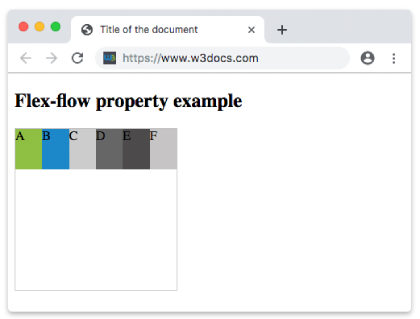
Beispiel der Eigenschaft flex-flow mit den Werten "row-reverse" und "nowrap":
html
<!DOCTYPE html>
<html>
  <head>
    <title>Title of the document</title>
    <style>
      .example {
        width: 200px;
        height: 200px;
        border: 1px solid #c3c3c3;
        display: flex;
        flex-flow: row-reverse nowrap;
      }
      .example div {
        width: 50px;
        height: 50px;
      }
    </style>
  </head>
  <body>
    <h2>Flex-flow property example</h2>
    <div class="example">
      <div style="background-color: #8ebf42;">A</div>
      <div style="background-color: #1c87c9;">B</div>
      <div style="background-color: #cccccc;">C</div>
      <div style="background-color: #666666;">D</div>
      <div style="background-color: #4c4a4a;">E</div>
      <div style="background-color: #c6c4c4;">F</div>
    </div>
  </body>
</html>Beispiel der Eigenschaft flex-flow mit den Werten "column" und "nowrap":
html
<!DOCTYPE html>
<html>
  <head>
    <title>Title of the document</title>
    <style>
      .example {
        width: 200px;
        height: 200px;
        border: 1px solid #c3c3c3;
        display: flex;
        flex-flow: column nowrap;
      }
      .example div {
        width: 50px;
        height: 50px;
      }
    </style>
  </head>
  <body>
    <h2>Flex-flow property example</h2>
    <div class="example">
      <div style="background-color: #8ebf42;">A</div>
      <div style="background-color: #1c87c9;">B</div>
      <div style="background-color: #cccccc;">C</div>
      <div style="background-color: #666666;">D</div>
      <div style="background-color: #4c4a4a;">E</div>
      <div style="background-color: #c6c4c4;">F</div>
    </div>
  </body>
</html>Beispiel der Eigenschaft flex-flow mit den Werten "column-reverse" und "nowrap":
html
<!DOCTYPE html>
<html>
  <head>
    <title>Title of the document</title>
    <style>
      .example {
        width: 200px;
        height: 200px;
        border: 1px solid #c3c3c3;
        display: flex;
        flex-flow: column-reverse nowrap;
      }
      .example div {
        width: 50px;
        height: 50px;
      }
    </style>
  </head>
  <body>
    <h2>Flex-flow property example</h2>
    <div class="example">
      <div style="background-color: #8ebf42;">A</div>
      <div style="background-color: #1c87c9;">B</div>
      <div style="background-color: #cccccc;">C</div>
      <div style="background-color: #666666;">D</div>
      <div style="background-color: #4c4a4a;">E</div>
      <div style="background-color: #c6c4c4;">F</div>
    </div>
  </body>
</html>Werte
| Wert | Beschreibung | Play it |
|---|---|---|
| flex-direction | Definiert die Richtung flexibler Elemente. Mögliche Werte sind: row row-reverse column column-reverse initial inherit | Play it » |
| flex-wrap | Definiert, ob flexible Elemente umbrechen sollen oder nicht. Mögliche Werte sind: nowrap wrap wrap-reverse initial inherit | Play it » |
| initial | Verwendet den Standardwert der Eigenschaft. | Play it » |
| inherit | Erbt die Eigenschaft vom übergeordneten Element. |
Practice
What is correct about the 'flex-flow' property in CSS?