CSS-Eigenschaft padding-right
Die CSS-Eigenschaft padding-right legt den Innenabstand auf der rechten Seite eines Elements fest.
INFO
Negative Werte sind nicht gültig.
INFO
Diese Eigenschaft hat keine Wirkung auf Inline-Elemente, wie <span>.
| Initial Value | 0 |
|---|---|
| Applies to | Alle Elemente. Eine Ausnahme gilt, wenn die Eigenschaft display auf table-row-group, table-header-group, table-footer-group, table-row, table-column-group und table-column gesetzt ist. Sie gilt auch für ::first-letter. |
| Inherited | No. |
| Animatable | Yes. Padding space is animatable. |
| Version | CSS1 |
| DOM Syntax | object.style.paddingRight = "40px"; |
TIP
Mit Hilfe der Eigenschaft padding können Sie die Innenabstände auf allen Seiten eines Elements mit einer einzigen Anweisung festlegen.
Syntax
Syntax der CSS-Eigenschaft padding-right
css
padding-right: length | initial | inherit;Beispiel für die Eigenschaft padding-right:
Beispiel der CSS-Eigenschaft padding-right mit px-Wert
html
<!DOCTYPE html>
<html>
  <head>
    <title>Title of the document</title>
    <style>
      p {
        border: 2px solid #000;
        color: #8ebf42;
        padding-right: 100px;
      }
    </style>
  </head>
  <body>
    <h2>Padding-right property example</h2>
    <p>Lorem Ipsum is simply dummy text of the printing and typesetting industry. Lorem Ipsum has been the industry's standard dummy text ever since the 1500s...</p>
  </body>
</html>Ergebnis
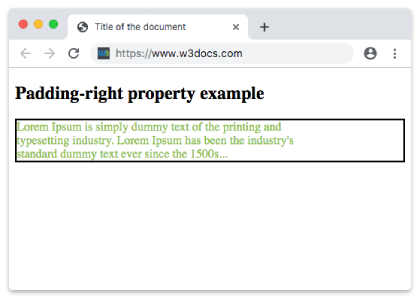
Beispiel für die Eigenschaft padding-right mit dem Wert "length":
Beispiel der CSS-Eigenschaft padding-right mit pt-Wert
html
<!DOCTYPE html>
<html>
  <head>
    <title>Title of the document</title>
    <style>
      p {
        border: 2px solid #000;
        color: #8ebf42;
        padding-right: 100pt;
      }
    </style>
  </head>
  <body>
    <h2>Padding-right property example</h2>
    <p>Lorem Ipsum is simply dummy text of the printing and typesetting industry. Lorem Ipsum has been the industry's standard dummy text ever since the 1500s</p>
  </body>
</html>Beispiel für die in Prozent angegebene Eigenschaft padding-right:
Beispiel der CSS-Eigenschaft padding-right mit %-Wert:
html
<!DOCTYPE html>
<html>
  <head>
    <title>Title of the document</title>
    <style>
      p {
        border: 3px solid #cccccc;
        color: deepskyblue;
        padding: 15px;
        padding-right: 10%;
      }
    </style>
  </head>
  <body>
    <h2>Padding-left property example</h2>
    <p>
      Lorem Ipsum is simply dummy text of the printing and typesetting industry. Lorem Ipsum is simply dummy text of the printing and typesetting industry. Lorem Ipsum is simply dummy text of the printing and typesetting industry.
    </p>
  </body>
</html>Werte
| Value | Description | Play it |
|---|---|---|
| length | Es legt den rechten Innenabstand in px, pt, cm usw. fest. Der Standardwert ist 0px. | Play it » |
| % | Es legt den rechten Innenabstand in Prozent der Breite des umschließenden Elements fest. | Play it » |
| initial | Verwendet den Standardwert der Eigenschaft. | Play it » |
| inherit | Erbt die Eigenschaft vom übergeordneten Element. |
Practice
What is the function of the padding-right property in CSS?