CSS-Eigenschaft column-count
Die column-count-Eigenschaft legt fest, in wie viele Spalten der Inhalt eines Elements aufgeteilt wird.
Die column-count-Eigenschaft ist eine der CSS3-Eigenschaften.
Sie akzeptiert einen numerischen Wert oder das Schlüsselwort auto. auto ist der Standardwert. Wenn auf auto gesetzt, wird die Anzahl der Spalten durch andere Eigenschaften wie column-width bestimmt. Ein numerischer Wert gibt die genaue Anzahl der Spalten an, in die der Inhalt des Elements fließen soll.
| Anfangswert | auto |
|---|---|
| Gilt für | Block-Container außer Tabellen-Wrapper-Boxen. |
| Vererbbar | Nein. |
| Animierbar | Ja. Die Anzahl der Spalten ist animierbar. |
| Version | CSS3 |
| DOM-Syntax | object.style.columnCount = "4"; |
Syntax
Syntax der column-count-Eigenschaft
css
column-count: <integer> | auto | initial | inherit;Beispiel für die column-count-Eigenschaft:
Beispiel der CSS column-count-Eigenschaft mit auto-Wert
html
<!DOCTYPE html>
<html>
  <head>
    <title>Title of the document</title>
    <style>
      div {
        column-count: auto;
      }
    </style>
  </head>
  <body>
    <h2>Column-count property example</h2>
    <div>
      Lorem Ipsum is dummy text of the printing and typesetting industry. Lorem Ipsum has been the industry's standard dummy text ever since the 1500s, when an unknown printer took a galley of type and scrambled it to make a type specimen book. It has survived not only five centuries, but also the leap into electronic typesetting, remaining essentially unchanged. It was popularised in the 1960s with the release of Letraset sheets containing Lorem Ipsum passages, and more recently with desktop publishing software like Aldus PageMaker including versions of Lorem Ipsum.
    </div>
  </body>
</html>Ergebnis
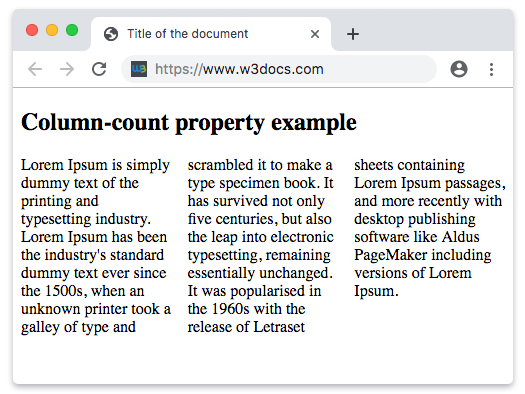
Beispiel für die column-count-Eigenschaft mit einem numerischen Wert:
Beispiel der CSS column-count-Eigenschaft mit einem Zahlenwert
html
<!DOCTYPE html>
<html>
  <head>
    <title>Title of the document</title>
    <style>
      div {
        column-count: 7;
      }
    </style>
  </head>
  <body>
    <h2>Column-count property example</h2>
    <div>
      Lorem Ipsum is dummy text of the printing and typesetting industry. Lorem Ipsum has been the industry's standard dummy text ever since the 1500s when an unknown printer took a galley of type and scrambled it to make a type specimen book. It has survived not only five centuries, but also the leap into electronic typesetting, remaining essentially unchanged. It was popularised in the 1960s with the release of Letraset sheets containing Lorem Ipsum passages, and more recently with desktop publishing software like Aldus PageMaker including versions of Lorem Ipsum. It is a great fact that a reader will be distracted by the readable content of a page when looking at its layout.
    </div>
  </body>
</html>Werte
| Wert | Beschreibung | Testen |
|---|---|---|
| auto | Die Anzahl der Spalten wird durch andere Eigenschaften bestimmt. Dies ist der Standardwert dieser Eigenschaft. | Testen » |
<integer> | Gibt die genaue Anzahl der Spalten an, in die der Inhalt fließen soll. | Testen » |
| initial | Setzt die Eigenschaft auf ihren Standardwert zurück. | Testen » |
| inherit | Erbt die Eigenschaft von ihrem übergeordneten Element. |
Praxis
Was bewirkt die CSS-Eigenschaft 'column-count'?