CSS top-Eigenschaft
Die top-Eigenschaft definiert die obere Position eines Elements in Kombination mit der position-Eigenschaft.
Die Wirkung der top-Eigenschaft hängt davon ab, wie das Element positioniert ist (siehe position-Eigenschaft).
- Wenn
positionauf "absolute" oder "fixed" gesetzt ist, gibt dietop-Eigenschaft die obere Kante eines Elements relativ zu einer Einheit oberhalb/unterhalb der oberen Kante seines nächsten positionierten Elternelements an. - Wenn
positionauf "relative" gesetzt ist, gibt dietop-Eigenschaft an, um wie viel die obere Kante oberhalb/unterhalb ihrer Normalposition verschoben werden soll. - Wenn
positionauf "sticky" gesetzt ist, wechselt dietop-Eigenschaft ihre Position zu relativ, wenn sich das Element im Viewport befindet, und zu fixed, wenn es sich außerhalb befindet. - Wenn die
position-Eigenschaft auf "static" gesetzt ist, wird die Eigenschaft nicht angewendet.
INFO
Negative Werte sind erlaubt.
| Initialwert | auto |
|---|---|
| Anwendbar auf | Positionierte Elemente. |
| Vererbt | Nein. |
| Animierbar | Ja. |
| Version | CSS2 |
| DOM-Syntax | Object.style.top = "50px"; |
Syntax
Syntax der CSS top-Eigenschaft
css
top: auto | length | initial | inherit;Beispiel zur top-Eigenschaft:
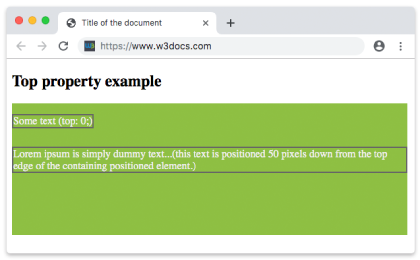
Beispiel zur CSS top-Eigenschaft mit Längenwert
html
<!DOCTYPE html>
<html>
  <head>
    <title>Title of the document</title>
    <style>
      div {
        background-color: #8ebf42;
        height: 200px;
        width: 600px;
        position: relative;
      }
      p {
        margin: 0;
        color: #eee;
        position: absolute;
        border: 2px solid #666;
      }
      .ex1 {
        top: 0;
      }
      .ex2 {
        top: 50px;
      }
    </style>
  </head>
  <body>
    <h2>Top property example</h2>
    <div>
      <p class="ex1">Some text (top: 0;)</p>
      <p class="ex2">
        Lorem ipsum is simply dummy text...(this text is positioned 50 pixels down from the top edge of the containing positioned element.)
      </p>
    </div>
  </body>
</html>Ergebnis
Beispiel zur top-Eigenschaft mit negativem Wert:
Beispiel zur CSS top-Eigenschaft mit negativem Wert
html
<!DOCTYPE html>
<html>
  <head>
    <title>Title of the document</title>
    <style>
      div {
        background-color: #666;
        height: 200px;
        position: relative;
      }
      p {
        margin: 0;
        color: #fff;
      }
      .top {
        position: absolute;
        top: -35px;
        color: #000000;
      }
    </style>
  </head>
  <body>
    <h2>Top property example</h2>
    <div>
      <p>Some text.</p>
      <p class="top">Text with the top property.</p>
    </div>
  </body>
</html>Beispiel zur top-Eigenschaft mit Werten in "pt", "%" und "em":
Beispiel zur top-Eigenschaft mit Werten in "pt", "%" und "em":
html
<!DOCTYPE html>
<html>
  <head>
    <title>Title of the document</title>
    <style>
      div {
        background-color: #8ebf42;
        height: 200px;
        width: 600px;
        position: relative;
      }
      p {
        margin: 0;
        color: #eee;
        position: absolute;
        border: 2px solid #666;
      }
      .ex1 {
        top: 5em;
      }
      .ex2 {
        top: 10pt;
      }
      .ex3 {
        top: 75%;
      }
    </style>
  </head>
  <body>
    <h2>Top property example</h2>
    <div>
      <p class="ex1">Some text (top: 0;)</p>
      <p class="ex2">
        Lorem ipsum is simply dummy text...(this text is positioned 50 pixels down from the top edge of the containing positioned element.)
      </p>
      <p class="ex3">
        Lorem ipsum is simply dummy text...(this text is positioned 50 pixels down from the top edge of the containing positioned element.)
      </p>
    </div>
  </body>
</html>Werte
| Wert | Beschreibung | Ausführen |
|---|---|---|
| auto | Legt die Position der oberen Kante fest. Dies ist der Standardwert dieser Eigenschaft. | Ausführen » |
| length | Legt die Position der oberen Kante mit px, cm usw. fest. Negative Werte sind gültig. | Ausführen » |
| % | Legt die Position der oberen Kante in % des Elternelements fest. Negative Werte sind gültig. | Ausführen » |
| initial | Legt die Eigenschaft auf ihren Standardwert zurück. | Ausführen » |
| inherit | Erbt die Eigenschaft von ihrem Elternelement. |
Praxis
Was bewirkt die CSS-Eigenschaft 'top'?