CSS margin-top-Eigenschaft
Die margin-top-Eigenschaft wird verwendet, um den oberen Außenabstand eines Elements zu definieren.
INFO
Diese Eigenschaft hat keine Auswirkung auf Inline-Elemente wie <span>.
Die oberen und unteren Außenabstände eines Elements können zu einem einzigen zusammenfallen, der dem größeren der beiden entspricht. Dies tritt jedoch nur bei vertikalen Außenabständen auf.
INFO
Negative Werte sind erlaubt.
| Anfangswert | 0 |
|---|---|
| Gilt für | Alle Elemente. Gilt auch für ::first-letter. |
| Vererbbar | Nein. |
| Animierbar | Ja. Der obere Außenabstand des Elements ist animierbar. |
| Version | CSS2 |
| DOM-Syntax | object.style.marginTop = "50px"; |
Syntax
Syntax der CSS margin-top-Eigenschaft
margin-top: length | auto | initial | inherit;Beispiel für die margin-top-Eigenschaft:
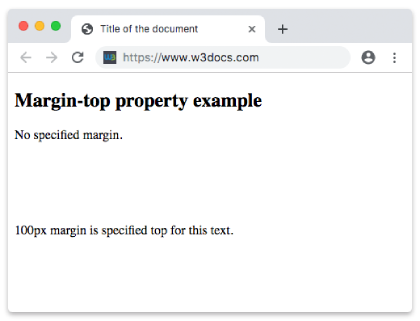
Beispiel für die CSS margin-top-Eigenschaft mit px-Wert
<!DOCTYPE html>
<html>
  <head>
    <title>Title of the document</title>
    <style>
      .margin-top {
        margin-top: 100px;
      }
    </style>
  </head>
  <body>
    <h2>Margin-top property example</h2>
    <p>No specified margin.</p>
    <p class="margin-top"> 100px margin is specified top for this text.</p>
  </body>
</html>Ergebnis
Beispiel für die margin-top-Eigenschaft in "em" angegeben:
Beispiel für die CSS margin-top-Eigenschaft mit em-Wert
<!DOCTYPE html>
<html>
  <head>
    <title>Title of the document</title>
    <style>
      p.example {
        margin-top: 5em;
      }
    </style>
  </head>
  <body>
    <h2>Margin-top property example</h2>
    <p>Lorem Ipsum is simply dummy text of the printing and typesetting industry.</p>
    <p class="example">Lorem Ipsum is simply dummy text of the printing and typesetting industry.</p>
    <p>Lorem Ipsum is simply dummy text of the printing and typesetting industry.</p>
  </body>
</html>Beispiel für die margin-top-Eigenschaft in "%" angegeben:
Beispiel für die margin-top-Eigenschaft in "%" angegeben:
<!DOCTYPE html>
<html>
  <head>
    <title>Title of the document</title>
    <style>
      .margin-top {
        margin-top: 10%;
        background-color: lightblue;
      }
    </style>
  </head>
  <body>
    <h2>Margin-top property example</h2>
    <p>No specified margin.</p>
    <p class="margin-top"> 10% margin is specified top for this text.</p>
  </body>
</html>Beispiel für die margin-top-Eigenschaft mit dem Wert "initial":
Beispiel für die margin-top-Eigenschaft mit dem Wert "initial":
<!DOCTYPE html>
<html>
  <head>
    <title>Title of the document</title>
    <style>
      .margin-top {
        margin-top: initial;
        background-color: lightgreen;
      }
    </style>
  </head>
  <body>
    <h2>Margin-top property example</h2>
    <p>No specified margin.</p>
    <p class="margin-top"> Margin top is specified for this text.</p>
  </body>
</html>Beispiel für die margin-top-Eigenschaft mit dem Wert "inherit":
Beispiel für die margin-top-Eigenschaft mit dem Wert "inherit":
<!DOCTYPE html>
<html>
  <head>
    <title>Title of the document</title>
    <style>
      div {
        margin-top: 50px;
      }
      .margin-top {
        margin-top: inherit;
        background-color: lime;
      }
    </style>
  </head>
  <body>
    <h2>Margin-top property example</h2>
    <div>
      Here is some text.
      <p class="margin-top"> Margin top is specified for this text.</p>
    </div>
  </body>
</html>Werte
| Wert | Beschreibung | Ausführen |
|---|---|---|
| auto | Legt den oberen Außenabstand fest. Dies ist der Standardwert dieser Eigenschaft. | Ausführen » |
| length | Definiert einen oberen Außenabstand in px, pt, cm usw. Standardwert ist 0. | Ausführen » |
| % | Legt den oberen Außenabstand in % des Elternelements fest. | Ausführen » |
| initial | Setzt die Eigenschaft auf ihren Standardwert zurück. | Ausführen » |
| inherit | Erbt die Eigenschaft von ihrem Elternelement. |
Practice
Welche Funktion hat die 'margin-top'-Eigenschaft in CSS?