CSS margin-right-Eigenschaft
Die Eigenschaft margin-right definiert, wie groß der rechte Außenabstand des Elements festgelegt wird.
INFO
Negative Werte sind erlaubt.
| Anfangswert | 0 |
|---|---|
| Gilt für | Alle Elemente. Gilt auch für ::first-letter. |
| Vererbt | Nein. |
| Animierbar | Ja. Der rechte Außenabstand des Elements ist animierbar. |
| Version | CSS2 |
| DOM-Syntax | object.style.marginRight = "50px"; |
Syntax
Syntax der CSS margin-right-Eigenschaft
css
margin-right: length | auto | initial | inherit;Beispiel für die margin-right-Eigenschaft:
Beispiel für die CSS margin-right-Eigenschaft mit px-Wert
html
<!DOCTYPE html>
<html>
  <head>
    <title>Title of the document</title>
    <style>
      .right {
        margin-right: 400px;
      }
    </style>
  </head>
  <body>
    <h2>Margin-right property example</h2>
    <p>Lorem Ipsum is simply dummy text of the printing and typesetting industry.</p>
    <p class="right">Lorem Ipsum is simply dummy text of the printing and typesetting industry.</p>
  </body>
</html>Ergebnis
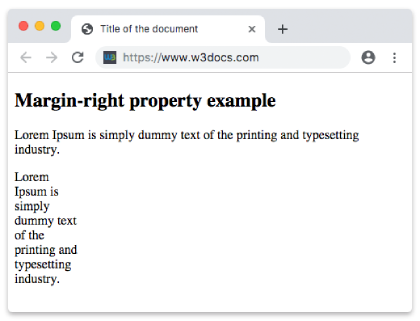
Beispiel für die margin-right-Eigenschaft in "%":
Beispiel für die CSS margin-right-Eigenschaft mit %-Wert
html
<!DOCTYPE html>
<html>
  <head>
    <title>Title of the document</title>
    <style>
      .right {
        margin-right: 50%;
      }
    </style>
  </head>
  <body>
    <h2>Margin-right property example</h2>
    <p>Lorem Ipsum is simply dummy text of the printing and typesetting industry.</p>
    <p class="right">Lorem Ipsum is simply dummy text of the printing and typesetting industry.</p>
  </body>
</html>Beispiel für die margin-right-Eigenschaft mit dem Wert "auto":
Beispiel für die margin-right-Eigenschaft mit dem Wert "auto":
html
<!DOCTYPE html>
<html>
  <head>
    <title>Title of the document</title>
    <style>
      .right {
        margin-right: auto;
      }
    </style>
  </head>
  <body>
    <h2>Margin-right property example</h2>
    <p>
      Lorem Ipsum is simply dummy text of the printing and typesetting industry. Lorem Ipsum is simply dummy text of the printing and typesetting industry.
    </p>
    <p class="right">
      Lorem Ipsum is simply dummy text of the printing and typesetting industry. Lorem Ipsum is simply dummy text of the printing and typesetting industry. Lorem Ipsum is simply dummy text of the printing and typesetting industry.
    </p>
  </body>
</html>Werte
| Wert | Beschreibung | Ausführen |
|---|---|---|
| auto | Legt den rechten Außenabstand fest. Dies ist der Standardwert dieser Eigenschaft. | Ausführen » |
| length | Definiert einen rechten Außenabstand in px, pt, cm usw. Der Standardwert ist 0. | Ausführen » |
| % | Legt den rechten Außenabstand in % des Elternelements fest. | Ausführen » |
| initial | Legt fest, dass die Eigenschaft ihren Standardwert verwendet. | Ausführen » |
| inherit | Erbt die Eigenschaft von ihrem Elternelement. |
Praxis
Was macht die CSS-Eigenschaft 'margin-right'?