HTML <section> Tag
Das <section>-Tag gruppiert thematische Seiteninhalte. Erfahren Sie, wann section, article oder div zu verwenden ist und wie das region-Landmark funktioniert.
Das HTML-Element <section> ist eines der semantischen HTML5-Elemente. Es fasst zusammengehörige Inhalte zusammen, die einen thematischen Teil der Seite bilden — einen Teil, der idealerweise als Eintrag im Dokumentgliederung erscheinen würde (ein Nachrichtenblock, ein „Kontakt"-Bereich, ein Kapitel eines langen Artikels usw.).
Diese Seite erklärt, was <section> bedeutet, wie man zwischen <section>, <article> und <div> entscheidet, warum ein Abschnitt fast immer eine Überschrift benötigt und welche Barrierefreiheitsregel einen Abschnitt in ein navigierbares Landmark umwandelt.
Wann <section> vs <article> vs <div> verwenden
Diese drei Elemente sehen austauschbar aus, tragen aber sehr unterschiedliche Bedeutungen. Wählen Sie nach Absicht, nicht nach Erscheinungsbild:
<section>— eine thematische Gruppierung von Inhalten, die zur Seitengliederung gehört und eine eigene Überschrift hat. Verwenden Sie es, wenn der Inhalt „ein eigenständiger Teil dieser Seite" ist, aber keinen Sinn ergibt, wenn er von der Seite entfernt wird. Beispiele: ein Einführungs-Block, ein Preise-Block, ein Bewertungen-Block auf einer Produktseite.<article>— eine in sich geschlossene, unabhängig verteilbare Komposition. Verwenden Sie es, wenn der Inhalt noch Sinn ergeben würde, wenn man ihn herausnähme und anderswo veröffentlichte (ein syndizierter Feed, ein RSS-Eintrag, ein Suchergebnis). Beispiele: ein Blogbeitrag, eine Nachrichtenstory, ein einzelner Nutzerkommentar, eine Produktkarte.<div>— keinerlei semantische Bedeutung; ein generisches Kästchen, das nur als Styling- oder Scripting-Anker existiert. Greifen Sie auf<div>zurück, wenn Sie nur einen Wrapper für das Layout benötigen (ein Flex/Grid-Container, eine Spalte) und kein thematischer Inhalt zu bezeichnen ist.
Ein schneller Test: Wenn Sie dem Block eine sinnvolle Überschrift geben können, ist es wahrscheinlich ein <section>. Wenn der Block als eigene Seite oder Feed-Eintrag stehen könnte, ist es ein <article>. Wenn Sie ihn nur hinzufügen, um CSS oder eine Klasse anzuhängen, ist es ein <div>.
Verwenden Sie <section> nicht als generischen Wrapper für Layout oder Styling. Wenn ein Markup-Block keine thematische Bedeutung und keine Überschrift hat, verwenden Sie stattdessen ein <div>.
Die Überschriftspflicht
HTML erwartet, dass jedes <section> identifiziert wird, und der übliche Weg dafür ist eine Überschrift (<h1>–<h6>). Ein Abschnitt ohne Überschrift hat kein klares Thema und erzeugt einen verwirrenden, „unbetitelten" Eintrag in den Dokumentgliederungen von Hilfstechnologien.
Verwenden Sie die Überschriftsebene, die zur Verschachtelungstiefe passt: ein <h2> für einen Abschnitt der obersten Ebene unter dem <h1> der Seite, ein <h3> für einen eine Ebene tiefer verschachtelten Abschnitt usw. Halten Sie die Hierarchie logisch und überspringen Sie keine Ebenen — siehe HTML Headings für die Regeln.
<h1>Web technologies</h1>

<section>
  <h2>HTML</h2>
  <p>HTML is the standard markup language for creating web pages.</p>
</section>

<section>
  <h2>CSS</h2>
  <p>CSS describes how HTML elements should be presented.</p>
</section><section> und Barrierefreiheit: das region-Landmark
Ein <section> ist nicht automatisch ein Landmark, zu dem Screenreader-Nutzer springen können. Es wird erst zu einem navigierbaren region-Landmark, wenn es einen zugänglichen Namen hat. Sie vergeben ihn auf zwei Wegen:
aria-labelledby, das auf dieidseiner Überschrift zeigt (bevorzugt — die sichtbare Überschrift und der zugängliche Name bleiben synchron), oderaria-labelmit einem wörtlichen String (wenn kein sichtbarer Überschriftstext als Referenz vorhanden ist).
Ohne Namen ist der Abschnitt nur eine Gruppierung für die Gliederung; mit einem Namen erscheint er in der Landmark-Liste des Screenreaders.
<section aria-labelledby="pricing-heading">
  <h2 id="pricing-heading">Pricing</h2>
  <p>Choose the plan that fits your team.</p>
</section>

<!-- No visible heading? Name it directly: -->
<section aria-label="Search results">
  <p>3 results found.</p>
</section>Deshalb unterscheidet sich <section> von Regionen wie <main>, <aside>, <header> und <footer>: Diese stellen Landmark-Rollen von sich aus bereit, während <section> einen Namen benötigt, um dies zu tun.
Syntax
Das <section>-Tag kommt paarweise vor. Der Inhalt wird zwischen dem öffnenden (<section>) und schließenden (</section>) Tag geschrieben.
Beispiel des HTML-<section>-Tags:
<!DOCTYPE html>
<html>
  <head>
    <title>Using the section tag</title>
  </head>
  <body>
    <section>
      <h2>Hypertext markup language HTML</h2>
      <p>HTML is the standard markup language for creating web pages and web applications. Browsers receive HTML documents from a web server or from local storage and render the documents into multimedia web pages. HTML describes the structure of a web page semantically and originally included cues for the appearance of the document.</p>
    </section>
    <section>
      <h2>CSS</h2>
      <p>Formal language, which is used as a description zone, formatting the appearance of a web page, written by the help of markup languages HTML and XHTML, but it can be applied to any XML-document, for example, to SVG or XUL.</p>
    </section>
  </body>
</html>Ergebnis
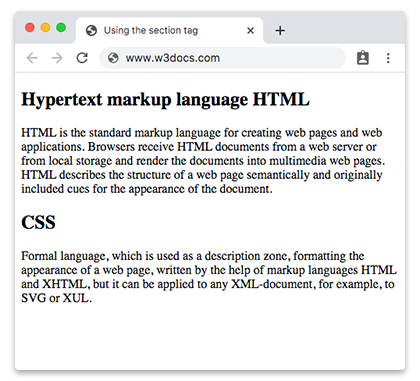
Beispiel eines <section> innerhalb eines <article>:
Ein langer, in sich geschlossener Inhalt ist ein <article>; die Kapitel darin sind <section>-Elemente. Jeder Abschnitt hat seine eigene Überschrift und seinen eigenen eigenständigen Inhalt.
<!DOCTYPE html>
<html>
  <head>
    <title>Title of the document</title>
  </head>
  <body>
    <article>
      <h1>A short guide to web technologies</h1>
      <p>Modern web pages are built from three core technologies that work together.</p>

      <section>
        <h2>HTML: structure</h2>
        <p>HTML is the standard markup language for web pages. It describes the structure of a document — headings, paragraphs, links and media — so browsers can render it as a page.</p>
      </section>

      <section>
        <h2>CSS: presentation</h2>
        <p>CSS controls how the structured content looks: colors, spacing, typography and responsive layout across different screen sizes.</p>
      </section>

      <section>
        <h2>JavaScript: behavior</h2>
        <p>JavaScript adds interactivity, letting the page respond to user actions, update content dynamically and communicate with servers.</p>
      </section>
    </article>
  </body>
</html>Attribute
Das <section>-Tag unterstützt die globalen Attribute und die Ereignisattribute.
So gestalten Sie einen HTML-<section>-Tag
section {
  background-color: #f9f9f9;
  padding: 20px;
  border: 1px solid #ddd;
}