CSS column-fill Eigenschaft
Die CSS-Eigenschaft column-fill legt fest, ob Spalten gleichmäßig gefüllt werden oder nicht. Werte: balance. Mit Beispielen.
Die Eigenschaft column-fill steuert, wie Inhalt auf die Spalten eines Mehrspaltenlayouts verteilt wird – entweder gleichmäßig auf alle Spalten verteilt oder nacheinander eine Spalte nach der anderen befüllt.
Sie gehört zu den CSS3-Eigenschaften und arbeitet zusammen mit column-count und columns, um zeitungsähnliche Layouts zu erstellen.
Wann verwenden
column-fill hat nur dann eine sichtbare Wirkung, wenn der Mehrspaltencontainer eine feste Höhe hat (z. B. height: 200px). Ohne Höhenbegrenzung hat der Browser keinen Grund, das Befüllen einer Spalte zu stoppen, sodass beide Werte identisch aussehen.
Es gibt zwei sinnvolle Werte:
balance(Standard) versucht, jede Spalte in etwa gleich lang zu machen, sodass der Spaltenblock gleichmäßig wirkt und der Inhalt in jeder Spalte ungefähr auf derselben Zeile endet. Dies ist in der Regel die bessere Wahl für lesbaren, zeitungsähnlichen Text.autofüllt die erste Spalte bis zur vollen Containerhöhe und wechselt dann zur nächsten usw. Die letzte Spalte kann wesentlich kürzer als die übrigen sein. Verwenden Sie diesen Wert, wenn die visuelle Reihenfolge der Spalten wichtiger ist als die Balance.
| Ausgangswert | balance |
|---|---|
| Gilt für | Mehrspalten-Elemente. |
| Vererbbar | Nein. |
| Animierbar | Nein. |
| Version | CSS3 |
| DOM-Syntax | object.style.columnFill = "balance"; |
Syntax
column-fill: auto | balance | balance-all | initial | inherit;Beispiel der column-fill-Eigenschaft mit dem Wert balance
<!DOCTYPE html>
<html>
  <head>
    <title>Title of the document</title>
    <style>
      .balance {
        column-count: 4;
        column-rule: 1px solid black;
        column-fill: balance;
      }
    </style>
  </head>
  <body>
    <h1>Column-fill property example</h1>
    <p class="balance">
      This is a bunch of text split into multiple columns. The CSS column-fill property is used to spread the contents evenly across all the columns. Lorem ipsum dolor sit amet, consectetur adipiscing elit. Sed do eiusmod tempor incididunt ut labore et dolore magna aliqua. Ut enim ad minim veniam, quis nostrud exercitation ullamco laboris nisi ut aliquip ex ea commodo consequat. Duis aute irure dolor in reprehenderit in voluptate velit esse cillum dolore eu fugiat nulla pariatur. Excepteur sint occaecat cupidatat non proident, sunt in culpa qui officia deserunt mollit anim id est laborum.
    </p>
  </body>
</html>Ergebnis
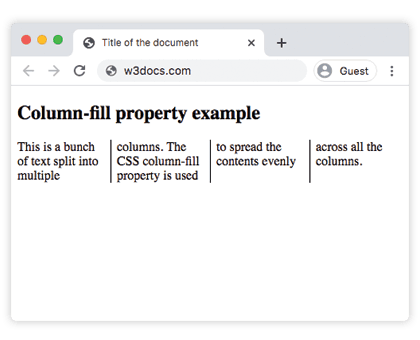
Mit balance wird der Text so verteilt, dass alle vier Spalten ungefähr auf derselben Höhe enden.
Beispiel der column-fill-Eigenschaft mit dem Wert auto
<!DOCTYPE html>
<html>
  <head>
    <title>Title of the document</title>
    <style>
      .auto {
        height: 200px;
        column-count: 3;
        column-rule: 1px solid black;
        column-fill: auto;
      }
    </style>
  </head>
  <body>
    <h1>Column-fill property example</h1>
    <p class="auto">
      This is a bunch of text split into multiple columns. The CSS column-fill property is used to fill columns sequentially. Lorem ipsum dolor sit amet, consectetur adipiscing elit. Sed do eiusmod tempor incididunt ut labore et dolore magna aliqua. Ut enim ad minim veniam, quis nostrud exercitation ullamco laboris nisi ut aliquip ex ea commodo consequat. Duis aute irure dolor in reprehenderit in voluptate velit esse cillum dolore eu fugiat nulla pariatur. Excepteur sint occaecat cupidatat non proident, sunt in culpa qui officia deserunt mollit anim id est laborum.
    </p>
  </body>
</html>Hier hat der Container eine feste height: 200px. Mit auto füllt die erste Spalte bis zu dieser Höhe, bevor Text in die nächste Spalte fließt – daher können spätere Spalten kürzer oder leer sein, wenn der Text nicht ausreicht.
Werte
| Wert | Beschreibung |
|---|---|
| auto | Füllt die Spalten nacheinander. |
| balance | Verteilt den Inhalt gleichmäßig auf die Spalten. Bei Seitenmedien wird nur die letzte Seite ausgeglichen. |
| balance-all | Verteilt den Inhalt gleichmäßig auf die Spalten. Bei Seitenmedien werden alle Seiten ausgeglichen. |
| initial | Setzt die Eigenschaft auf ihren Standardwert. |
| inherit | Übernimmt die Eigenschaft vom übergeordneten Element. |
Browser-Unterstützung
column-fill wird von allen modernen Browsern unterstützt. Beachten Sie, dass balance-all nur eingeschränkt unterstützt wird und in vielen Engines auto wie balance verhält, solange der Mehrspaltencontainer nicht fragmentiert ist (z. B. paginiert oder mit fester Höhe versehen).
Verwandte Eigenschaften
column-count— legt fest, wie viele Spalten erstellt werden.columns— Kurzschreibweise fürcolumn-widthundcolumn-count.column-rule— zeichnet eine Linie zwischen den Spalten.