CSS stroke-linecap Eigenschaft
Wie man die CSS-Eigenschaft stroke-linecap verwendet, um die Start- und Endpunkte des Element-Rahmens festzulegen. Werte und Beispiele.
Die Eigenschaft stroke-linecap legt die Form fest, die an den offenen Enden eines SVG-Strichs verwendet wird. Sie verändert nur, wie die beiden Endpunkte eines offenen Pfades gezeichnet werden — sie hat keinen Einfluss auf die Ecken, an denen zwei Liniensegmente aufeinandertreffen, und keinen Einfluss auf geschlossene Formen ohne offene Enden.
Diese Seite erklärt, wie jeder Cap-Wert aussieht, wie stroke-linecap mit der CSS-Spezifität interagiert und den Sonderfall „Pfad mit Länge null", mit dem man einen einzelnen Punkt zeichnen kann.
Wann würde ich es verwenden?
Immer wenn Sie Linien oder offene Pfade in SVG zeichnen und steuern möchten, wie die Linie endet:
roundist die häufigste Wahl für handgezeichnete Striche, Fortschrittsbalken und Diagrammlinien — es erzeugt ein weiches, abgeschlossenes Aussehen.squareist nützlich, wenn die Linie leicht über ihren Endpunkt hinausragen soll (beispielsweise damit zwei aneinanderstoßende Linien sauber aufeinandertreffen).butt(der Standard) schneidet die Linie genau an der Endkoordinate ab — wählen Sie ihn, wenn die präzise Länge wichtig ist.
Ein praktischer Trick: Ein Pfad mit Länge null (ein Strich, der am selben Punkt beginnt und endet) wird als einzelner Punkt dargestellt, wenn stroke-linecap round oder square ist, und als nichts, wenn er butt ist. Dies ist die standardmäßige Methode, um Punkte in SVG zu zeichnen.
CSS oder Präsentationsattribut?
stroke-linecap ist sowohl eine CSS-Eigenschaft als auch ein SVG-Präsentationsattribut. Das gibt Ihnen zwei Möglichkeiten, es zu setzen:
- Als Attribut am Element:
<path stroke-linecap="round" /> - Als CSS-Deklaration:
path { stroke-linecap: round; }
Ein Präsentationsattribut verhält sich wie der Stil mit der niedrigsten Priorität, daher überschreibt jede CSS-Regel es. Inline-style="…" und externe Stylesheets haben Vorrang vor dem Attribut; unter den CSS-Regeln gilt die normale Spezifität.
Die Eigenschaft stroke-linecap kann auf jedes Element angewendet werden, wirkt sich aber nur auf SVG-Form- und Textelemente aus: <path>, <line>, <polyline>, <text>, <textPath> und <tspan>. Sie wirkt sich nicht auf geschlossene Formen wie <rect>, <circle> oder <polygon> aus, da diese keine offenen Enden haben.
| Anfangswert | butt |
|---|---|
| Gilt für | Formen und Textelemente. |
| Vererbt | Ja. |
| Animierbar | Nein. |
| Version | SVG 1.1 Spezifikation |
| DOM Syntax | Object.strokeLinecap = "round"; |
Syntax
CSS stroke-linecap Syntax
stroke-linecap: butt | square | round | initial | inherit;Beispiel der stroke-linecap Eigenschaft:
CSS stroke-linecap Code-Beispiel
<!DOCTYPE html>
<html>
  <head>
    <title>Title of the document</title>
  </head>
  <body>
    <h2>Stroke-linecap property example</h2>
    <svg viewBox="0 0 6 4">
      <!-- Effect of the "butt" value -->
      <path d="M1,1 h4" stroke="#8ebf42"
        stroke-linecap="butt" />
      <!-- Effect of the "butt" value on a zero length path -->
      <path d="M3,3 h0" stroke="#8ebf42"
        stroke-linecap="butt" />
      <!--
        the following pink lines highlight the
        position of the path for each stroke
        -->
      <path d="M1,1 h4" stroke="#1c87c9" stroke-width="0.05" />
      <circle cx="1" cy="1" r="0.05" fill="#1c87c9" />
      <circle cx="5" cy="1" r="0.05" fill="#1c87c9" />
      <circle cx="3" cy="3" r="0.05" fill="#1c87c9" />
    </svg>
  </body>
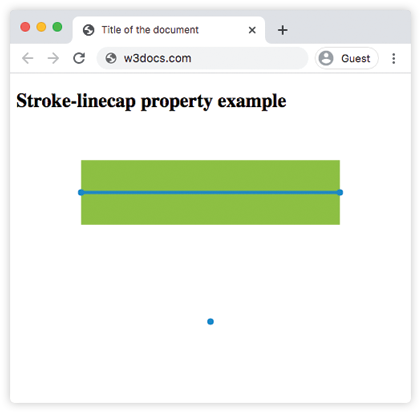
</html>Mit butt endet der grüne Strich genau bei den Koordinaten (1,1) und (5,1) — markiert durch die blauen Punkte — sodass seine sichtbare Länge der Pfadlänge entspricht. Der Pfad mit Länge null bei (3,3) wird überhaupt nicht dargestellt.
Ergebnis
Beispiel der stroke-linecap Eigenschaft mit dem Wert "round":
CSS stroke-linecap round Beispiel
<!DOCTYPE html>
<html>
  <head>
    <title>Title of the document</title>
  </head>
  <body>
    <h2>Stroke-linecap property example</h2>
    <svg viewBox="0 0 6 4">
      <!-- Effect of the "round" value -->
      <path d="M1,1 h4" stroke="#8ebf42" stroke-linecap="round" />
      <!-- Effect of the "round" value on a zero length path -->
      <path d="M3,3 h0" stroke="#8ebf42" stroke-linecap="round" />
      <!--
      the following pink lines highlight the
      position of the path for each stroke
      -->
      <path d="M1,1 h4" stroke="#1c87c9" stroke-width="0.05" />
      <circle cx="1" cy="1" r="0.05" fill="#1c87c9" />
      <circle cx="5" cy="1" r="0.05" fill="#1c87c9" />
      <circle cx="3" cy="3" r="0.05" fill="#1c87c9" />
    </svg>
  </body>
</html>Mit round wird über jeden Endpunkt hinaus ein Halbkreis mit dem Radius stroke-width / 2 hinzugefügt, sodass die grüne Linie die blauen Punkte leicht überragt. Der Pfad mit Länge null bei (3,3) wird zu einem ausgefüllten Kreis — das ist der Punkt-Trick in Aktion.
Beispiel der stroke-linecap Eigenschaft mit dem Wert "square":
CSS stroke-linecap square Beispiel
<!DOCTYPE html>
<html>
  <head>
    <title>Title of the document</title>
  </head>
  <body>
    <h2>Stroke-linecap property example</h2>
    <svg viewBox="0 0 6 4">
      <!-- Effect of the "square" value -->
      <path d="M1,1 h4" stroke="#8ebf42" stroke-linecap="square" />
      <!-- Effect of the "square" value on a zero length path -->
      <path d="M3,3 h0" stroke="#8ebf42" stroke-linecap="square" />
      <!--
        the following pink lines highlight the
        position of the path for each stroke
        -->
      <path d="M1,1 h4" stroke="#1c87c9" stroke-width="0.05" />
      <circle cx="1" cy="1" r="0.05" fill="#1c87c9" />
      <circle cx="5" cy="1" r="0.05" fill="#1c87c9" />
      <circle cx="3" cy="3" r="0.05" fill="#1c87c9" />
    </svg>
  </body>
</html>square sieht ähnlich wie round aus, da der Strich um stroke-width / 2 über den Endpunkt hinausgeht, aber die hinzugefügte Kappe ist ein Rechteck statt eines Halbkreises, was eine flache Kante ergibt. Der Pfad mit Länge null bei (3,3) wird als kleines Quadrat dargestellt.
Werte
| Wert | Beschreibung |
|---|---|
butt | Standard. Beendet den Strich flach, genau am Endpunkt, ohne Verlängerung. Ein Teilpfad mit Länge null wird nicht dargestellt. |
round | Fügt eine halbkreisförmige Kappe mit dem Radius stroke-width / 2 über jeden Endpunkt hinaus hinzu und erzeugt so abgerundete Enden. Ein Teilpfad mit Länge null wird als Punkt dargestellt. |
square | Fügt eine rechteckige Kappe hinzu, die stroke-width / 2 über jeden Endpunkt hinausragt, und erzeugt so flache Enden, die über den Pfad hinausragen. Ein Teilpfad mit Länge null wird als kleines Quadrat dargestellt. |
initial | Setzt die Eigenschaft auf ihren Standardwert zurück (butt). |
inherit | Erbt den Wert vom übergeordneten Element. stroke-linecap wird standardmäßig vererbt. |
Verwandte Eigenschaften
stroke-linecap ist eine von mehreren SVG-Strich-Eigenschaften, die steuern, wie Linien gezeichnet werden:
stroke— legt die Farbe des Strichs fest.stroke-width— legt fest, wie dick der Strich ist (und damit, wie groß die Kappen sind).stroke-dasharray— verwandelt einen durchgehenden Strich in Striche; jeder Strich erhält seine eigenen Linienkappen.stroke-dashoffset— verschiebt den Startpunkt des Strichmusters.fill— legt die Farbe fest, die zum Ausfüllen des Innenbereichs einer Form verwendet wird.