CSS isolation-Eigenschaft
Wie CSS isolation: isolate einen neuen Stacking Context erzeugt, um mix-blend-mode- und filter-Effekte zu begrenzen — mit Beispielen und Browser-Support.
Die CSS-Eigenschaft isolation steuert, ob ein Element einen neuen Stacking Context erstellen muss. Die zwei möglichen Werte sind auto (Standard — der Browser entscheidet) und isolate (immer einen erstellen, bedingungslos).
Ein Stacking Context ist eine in sich geschlossene Ebene, die der Browser als Einheit rendert. Elemente darin werden relativ zueinander mittels z-index angeordnet, verschränken sich jedoch niemals mit Elementen in einem anderen Stacking Context. Jedes Dokument beginnt mit einem Root-Stacking-Context; weitere werden erstellt, sobald bestimmte CSS-Eigenschaften angewendet werden.
isolation ist am nützlichsten in Kombination mit mix-blend-mode. Standardmäßig mischt mix-blend-mode ein Element mit allem, was darunter liegt — einschließlich des Seitenhintergrunds und nicht verwandter Bereiche weit oben im DOM. Wenn man isolation: isolate auf ein übergeordnetes Element setzt, entsteht eine Grenze: Die Mischoperation findet nur innerhalb des Teilbaums dieses Elements statt, nicht gegenüber dem Rest der Seite.
Bei der Verwendung von background-blend-mode ist isolation unnötig — Hintergrundebenen mischen sich immer nur mit anderen Hintergrundebenen desselben Elements.
Wann sollte man es verwenden?
- Eine Blend-Gruppe eingrenzen. Sie haben überlappende Bilder oder Text mit
mix-blend-modeund möchten, dass sie sich untereinander mischen, aber nicht mit dem Rest der Seite. Umschließen Sie sie mit einem Container, derisolation: isolatebesitzt. - Eine wiederverwendbare Komponente schützen. Eine Karte oder ein Widget soll unabhängig vom Hintergrund gleich aussehen. Die Isolierung der Wurzel verhindert, dass äußere Farben durch interne Blend-Modi hindurchscheinen.
- Einen Stacking Context ohne Nebeneffekte erstellen. Mehrere Eigenschaften erstellen implizit Stacking Contexts —
opacityunter1, transform, filter, will-change und ein nicht-autoz-indexauf einem positionierten Element — sie alle verändern jedoch Layout oder Erscheinungsbild.isolation: isolateerstellt den Stacking Context und nichts weiter.
isolation verändert weder das Aussehen des Elements noch die Platzierung im Layout. Sein einziger Effekt besteht darin, ob ein neuer Stacking Context erstellt wird. Das macht es zur saubersten Methode, eine Grenze zu setzen, wenn man eine benötigt, ohne andere visuelle Konsequenzen.
Eigenschaftsreferenz
| Anfangswert | auto |
| Gilt für | Alle Elemente |
| Vererbbar | Nein |
| Animierbar | Nein |
| Version | CSS3 |
| DOM-Syntax | element.style.isolation = "isolate" |
Syntax
isolation: auto | isolate | initial | inherit;Werte
| Wert | Beschreibung |
|---|---|
auto | Es wird kein neuer Stacking Context erstellt, es sei denn, eine andere Eigenschaft (z. B. mix-blend-mode oder filter) erfordert einen. Dies ist der Standardwert. |
isolate | Erstellt immer einen neuen Stacking Context auf dem Element und begrenzt Blend- und Compositing-Operationen auf diesen Context. |
initial | Setzt die Eigenschaft auf ihren Standardwert zurück (auto). |
inherit | Übernimmt den Wert vom übergeordneten Element. |
Beispiele
mix-blend-mode mit isolation eingrenzen
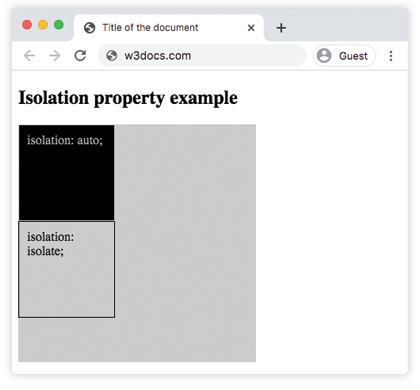
Die beiden Boxen unten verwenden identisches inneres Markup — ein <div> mit mix-blend-mode: difference. Der einzige Unterschied liegt im Wrapper: Der erste verwendet isolation: auto, der zweite isolation: isolate.
Mit auto reicht der difference-Blend durch den Wrapper und mischt sich mit dem grauen Seitenhintergrund (#ccc des äußeren Containers). Mit isolate wird auf Wrapper-Ebene ein neuer Stacking Context erstellt, sodass der Blend nur den eigenen Hintergrund des Wrappers sieht — nicht die umgebende Seite.
<!DOCTYPE html>
<html>
  <head>
    <title>Title of the document</title>
    <style>
      .a {
        background-color: #ccc;
      }
      #isolation-example {
        width: 300px;
        height: 300px;
      }
      .c {
        width: 100px;
        height: 100px;
        border: 1px solid #000;
        padding: 10px;
        mix-blend-mode: difference;
      }
      #isolation-example1 {
        isolation: auto;
      }
      #isolation-example2 {
        isolation: isolate;
      }
    </style>
  </head>
  <body>
    <h2>Isolation property example</h2>
    <div id="isolation-example" class="a">
      <div id="isolation-example1">
        <div class="a c">isolation: auto;</div>
      </div>
      <div id="isolation-example2">
        <div class="a c">isolation: isolate;</div>
      </div>
    </div>
  </body>
</html>Ergebnis
Einen gemischten Titel über einem Bild isolieren
Hier verwendet eine Überschrift mix-blend-mode: overlay, um sich mit einem Foto zu mischen. Ohne isolation: isolate auf der Überschrift mischt sich das Overlay auch mit dem #eee-Body-Hintergrund, wo die Überschrift über das Bild hinausragt. Mit isolation: isolate wird der Blend auf den eigenen Stacking Context der Überschrift begrenzt, sodass der Effekt über die gesamte Breite einheitlich wirkt.
<!DOCTYPE html>
<html>
  <head>
    <title>Title of the document</title>
    <style>
      * {
        box-sizing: border-box;
      }
      body {
        background-color: #eee;
        color: #555;
        font-size: 1.1em;
        font-family: Roboto, Helvetica, Arial, sans-serif;
      }
      .isolation-example {
        margin: 1em auto;
        width: 100%;
        max-width: 814px;
        position: relative;
      }
      img {
        width: 100%;
      }
      .isolation-example h1 {
        position: absolute;
        top: 5em;
        color: white;
        text-align: center;
        font-size: 40px;
        width: 100%;
        text-transform: uppercase;
        background-color: #000;
        padding: .5em .25em;
        mix-blend-mode: overlay;
        isolation: isolate;
      }
    </style>
  </head>
  <body>
    <h2>Isolation property example</h2>
    <div class="isolation-example">
      <img src="/uploads/media/default/0001/01/4982c4f43023330a662b9baed5a407e391ae6161.jpeg" alt="Yellow tree." />
      <div class="element">
        <h1>House</h1>
      </div>
    </div>
  </body>
</html>Wie Stacking Contexts erstellt werden
isolation: isolate ist eine von vielen Möglichkeiten, einen neuen Stacking Context auszulösen. Die folgende Tabelle listet die häufigsten Auslöser auf und zeigt, ob sie visuelle oder Layout-Nebeneffekte haben:
| Auslöser | Nebeneffekt |
|---|---|
isolation: isolate | Keiner — nur Stacking Context |
opacity kleiner als 1 | Ändert die Transparenz des Elements |
transform (jeder Wert außer none) | Bewegt oder verformt das Element |
filter (jeder Wert außer none) | Wendet einen visuellen Effekt an |
will-change mit transform oder opacity | Kann das Element auf eine eigene Compositor-Ebene heben |
Nicht-auto z-index auf einem positionierten Element | Ändert die Stapelreihenfolge |
Wenn man nur die Grenze benötigt — keine Transparenz, keine visuelle Änderung, keine Neuanordnung — greift man zu isolation: isolate.
Was man beachten sollte
isolationwird nicht vererbt. Das Setzen auf einem übergeordneten Element bewirkt nicht, dass Kindelemente eigene Stacking Contexts erhalten.- Die Eigenschaft wirkt nur auf Elemente, die selbst an einem Stacking Context teilnehmen (in der Praxis alle Block- und Inline-Elemente, SVG-Elemente sowie Flex/Grid-Kinder).
- Stacking-Context-Grenzen können in den Browser-DevTools überprüft werden: Firefox zeigt das Stacking-Context-Symbol neben Elementen im Layers-Panel; Chrome zeigt Stacking-Context-Informationen im Tab „Berechnet".
- Die Browser-Unterstützung ist ausgezeichnet — alle modernen Browser unterstützen
isolationseit 2015. Kein Präfix ist erforderlich.
Verwandte Eigenschaften
- mix-blend-mode — mischt ein Element mit dem Inhalt darunter;
isolationsteuert, wo dieser Mischvorgang endet. - background-blend-mode — mischt die eigenen Hintergrundebenen eines Elements miteinander.
- filter — wendet grafische Effekte wie Weichzeichnung und Graustufen an; erstellt ebenfalls implizit einen Stacking Context.
- opacity — ein weiterer Stacking-Context-Auslöser; Werte unter
1machen das Element halbtransparent. - transform — bewegt, dreht oder skaliert ein Element; erstellt ebenfalls einen Stacking Context.
- z-index — steuert die Stapelreihenfolge innerhalb eines Stacking Context.