CSS text-align-last Eigenschaft
Verwenden Sie die CSS-Eigenschaft text-align-last, um die Ausrichtung der letzten Zeile eines Textes festzulegen. Werte und Beispiele.
Die CSS-Eigenschaft text-align-last legt die Ausrichtung der letzten Zeile eines Textblocks fest – und nur der letzten Zeile. Sie gehört zu den CSS3-Eigenschaften und arbeitet Hand in Hand mit der regulären Eigenschaft text-align.
Wenn Sie einen Absatz mit text-align: justify im Blocksatz formatieren, wird jede Zeile auf die volle Breite gestreckt – außer der letzten, die standardmäßig kurz bleibt und am Anfang ausgerichtet wird. text-align-last ist die Eigenschaft, die bestimmt, was mit dieser abschließenden „unvollständigen" Zeile passiert.
Die Eigenschaft zielt auf die letzte formatierte Zeile des Block-Containers ab, auf den sie angewendet wird. Wenn ein <div> zum Beispiel einen langen umgebrochenen Text enthält, formatiert text-align-last die einzelne Zeile ganz unten – die übrig gebliebenen Wörter, die keine vollständige Zeile gefüllt haben.
Diese Eigenschaft fällt am stärksten auf, wenn text-align: justify verwendet wird und der Text über mehrere Zeilen umbricht. Bei einer einzelnen Textzeile ist die letzte Zeile zugleich die einzige Zeile, sodass sie sich identisch wie text-align verhält.
Wann verwenden
Greifen Sie auf text-align-last zurück, wenn der Blocksatz eine unschöne letzte Zeile hinterlässt und Sie mehr Kontrolle darüber möchten:
justify— erzwingt, dass sich auch die letzte Zeile über die volle Breite erstreckt, sodass der Absatz einen sauberen rechteckigen Block bildet (üblich in druckseitenähnlichen Layouts und Postern).center— gibt einem im Blocksatz gesetzten Text eine zentrierte Abschlusszeile, häufig bei kurzen Überschriften oder Zitatblöcken verwendet.right/end— schiebt die letzte Zeile an den gegenüberliegenden Rand für einen bewussten, asymmetrischen Look.
Da die Eigenschaft vererbt wird, genügt es, sie einmal an einem übergeordneten Element zu setzen, um sie auf alle Block-Container darin anzuwenden – sofern ein untergeordnetes Element sie nicht überschreibt.
| Anfangswert | auto |
|---|---|
| Gilt für | Block-Container. |
| Vererbt | Ja. |
| Animierbar | Nein. |
| Version | CSS3 |
| DOM-Syntax | object.style.textAlignLast = "left"; |
Browser-Kompatibilität
| Browser | Unterstützung |
|---|---|
| Chrome | 50+ |
| Edge | 12+ |
| Firefox | 49+ |
| Safari | 10.1+ |
| Opera | 37+ |
Syntax
CSS text-align-last Syntax
text-align-last: auto | left | right | center | justify | start | end | initial | inherit;Beispiel der text-align-last Eigenschaft:
CSS text-align-last Codebeispiel
<!DOCTYPE html>
<html>
  <head>
    <title>Title of the document</title>
    <style>
      .demo {
        text-align: justify;
        text-align-last: right;
      }
    </style>
  </head>
  <body>
    <h2>Text-align-last property example</h2>
    <h3>text-align-last: right:</h3>
    <div class="demo">
      Lorem Ipsum is dummy text of the printing and typesetting industry. Lorem Ipsum has been the industry's standard dummy text ever since the 1500s when an unknown printer took a galley of type and scrambled it to make a type specimen book. It has survived not only five centuries, but also the leap into electronic typesetting, remaining essentially unchanged. It was popularised in the 1960s with the release of Letraset sheets containing Lorem Ipsum passages, and more recently with desktop publishing software like Aldus PageMaker including versions of Lorem Ipsum.
    </div>
  </body>
</html>Ergebnis
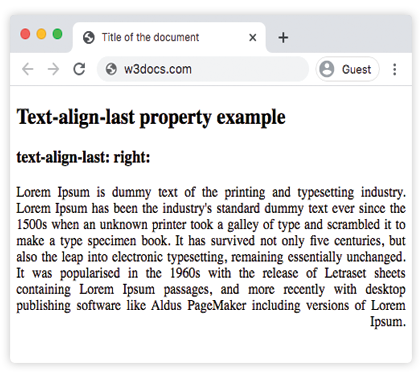
Beispiel der text-align-last Eigenschaft mit den Werten "start", "justify" und "center":
CSS text-align-last alle Werte Beispiel
<!DOCTYPE html>
<html>
  <head>
    <title>Title of the document</title>
    <style>
      .demo1 {
        text-align: justify;
        text-align-last: start;
      }
      .demo2 {
        text-align: justify;
        text-align-last: center;
      }
      .demo3 {
        text-align: justify;
        text-align-last: justify;
      }
    </style>
  </head>
  <body>
    <h2>Text-align-last property example</h2>
    <h3>Text-align-last: start:</h3>
    <div class="demo1">
      Lorem Ipsum is dummy text of the printing and typesetting industry. Lorem Ipsum has been the industry's standard dummy text ever since the 1500s when an unknown printer took a galley of type and scrambled it to make a type specimen book. It has survived not only five centuries, but also the leap into electronic typesetting, remaining essentially unchanged. It was popularised in the 1960s with the release of Letraset sheets containing Lorem Ipsum passages, and more recently with desktop publishing software like Aldus PageMaker including versions of Lorem Ipsum.
    </div>
    <h3>Text-align-last: center:</h3>
    <div class="demo2">
      Lorem Ipsum is dummy text of the printing and typesetting industry. Lorem Ipsum has been the industry's standard dummy text ever since the 1500s when an unknown printer took a galley of type and scrambled it to make a type specimen book. It has survived not only five centuries, but also the leap into electronic typesetting, remaining essentially unchanged. It was popularised in the 1960s with the release of Letraset sheets containing Lorem Ipsum passages, and more recently with desktop publishing software like Aldus PageMaker including versions of Lorem Ipsum.
    </div>
    <h3>Text-align-last: justify:</h3>
    <div class="demo3">
      Lorem Ipsum is dummy text of the printing and typesetting industry. Lorem Ipsum has been the industry's standard dummy text ever since the 1500s when an unknown printer took a galley of type and scrambled it to make a type specimen book. It has survived not only five centuries, but also the leap into electronic typesetting, remaining essentially unchanged. It was popularised in the 1960s with the release of Letraset sheets containing Lorem Ipsum passages, and more recently with desktop publishing software like Aldus PageMaker including versions of Lorem Ipsum.
    </div>
  </body>
</html>Beispiel der text-align-last Eigenschaft mit dem Wert "end":
Beachten Sie, dass text-align-last auf das umschließende <div> angewendet wird, jedes darin enthaltene <p> jedoch ein eigener Block-Container ist – die end-Ausrichtung betrifft daher die letzte Zeile jedes Absatzes, nicht nur die des letzten Absatzes in der Gruppe.
<!DOCTYPE html>
<html>
  <head>
    <title>Title of the document</title>
    <style>
      .demo {
        text-align: justify;
        text-align-last: end;
      }
    </style>
  </head>
  <body>
    <h2>Text-align-last property example</h2>
    <h3>text-align-last: end:</h3>
    <div class="demo">
      <p>
        Lorem Ipsum is dummy text of the printing and typesetting industry. Lorem Ipsum has been the industry's standard dummy text ever since the 1500s when an unknown printer took a galley of type and scrambled it to make a type specimen book. It has survived not only five centuries, but also the leap into electronic typesetting, remaining essentially unchanged. It was popularised in the 1960s with the release of Letraset sheets containing Lorem Ipsum passages, and more recently with desktop publishing software like Aldus PageMaker including versions of Lorem Ipsum.
      </p>
      <p>
        Lorem Ipsum is dummy text of the printing and typesetting industry. Lorem Ipsum has been the industry's standard dummy text ever since the 1500s when an unknown printer took a galley of type and scrambled it to make a type specimen book. It has survived not only five centuries, but also the leap into electronic typesetting, remaining essentially unchanged.
      </p>
      <p>
        Lorem Ipsum is dummy text of the printing and typesetting industry. Lorem Ipsum has been the industry's standard dummy text ever since the 1500s when an unknown printer took a galley of type and scrambled it to make a type specimen book.
      </p>
    </div>
  </body>
</html>Werte
| Wert | Beschreibung |
|---|---|
| auto | Verwendet den Wert der Eigenschaft text-align. Dies ist der Standardwert. |
| left | Richtet die letzte Zeile links aus. |
| right | Richtet die letzte Zeile rechts aus. |
| center | Richtet die letzte Zeile mittig aus. |
| justify | Die letzte Zeile wird wie die anderen Zeilen im Blocksatz ausgerichtet. |
| start | Die letzte Zeile wird am Zeilenanfang ausgerichtet. Links, wenn die Richtung von links nach rechts ist, und rechts, wenn die Richtung von rechts nach links ist. |
| end | Die letzte Zeile wird am Zeilenende ausgerichtet. Rechts, wenn die Richtung von links nach rechts ist, links, wenn die Richtung von rechts nach links ist. |
| initial | Setzt die Eigenschaft auf ihren Standardwert zurück. |
| inherit | Erbt die Eigenschaft vom übergeordneten Element. |
Übung
Verwandte Eigenschaften
text-align— richtet alle Zeilen eines Textblocks aus.text-justify— steuert, wie der Abstand verteilt wird, wenn Text im Blocksatz gesetzt ist.direction— legt die Textrichtung fest, die bestimmt, wasstartundendbedeuten.