CSS overflow-Eigenschaft
Die CSS overflow-Eigenschaft legt fest, wie Inhalt im Box-Modell behandelt wird. Werte und Beispiele im Überblick.
Die CSS-Eigenschaft overflow steuert, was passiert, wenn der Inhalt eines Elements zu groß ist, um in seine Box zu passen. Sie entscheiden, ob der überschüssige Inhalt einfach abgeschnitten, trotzdem angezeigt oder scrollbar gemacht wird.
Überlauf wird nur sichtbar, wenn die Box eine eingeschränkte Größe hat. Die häufigste Methode zur Einschränkung ist das Festlegen einer festen Höhe (und optional einer Breite), aber eine Box kann auch durch ein Flex- oder Grid-Layout eingeschränkt werden. Wenn die Box frei wachsen kann, um ihren Inhalt aufzunehmen, gibt es keinen Überlauf und die Eigenschaft hat keinen sichtbaren Effekt.
overflow ist eine Kurzschreibweise, die gleichzeitig zwei Langform-Eigenschaften setzt:
- overflow-x — steuert das Abschneiden auf der linken/rechten (horizontalen) Achse.
- overflow-y — steuert das Abschneiden auf der oberen/unteren (vertikalen) Achse.
Wenn Sie overflow einen Wert geben, erhalten beide Achsen diesen Wert. Mit zwei Werten gilt der erste für overflow-x und der zweite für overflow-y (zum Beispiel overflow: hidden scroll;).
Werte auf einen Blick
Die Eigenschaft overflow akzeptiert folgende Schlüsselwörter:
visible— der Standardwert. Inhalt wird nicht abgeschnitten; er läuft aus der Box heraus und überlappt benachbarte Elemente.hidden— Inhalt, der nicht hineinpasst, wird abgeschnitten und unsichtbar. Es wird keine Scrollleiste angeboten, sodass der versteckte Teil für den Nutzer nicht erreichbar ist.scroll— Inhalt wird abgeschnitten und Scrollleisten werden immer angezeigt (auch wenn alles passt), was ein Verschieben des Layouts verhindert.auto— Inhalt wird abgeschnitten und Scrollleisten erscheinen nur bei Bedarf. Dies ist die übliche Wahl für scrollbare Bereiche.overlay— wieauto, aber die Scrollleisten werden über dem Inhalt gezeichnet, anstatt Platz einzunehmen.
Der Wert overlay ist veraltet und sollte nicht mehr verwendet werden. Verwenden Sie stattdessen auto — moderne Browser können Overlay-Scrollleisten basierend auf den OS-Einstellungen des Nutzers darstellen.
Einen Wert wählen
- Verwenden Sie
autofür einen scrollbaren Bereich (Chat-Panels, Code-Blöcke, Modals) — Scrollleisten erscheinen nur, wenn der Inhalt tatsächlich überläuft. - Verwenden Sie
hidden, um Inhalt gezielt zuzuschneiden, ein Bild mit abgerundeten Ecken zu beschneiden oder Floats einzuschließen (siehe unten). Denken Sie daran: abgeschnittener Inhalt ist für den Nutzer nicht zugänglich, verstecken Sie also nichts, das der Nutzer erreichen muss. - Verwenden Sie
scroll, wenn Sie eine reservierte Scrollleisten-Rinne möchten, damit das Layout nicht springt, wenn sich der Inhalt ändert. - Lassen Sie es als
visible, wenn Überlauf in Ordnung ist, z. B. bei einem Tooltip oder Dropdown, das absichtlich über sein übergeordnetes Element hinausragt.
Zwei nützliche Nebeneffekte
Floats einschließen. Wenn overflow auf einen anderen Wert als visible gesetzt wird, wächst das Element hoch genug, um seine gefloateten Kinder zu umschließen. Ein Elternelement mit overflow: hidden (oder auto) und ohne deklarierte Höhe dehnt sich also aus, um gefloateten Inhalt einzuschließen. Beachten Sie, dass dadurch der Float nicht gelöscht wird — er wird nur eingeschlossen. (Die moderne Alternative ist display: flow-root, die das Gleiche ohne die Clipping-Nebeneffekte bewirkt.)
Einen Block-Formatierungskontext (BFC) erstellen. Ein overflow-Wert, der nicht visible ist, startet einen neuen Block-Formatierungskontext. Dies ist hilfreich, wenn ein Block-Element neben einem gefloateten Element sitzen soll, anstatt darunter zu fließen.
| Anfangswert | visible |
|---|---|
| Gilt für | Block-Container, Flex-Container und Grid-Container. |
| Vererbt | Nein. |
| Animierbar | Nein. |
| Version | CSS2 |
| DOM-Syntax | Object.style.overflow = "auto"; |
Syntax
CSS overflow-Syntax
overflow: visible | hidden | scroll | auto | overlay | initial | inherit;Beispiel der overflow-Eigenschaft mit dem Wert "visible"
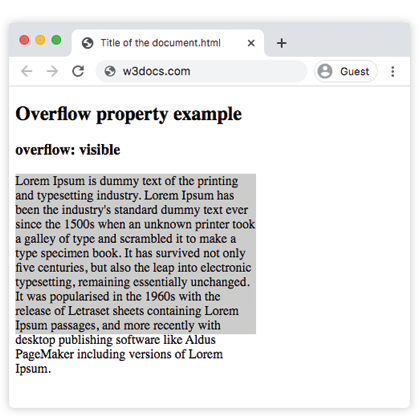
Mit visible läuft der Absatztext über den unteren Rand seiner 200px-Box hinaus, anstatt abgeschnitten zu werden — das Standardverhalten.
CSS overflow-Codebeispiel
<!DOCTYPE html>
<html>
  <head>
    <style>
      p {
        background-color: #ccc;
        width: 300px;
        height: 200px;
        overflow: visible;
      }
    </style>
  </head>
  <body>
    <h2>Overflow property example</h2>
    <h3>overflow: visible</h3>
    <p>Lorem Ipsum is dummy text of the printing and typesetting industry. Lorem Ipsum has been the industry's standard dummy text ever since the 1500s when an unknown printer took a galley of type and scrambled it to make a type specimen book. It has survived not only five centuries, but also the leap into electronic typesetting, remaining essentially unchanged. It was popularised in the 1960s with the release of Letraset sheets containing Lorem Ipsum passages, and more recently with desktop publishing software like Aldus PageMaker including versions of Lorem Ipsum.</p>
  </body>
</html>Ergebnis
Beispiel der overflow-Eigenschaft mit dem Wert "scroll"
Mit scroll erscheinen beide Scrollleisten, ob benötigt oder nicht, und der überlaufende Text ist durch Scrollen erreichbar.
CSS overflow scroll-Beispiel
<!DOCTYPE html>
<html>
  <head>
    <style>
      p {
        background-color: #ccc;
        width: 300px;
        height: 200px;
        overflow: scroll;
      }
    </style>
  </head>
  <body>
    <h2>Overflow property example</h2>
    <h3>overflow: scroll</h3>
    <p>Lorem Ipsum is simply dummy text of the printing and typesetting industry. Lorem Ipsum has been the industry's standard dummy text ever since the 1500s when an unknown printer took a galley of type and scrambled it to make a type specimen book. It has survived not only five centuries, but also the leap into electronic typesetting, remaining essentially unchanged. It was popularised in the 1960s with the release of Letraset sheets containing Lorem Ipsum passages, and more recently with desktop publishing software like Aldus PageMaker including versions of Lorem Ipsum.</p>
  </body>
</html>Beispiel der overflow-Eigenschaft mit dem Wert "hidden"
Mit hidden wird der Text, der nicht hineinpasst, abgeschnitten und es gibt keine Scrollleiste, sodass der abgeschnittene Teil nicht erreichbar ist.
CSS overflow hidden-Beispiel
<!DOCTYPE html>
<html>
  <head>
    <style>
      p {
        background-color: #ccc;
        width: 300px;
        height: 200px;
        overflow: hidden;
      }
    </style>
  </head>
  <body>
    <h2>Overflow property example</h2>
    <h3>overflow: hidden</h3>
    <p>Lorem Ipsum is dummy text of the printing and typesetting industry. Lorem Ipsum has been the industry's standard dummy text ever since the 1500s when an unknown printer took a galley of type and scrambled it to make a type specimen book. It has survived not only five centuries, but also the leap into electronic typesetting, remaining essentially unchanged. It was popularised in the 1960s with the release of Letraset sheets containing Lorem Ipsum passages, and more recently with desktop publishing software like Aldus PageMaker including versions of Lorem Ipsum.</p>
  </body>
</html>Beispiel der overflow-Eigenschaft mit dem Wert "auto"
auto ist der praktischste Wert: Eine Scrollleiste erscheint nur auf der Achse, die tatsächlich überläuft. Dieses Beispiel zeigt auch, wie overflow-x und overflow-y unabhängig voneinander gesetzt werden können.
CSS overflow auto
<!DOCTYPE html>
<html>
  <head>
    <title>Title of the document</title>
    <style>
      .scroll {
        width: 200px;
        height: 300px;
        border: 1px solid;
        overflow: auto;
        margin-bottom: 10px;
      }
      .scroll-x {
        width: 200px;
        height: 300px;
        border: 1px solid;
        overflow-x: auto;
        overflow-y: hidden;
        margin-bottom: 10px;
      }
      .scroll-y {
        width: 200px;
        height: 300px;
        border: 1px solid;
        overflow-y: auto;
        margin-bottom: 10px;
      }
      .scroll>div {
        width: 400px;
        height: 50px;
        background: #ccc;
      }
      .scroll-y>div {
        width: 200px;
        height: 50px;
        background: #ccc;
      }
      .scroll-x>div {
        width: 400px;
        height: 50px;
        background: #ccc;
        overflow: hidden;
      }
    </style>
  </head>
  <body>
    <h1>Example with Overflow Property</h1>
    <h2>overflow overflow scroll auto</h2>
    <div class="scroll">
      <h2>Overflow Property </h2>
      <div>
        <h2>overflow scroll property</h2>
      </div>
      <p>
        Lorem Ipsum is dummy text of the printing and typesetting industry. Lorem Ipsum has been the industry's standard dummy text ever since the 1500s when an unknown printer took a galley of type and scrambled it to make a type specimen book. It has survived not only five centuries, but also the leap into electronic typesetting, remaining essentially unchanged. It was popularised in the 1960s with the release of Letraset sheets containing Lorem Ipsum passages, and more recently with desktop publishing software like Aldus PageMaker including versions of Lorem Ipsum.
      </p>
    </div>
    <h2>overflow overflow-x auto</h2>
    <div class="scroll-x">
      <h2>Overflow Property </h2>
      <div>
        <h2>overflow scroll-x property</h2>
      </div>
      <p>
        Lorem Ipsum is dummy text of the printing and typesetting industry. Lorem Ipsum has been the industry's standard dummy text ever since the 1500s when an unknown printer.
      </p>
    </div>
    <h2>overflow overflow-y auto</h2>
    <div class="scroll-y">
      <h2>Overflow Property </h2>
      <div>
        <h2>overflow scroll-y property</h2>
      </div>
      <p>
        Lorem Ipsum is dummy text of the printing and typesetting industry. Lorem Ipsum has been the industry's standard dummy text ever since the 1500s when an unknown printer took a galley of type and scrambled it to make a type specimen book. software like Aldus PageMaker including versions of Lorem Ipsum.but also the leap into electronic typesetting, remaining essentially unchanged. It was popularised in the 1960s with the release of Letraset sheets containing Lorem Ipsum passages, and more recently with desktop publishing software like Aldus PageMaker including versions of Lorem Ipsum.
      </p>
    </div>
  </body>
</html>Beispiel der overflow-Eigenschaft mit allen Werten
Dieses Beispiel platziert denselben Text in fünf Boxen, damit Sie jeden Wert direkt vergleichen können.
CSS overflow alle Werte Beispiel
<!DOCTYPE html>
<html>
  <head>
    <title>Title of the document</title>
    <style>
      div.scroll {
        background-color: #eee;
        width: 300px;
        height: 200px;
        overflow: scroll;
      }
      div.hidden {
        background-color: #eee;
        width: 300px;
        height: 200px;
        overflow: hidden;
      }
      div.auto {
        background-color: #eee;
        width: 300px;
        height: 200px;
        overflow: auto;
      }
      div.visible {
        background-color: #eee;
        width: 300px;
        height: 200px;
        overflow: visible;
      }
      div.overlay {
        background-color: #eee;
        width: 300px;
        height: 200px;
        overflow: overlay;
      }
    </style>
  </head>
  <body>
    <h2>Overflow property example</h2>
    <h3>overflow: scroll</h3>
    <div class="scroll">
      Lorem Ipsum is dummy text of the printing and typesetting industry. Lorem Ipsum has been the industry's standard dummy text ever since the 1 500s when an unknown printer took a galley of type and scrambled it to make a type specimen book. It has survived not only five centuries, but also the leap into electronic typesetting, remaining essentially unchanged. It was popularised in the 1960s with the release of Letraset sheets containing Lorem Ipsum passages, and more recently with desktop publishing software like Aldus PageMaker including versions of Lorem Ipsum.
    </div>
    <h3>overflow: hidden</h3>
    <div class="hidden">
      Lorem Ipsum is the dummying text of the printing and typesetting industry. Lorem Ipsum has been the industry's standard dummy text ever since the 1500s when an unknown printer took a galley of type and scrambled it to make a type specimen book. It has survived not only five centuries, but also the leap into electronic typesetting, remaining essentially unchanged. It was popularised in the 1960s with the release of Letraset sheets containing Lorem Ipsum passages, and more recently with desktop publishing software like Aldus PageMaker including versions of Lorem Ipsum.
    </div>
    <h3>overflow: auto</h3>
    <div class="auto">
      Lorem Ipsum is the dummying text of the printing and typesetting industry. Lorem Ipsum has been the industry's standard dummy text ever since the 1500s when an unknown printer took a galley of type and scrambled it to make a type specimen book. It has survived not only five centuries, but also the leap into electronic typesetting, remaining essentially unchanged. It was popularised in the 1960s with the release of Letraset sheets containing Lorem Ipsum passages, and more recently with desktop publishing software like Aldus PageMaker including versions of Lorem Ipsum.
    </div>
    <h3>overflow: visible</h3>
    <div class="visible">
      Lorem Ipsum is the dummying text of the printing and typesetting industry. Lorem Ipsum has been the industry's standard dummy text ever since the 1500s when an unknown printer took a galley of type and scrambled it to make a type specimen book. It has survived not only five centuries, but also the leap into electronic typesetting, remaining essentially unchanged. It was popularised in the 1960s with the release of Letraset sheets containing Lorem Ipsum passages, and more recently with desktop publishing software like Aldus PageMaker including versions of Lorem Ipsum.
    </div>
    <br />
    <br />
    <h3>overflow: overlay</h3>
    <div class="overlay">
      Lorem Ipsum is the dummying text of the printing and typesetting industry. Lorem Ipsum has been the industry's standard dummy text ever since the 1500s when an unknown printer took a galley of type and scrambled it to make a type specimen book. It has survived not only five centuries, but also the leap into electronic typesetting, remaining essentially unchanged. It was popularised in the 1960s with the release of Letraset sheets containing Lorem Ipsum passages, and more recently with desktop publishing software like Aldus PageMaker including versions of Lorem Ipsum.
    </div>
  </body>
</html>Werte
| Wert | Beschreibung | Ausprobieren |
|---|---|---|
| visible | Der Inhalt wird nicht abgeschnitten und wird außerhalb der Padding-Box gerendert. Dies ist der Standardwert dieser Eigenschaft. | Ausprobieren » |
| hidden | Der Inhalt wird abgeschnitten, um in die Padding-Box zu passen. | Ausprobieren » |
| scroll | Die Scrollleiste wird hinzugefügt, um den restlichen Inhalt zu sehen. | Ausprobieren » |
| auto | Abhängig vom Browser. Bei Überlauf wird eine Scrollleiste hinzugefügt. | Ausprobieren » |
| overlay | Funktioniert wie auto, aber die Scrollleisten werden über dem Inhalt gezeichnet, anstatt Platz einzunehmen. Dieser veraltete Wert sollte nicht mehr verwendet werden, obwohl er möglicherweise noch funktioniert. | Ausprobieren » |
| initial | Setzt die Eigenschaft auf ihren Standardwert zurück. | Ausprobieren » |
| inherit | Erbt die Eigenschaft vom Elternelement. |
Verwandte Eigenschaften
- overflow-x und overflow-y — legen das Abschneiden pro Achse fest.
- white-space — kombinieren Sie
nowrapmitoverflow: hidden, um Text in einer Zeile zu halten, bevor er abgeschnitten wird. - display —
display: flow-rootschließt Floats ein, ohne die Clipping-Nebeneffekte vonoverflow.