CSS justify-content Eigenschaft
Erfahren Sie mehr über die justify-content-Eigenschaft, die die Position der Container-Elemente festlegt. Mit Beispielen zu allen Eigenschaftswerten.
Die Eigenschaft justify-content verteilt den verbleibenden Platz entlang der Hauptachse eines Flex- (oder Grid-) Containers und steuert, wie seine Elemente angeordnet und ausgerichtet werden, wenn sie die gesamte Zeile nicht ausfüllen. Sie ist eine Untereigenschaft des Flexible Box Layout-Moduls und eine der CSS3-Eigenschaften.
Diese Seite erklärt, was die Hauptachse ist, zeigt jeden Wert anhand eines ausführbaren Beispiels und listet häufige Fallstricke auf.
Warum die Hauptachse wichtig ist
justify-content wirkt sich nur entlang der Hauptachse aus — der Richtung, in der Ihre Flex-Elemente fließen. Diese Richtung wird durch flex-direction festgelegt:
flex-direction: row(Standard) → die Hauptachse verläuft von links nach rechts, sodassjustify-contentdie Elemente horizontal verschiebt.flex-direction: column→ die Hauptachse verläuft von oben nach unten, sodass derselbejustify-content-Wert die Elemente nun vertikal verschiebt.
Um Elemente auf der Querachse (der senkrechten Richtung) auszurichten, verwenden Sie stattdessen align-items, und um umgebrochene Flex-Zeilen zu verteilen, nutzen Sie align-content. Ein häufiger Anfängerfehler ist der Griff zu justify-content, um etwas in einem Standard-Row-Container vertikal zu zentrieren — das ist die Aufgabe von align-items.
justify-content wirkt nur dann, wenn der Container ein Flex- (oder Grid-) Container ist — d. h. die display-Eigenschaft auf flex oder grid gesetzt ist. Bei einem gewöhnlichen Block-Container hat sie keinen Effekt.
| Anfangswert | flex-start |
|---|---|
| Gilt für | Flex-Container. |
| Vererbbar | Nein. |
| Animierbar | Nein. |
| Version | CSS3 |
| DOM-Syntax | object.style.justifyContent = "center"; |
Syntax
CSS justify-content Syntax
justify-content: flex-start | flex-end | center | space-between | space-around | space-evenly | initial | inherit;Beispiel der justify-content-Eigenschaft:
CSS justify-content Codebeispiel
<!DOCTYPE html>
<html>
  <head>
    <title>Title of the document </title>
    <style>
      .center {
        width: 400px;
        height: 150px;
        border: 1px solid #666;
        display: flex;
        justify-content: center;
      }
      .center div {
        width: 70px;
        height: 70px;
        background-color: #ccc;
        border: 1px solid #666;
      }
    </style>
  </head>
  <body>
    <h2>Justify-content property example</h2>
    <p>Here the "justify-content: center" is set:</p>
    <div class="center">
      <div>1</div>
      <div>2</div>
      <div>3</div>
    </div>
  </body>
</html>Ergebnis
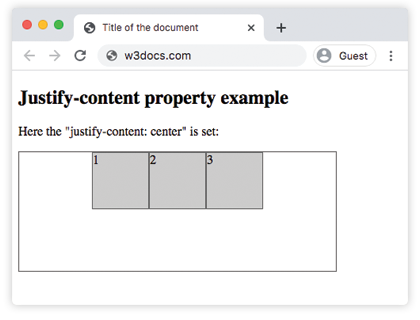
Beispiel der justify-content-Eigenschaft mit dem Wert "flex-start":
CSS justify-content flex-start Beispiel
<!DOCTYPE html>
<html>
  <head>
    <title>Title of the document </title>
    <style>
      .start {
        width: 400px;
        height: 150px;
        border: 1px solid #666;
        display: flex;
        justify-content: flex-start;
      }
      .start div {
        width: 70px;
        height: 70px;
        background-color: #ccc;
        border: 1px solid #666;
      }
    </style>
  </head>
  <body>
    <h2>Justify-content property example</h2>
    <p>Here the "justify-content: flex-start" is set:</p>
    <div class="start">
      <div>1</div>
      <div>2</div>
      <div>3</div>
    </div>
  </body>
</html>Beispiel der justify-content-Eigenschaft mit dem Wert "flex-end":
CSS justify-content flex-end Beispiel
<!DOCTYPE html>
<html>
  <head>
    <title>Title of the document </title>
    <style>
      .end {
        width: 400px;
        height: 150px;
        border: 1px solid #666;
        display: flex;
        justify-content: flex-end;
      }
      .end div {
        width: 70px;
        height: 70px;
        background-color: #ccc;
        border: 1px solid #666;
      }
    </style>
  </head>
  <body>
    <h2>Justify-content property example</h2>
    <p>Here the "justify-content: flex-end" is set:</p>
    <div class="end">
      <div>1</div>
      <div>2</div>
      <div>3</div>
    </div>
  </body>
</html>Beispiel der justify-content-Eigenschaft mit dem Wert "space-between":
CSS justify-content space-between Beispiel
<!DOCTYPE html>
<html>
  <head>
    <title>Title of the document </title>
    <style>
      .space-between {
        width: 400px;
        height: 150px;
        border: 1px solid #666;
        display: flex;
        justify-content: space-between;
      }

      .space-between div {
        width: 70px;
        height: 70px;
        background-color: #ccc;
        border: 1px solid #666;
      }
    </style>
  </head>
  <body>
    <h2>Justify-content property example</h2>
    <p>Here the "justify-content: space-between" is set:</p>
    <div class="space-between">
      <div>1</div>
      <div>2</div>
      <div>3</div>
    </div>
  </body>
</html>Beispiel der justify-content-Eigenschaft mit dem Wert "space-around":
CSS justify-content space-around Beispiel
<!DOCTYPE html>
<html>
  <head>
    <title>Title of the document </title>
    <style>
      .space-around {
        width: 400px;
        height: 150px;
        border: 1px solid #666;
        display: flex;
        justify-content: space-around;
      }
      .space-around div {
        width: 70px;
        height: 70px;
        background-color: #ccc;
        border: 1px solid #666;
      }
    </style>
  </head>
  <body>
    <h2>Justify-content property example</h2>
    <p>Here the "justify-content: space-around" is used:</p>
    <div class="space-around">
      <div>1</div>
      <div>2</div>
      <div>3</div>
    </div>
  </body>
</html>Beispiel der justify-content-Eigenschaft mit dem Wert "space-evenly":
Mit space-evenly sind die Abstände vor dem ersten Element, zwischen jedem Element und nach dem letzten Element alle gleich. (Bei space-around sind die äußeren Abstände nur halb so groß wie die Abstände zwischen den Elementen, während space-between überhaupt keine äußeren Abstände hat.)
<!DOCTYPE html>
<html>
  <head>
    <title>Title of the document </title>
    <style>
      .space-evenly {
        width: 400px;
        height: 150px;
        border: 1px solid #666;
        display: flex;
        justify-content: space-evenly;
      }
      .space-evenly div {
        width: 70px;
        height: 70px;
        background-color: #ccc;
        border: 1px solid #666;
      }
    </style>
  </head>
  <body>
    <h2>Justify-content property example</h2>
    <p>Here the "justify-content: space-evenly" is used:</p>
    <div class="space-evenly">
      <div>1</div>
      <div>2</div>
      <div>3</div>
    </div>
  </body>
</html>Wichtige Hinweise
justify-contenthat keinen Effekt, wenn das übergeordnete Element kein Flex- oder Grid-Container ist (display: flex/display: grid).- Die drei "space"-Schlüsselwörter unterscheiden sich nur in den äußeren Abständen:
space-betweenhat keine,space-aroundgibt halbe äußere Abstände,space-evenlymacht alle Abstände gleich. - Die Achse, auf der sie wirkt, folgt flex-direction. Wechseln Sie zu
column, funktioniert derselbe Wert von oben nach unten. - Sie hat nur Bedeutung, wenn freier Platz vorhanden ist. Wenn die Elemente die Hauptachse bereits ausfüllen (oder überlaufen), gibt es nichts zu verteilen.
Werte
| Wert | Beschreibung | Ausprobieren |
|---|---|---|
| flex-start | Die Elemente beginnen am Anfang des Containers. | Ausprobieren » |
| flex-end | Die Elemente werden am Ende des Containers platziert. | Ausprobieren » |
| center | Die Elemente werden in der Mitte des Containers platziert. | Ausprobieren » |
| space-around | Es gibt Abstände vor, zwischen und nach den Elementen. | Ausprobieren » |
| space-between | Es gibt Abstände zwischen den Elementen. | Ausprobieren » |
| space-evenly | Es gibt gleiche Abstände vor, zwischen und nach den Elementen. | Ausprobieren » |
| initial | Setzt die Eigenschaft auf ihren Standardwert. | Ausprobieren » |
| inherit | Erbt die Eigenschaft vom übergeordneten Element. |
Übungen
Verwandte Eigenschaften
- align-items — richtet Elemente entlang der Querachse aus.
- align-content — verteilt umgebrochene Flex-Zeilen entlang der Querachse.
- flex-direction — legt fest, welche Achse die Hauptachse ist.
- The Ultimate Guide to Flexbox — das vollständige Flexbox-Modell auf einen Blick.